EasyManua.ls Logo

Korg 01/W pro - Page 32

Korg 01/W pro
41 pages
Print Icon
To Next Page IconTo Next Page
To Previous Page IconTo Previous Page
Loading...
Recording
patterns
E
Another
approach
to
song
writing,
commonly
used
by
composers
in
rock
and
other
popular
genres,
is
to
think
up
guitar
and
bass
riffs
while
playing
a
set
rhythm
pattern,
then
build
the
melody
and
overall
ar-
rangement
on
top
of
these
basics.
You
wili
find
the
pattern
recording
method
useful
if
you
take
this
approach
to
music
creation.
This
tech-
nique
lets
you
register
repeatable
groups
of
measures,
such
as
drum
patterns
or
bass
riffs,
as
individual
patterns.
You
can
then
play
them
back
repeatedly
while
you're
putting
together
ideas
for
a
song.
You
can
also
arrange
these
patterns
into
tracks,
a
handy
feature
that
saves
on
inputting
time
and
cuts
down
on
the
amount
of
memory
re-
quired
to
record
a
song.
Let's
try
using
the
01/W
pro's
pattern
record-
ing
function
to
record
a
basic
drum
pattern.
When
you
create
a
pattern,
it
will
play
back
using
the
program
speci-
fied
for
the
currently
selected
track.
So
let's
begin
on
Page
O
of
the
display
to
select
the
program
we
will
use
for
our
pattern.
Select
pro-
gram
“A09
Total
Kit.”
Now
we
can
move
to
page
7
of
the
display
and
begin
preparing
the
pattern
we
will
record.
Press
the
CURSOR
UP
or
DOWN
keys
to
move
the
cursor
to
Erase
Pattern,
which
is
the
first
item
on
the
right
side
of
the
display.
Use
the
VALUE
siider
or
the
A
and
Y
keys
to
select
a
pattern
number,
then
press
cursor
key
or
H]
([ERASE])
to
clear
the
data
from
the
pattern
you
selected.
(Be-
fore
you
do
this,
check
to
make
sure
that
you
don't
want
to
keep
the
contents
of
the
pattern.
This
is
because
changing
the
contents
of
a
pattern
will
cause
the
new
data.
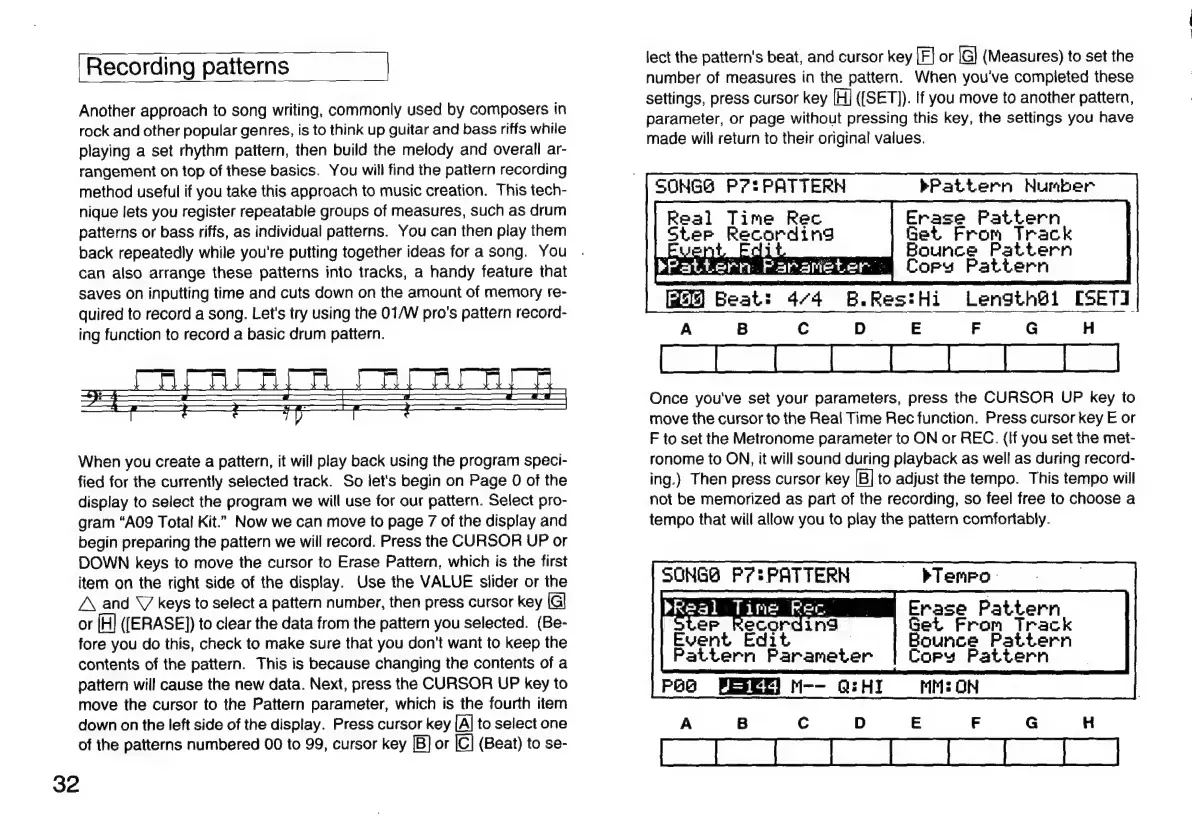
Next,
press
the
CURSOR
UP
key
to
move
the
cursor
to
the
Pattern
parameter,
which
is
the
fourth
item
down
on
the
left
side
of
the
display.
Press
cursor
key
[A]
to
select
one
of
the
patterns
numbered
00
to
99,
cursor
key
|B]
or
|C]
(Beat)
to
se-
32
lect
the
pattern's
beat,
and
cursor
key
|F]
or
IG]
(Measures)
to
set
the
number
of
measures
in
the
pattern.
When
you've
completed
these
settings,
press
cursor
key
[H]
([SET)).
If
you
move
to
another
pattern,
parameter,
or
page
without
pressing
this
key,
the
settings
you
have
made
will
return
to
their
original
values.
bPattern
Number
Erase
Pattern
From
Track
Bounce
Pattern
pPattern
Parameter
Cory
Pattern
J
Beat:
4/4
B.Res:Hi
Length@1
[SETI
A
B
Cc
D
E
F
G
H
Once
you've
set
your
parameters,
press
the
CURSOR
UP
key
to
move
the
cursor
to
the
Real
Time
Rec
function.
Press
cursor
key
E
or
F
to
set
the
Metronome
parameter
to
ON
or
REC.
(If
you
set
the
met-
ronome
to
ON,
it
will
sound
during
playback
as
well
as
during
record-
ing.)
Then
press
cursor
key
|B]
to
adjust
the
tempo.
This
tempo
will
not
be
memorized
as
part
of
the
recording,
so
feel
free
to
choose
a
tempo
that
will
allow
you
to
play
the
pattern
comfortably.
SONGS
P7?!PATTERN
Real
Time
Rec
eter
Recording
Get
SONGS
P72
PATTERN
pra
Sa
Tine
Rec
|
ging
Event
Edit
Pattern
Parameter
bTenro:
Erase
Pattern
Set
From
Track
Bounce
Pattern
Copy
Pattern
PaB M--
Q:HI
MM:O0N

Related product manuals