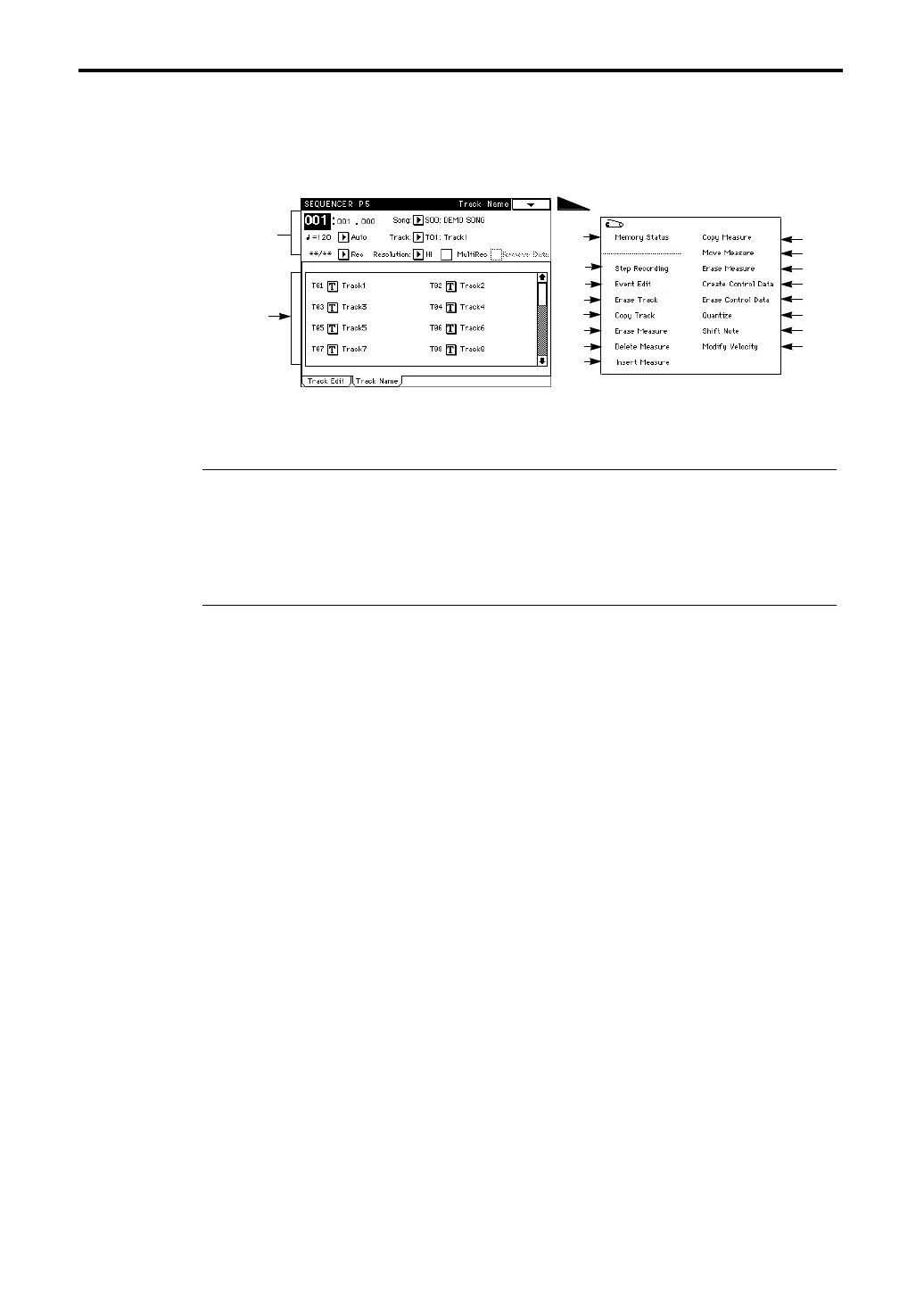
5–2: Track Name
114
5–2: Track Name
Assigns a name to each track.
5–2c: Track Name
Press the text edit button, and a screen will appear in which you can assign a name to each track
(☞ Basic Guide, page 6).
The track names will be displayed in all tab pages of Sequencer mode P1, P2 and P5.
▼ Page Menu Command
5–2A: Memory Status
This command displays the remaining amount of sequencer memory.
5–2B: Step Recording
Here you can perform non-realtime recording. This allows you to record songs that would be dif-
ficult to record using realtime recording.
For details refer to “5–1B: Step Recording.”
5–2C: Event Edit
Here you can edit individual events of recorded musical data.
For details refer to “5–1C: Event Edit.”
5–2D: Erase Track
This command erases all musical data from the track specified in the tab 2 display.
For details refer to “5–1D: Erase Track.”
5–2E: Copy Track
This command copies musical data of the track specified in the tab 2 display to another track.
For details refer to “5–1E: Copy Track.”
5–2F: Bounce Track
This command combines all musical data of the track specified in the tab 2 display with the data of
another track, and places the combined data into the bounce destination track.
For details refer to “5–1F: Bounce Track.”
5–2G: Erase Measure
This command erases specified measures from the track specified in the tab 2 display.
For details refer to “5–1G: Erase Measure.”
5–2H: Delete Measure
This command deletes specified measures from the track specified in the tab 2 display.
For details refer to “5–1H: Delete Measure.”
5–2c
Page Menu
5–2A
5–2B
5–2C
5–2D
5–2E
5–2F
5–2G
5–2H
5–2I
5–2J
5–2K
5–2L
5–2M
5–2N
5–2O
5–2P
Refer to
“1–1: Track
Parameter”





 To Next Page