Need help?
Do you have a question about the KOSPET Optimus and is the answer not in the manual?
Comprehensive safety guidelines covering prohibited areas, medical devices, flight safety, power, accessories, temperature, and battery.
Instructions for inserting a Nano SIM card, including precautions against dust and water.
Details on using the power button for turning on/off, locking the screen, returning to previous menus, and force restarting.
How to use the shortcut key to quickly switch to flight mode.
Information on the dedicated magnetic pogo interface data cable and its usage restrictions.
Scan the QR code on the watch to download and install the wiiWatch2 application on your smartphone.
Ensure Bluetooth is turned on your smartphone to establish a connection with the watch.
Confirm the Bluetooth pairing code on both the watch and phone to establish a successful connection.
Instructions on how to change the watch face display by swiping and selecting different dial styles.
Navigate to the 'Long standby' app and confirm to activate the power-saving mode.
Press the power button for 3 seconds to exit 'Long standby' mode and restart the watch.
Troubleshooting steps for when the watch cannot connect or is frequently disconnected from the phone.
Solutions for watch control problems, music playback, camera functions, and app compatibility.
Explanation of watch fever due to limited space and advice on avoiding it by limiting app usage and Wi-Fi.
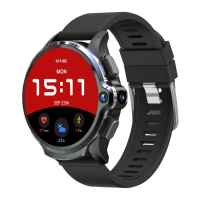
This document describes the Kospet Optimus/Optimus Pro smartwatch, detailing its features, technical specifications, usage instructions, and troubleshooting.
The Kospet Optimus/Optimus Pro is a smartwatch designed to offer a blend of traditional watch aesthetics with modern smart functionalities. It supports a Nano SIM card for cellular connectivity, allowing it to function independently for calls and data. The watch features a touch screen interface for navigation and interaction with various applications. It includes sensors for health and fitness tracking, such as a heart rate sensor and pedometer, and supports GPS/GLONASS for location services. The device also offers a "Long Standby" mode to extend battery life, which can be activated or deactivated as needed.
Initial Setup: Upon first use, the watch requires charging for 1 hour to achieve 7 days of standby with the screen on. After turning on the watch, users need to set their height, weight, and walk target.
SIM Card Installation: The device supports a Nano SIM card but does not support hot-swapping. The watch must be turned off before inserting the SIM card. Users need to manually remove the SIM card back cover to access the slot. It is crucial to protect the SIM card slot from dust and water to prevent damage.
Button Functions:
USB Data Cable: The watch uses a dedicated pogo interface data cable with magnetic properties. During charging, the data line interface must not come into contact with other metal products to avoid short-circuit risks.
Smartphone Connection (wiiWatch2 APP):
Dial Set: From the dial interface, pressing the screen allows users to switch to other dial functions. Dials can be changed by dragging left and right. More dials can be accessed by clicking the "+" icon when swiping right.
Long Standby Mode: To enter "Long Standby" mode, navigate to the menu, select the "Long standby" App, and click the confirmation button (✓). This mode extends battery life. To exit "Long Standby" mode and return to normal standby, press the power button for 3 seconds; the watch will restart.
Security Information:
Troubleshooting (Common Problems):
Contact Information:

 To Next Page
 General