E 5
GB
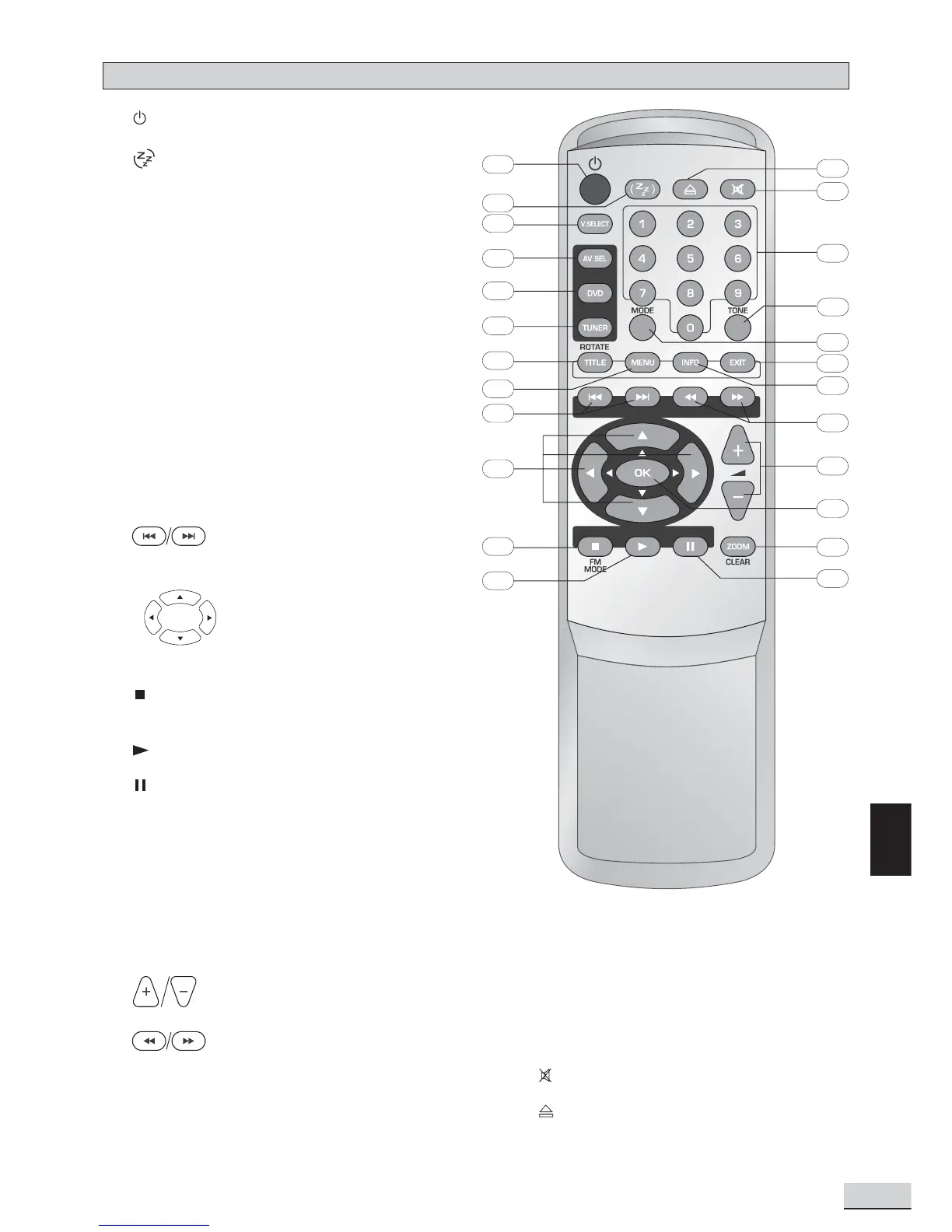
Remote Control
20. MODE selects surround modes or soundfield
modes.
21. TONE selects EQ modes.
22. 0 - 9 (Numeric keys) used for direct selections
of title, chapter, track, tuner channel and time
input.
23.
mutes and unmutes sound output.
24.
opens or closes the disc tray.
1.
turns unit on/off.
2.
sets the sleep (auto-off) timer function.
3. V.SELECT toggles between progressive scan
and switching different video output modes.
4. AV SEL selects external AV inputs (press
repeatedly).
5. DVD selects DVD/CD/VCD mode.
6. TUNER selects Tuner mode, switches between
AM and FM bands.
7. TITLE (ROTATE) 1) displays the Title Menu if
present on disc (DVD mode only), 2) rotates
pictures when playing Picture CDs.
8. MENU 1) enters Disc Contents Menu in DVD
mode, 2) enters System Setup for SPEAKER,
CLOCK or TIMER settings in all other modes.
9.
skip backward/forward to the
previous or next chapter/track.
10. (Active Navigation keys) advance
in indicated directions for making
selections in menus, Active
Navigation mode, clock and tuner
settings.
11.
1) stops playing, 2) selects Mono / Stereo in
Tuner mode.
12.
starts playing.
13.
freezes picture and sound during play.
14. ZOOM selects zooming options when playing
DVD by pressing repeatedly.
(CLEAR exits menus and Active Navigation
mode)
15. OK 1) enters or selects in menu and setup
navigation, 2) in Tuner mode, enters preset
programming mode or confirms a preset.
16.
increases or decreases the volume.
17.
start reverse or forward search.
18. INFO enters or exits Active Navigation mode.
19. EXIT exits menus and Active Navigation mode.
1
2
3
4
5
6
7
8
9
10
11
12
13
14
15
16
17
18
19
20
21
22
23
24



 To Next Page