21
Function Basic Action Result Remarks
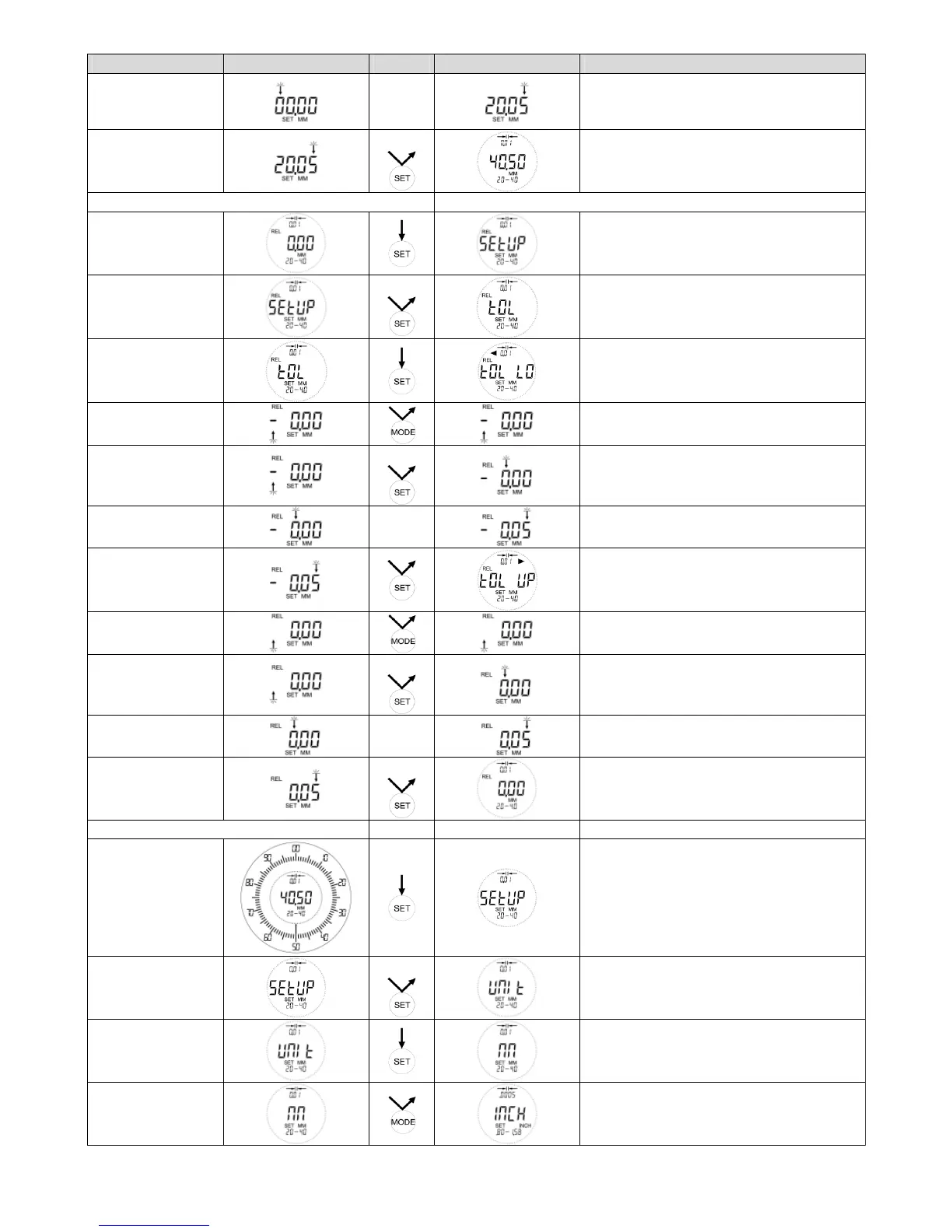
Adjust digits
Same procedure as in TOL LO
Attention!
TOL UP must be larger than TOL LO
Quitting
adjustment
4x
Returning to the last selected measuring
mode
Adjustment of the tolerance limits in REL Example: 0,00 +/- 0,05 mm
Start SETUP
SETUP Menu can be started within every
measuring mode
TOL
2x
Lower tolerance limit
Adjust lower
tolerance limit
After short display TOL LO, the last
saved value will always be shown
Adjust + / -
Attention!
TOL LO must be lower than TOL UP
Select first digit
2x
Adjust digits
Same adjustment as per description ABS
Adjust upper
tolerance limit
After short display TOL UP, the last saved
value will always be shown
Adjust + / -
Attention!
TOL UP must be larger than TOL LO
Select first digit
2x
Adjust digits
Same adjustment as per description ABS
Quitting setting
4x
Returning to the last selected measuring
mode
Switching between MM / INCH
Start SETUP
SETUP Menu can be started within every
measuring mode
UNIT
3x
Select measuring
unit
The last used measuring unit will be
shown
Change measuring
unit
By pressing the MODE key again the
measuring unit MM will appear



 To Next Page