22
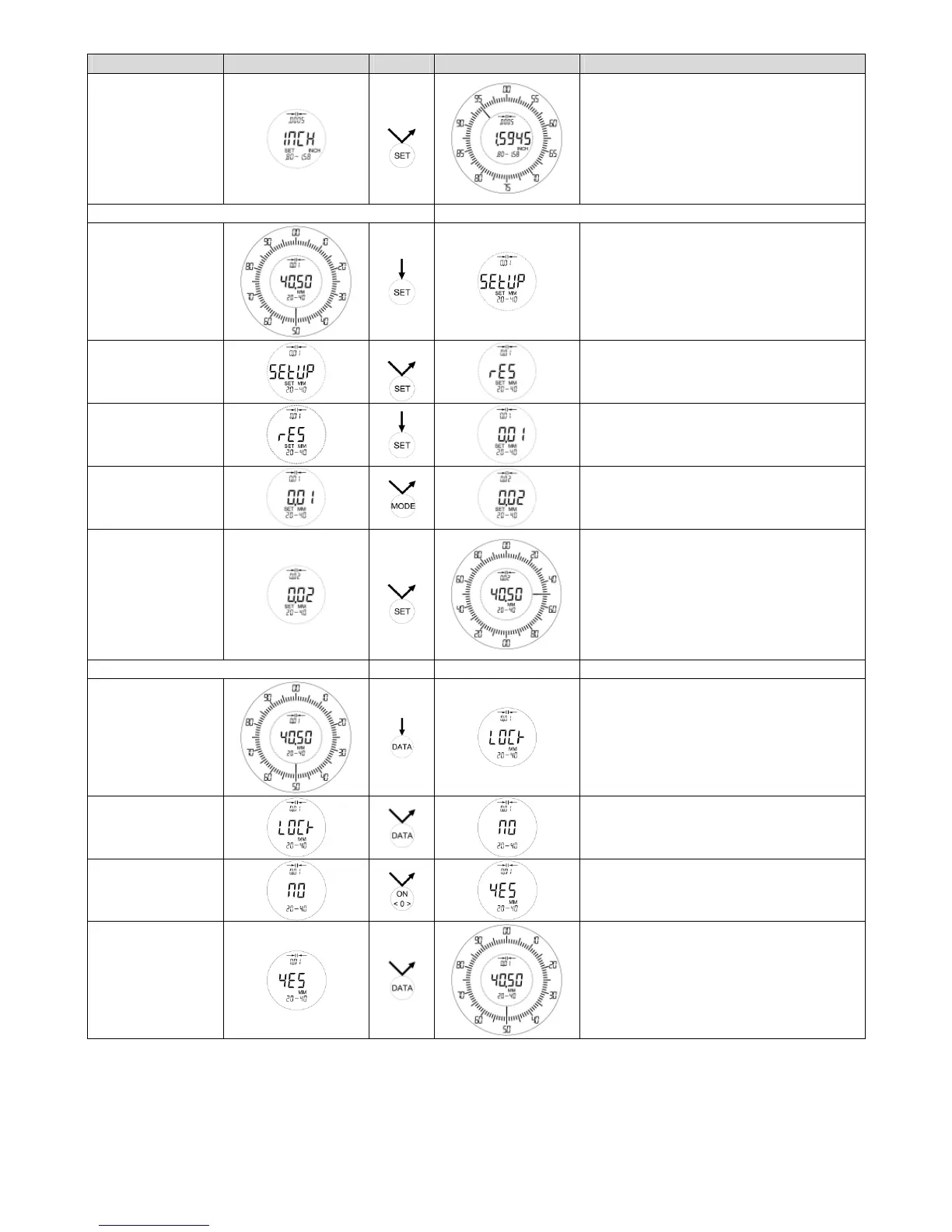
Function Basic Action Result Remarks
Returning into the
measuring mode
3x
The gauge shows now the measuring
values in INCH
Note:
After changing the unit the tolerance limit
must be checked again, as the limit will
rounded automatically to the new unit.
Selecting a better scale interval Example: from 0,01mm to 0,02mm
Start SETUP
SETUP Menu can be started within every
measuring mode
RES
4x
Adjust scale
interval
The last used scale interval will be shown
Change scale
interval
By pressing the MODE key again the
scale interval of 0,01 will appear.
Returning into the
measuring mode
2x
Scale interval of 0,02mm will be shown
Note:
After changing the scale interval the toler-
ance limit must be checked again, as the
limit will rounded automatically to the
new scale interval.
Key lock ON / OFF
LOCK
Adjustment
The last adjustment will be shown
Switch on the key
lock
Select last
measuring mode
Only ON / OFF and data transfer is active.
On forbidden actions „LOCK“ will appear
in the display.



 To Next Page