EN
OTHER FUNCTIONS
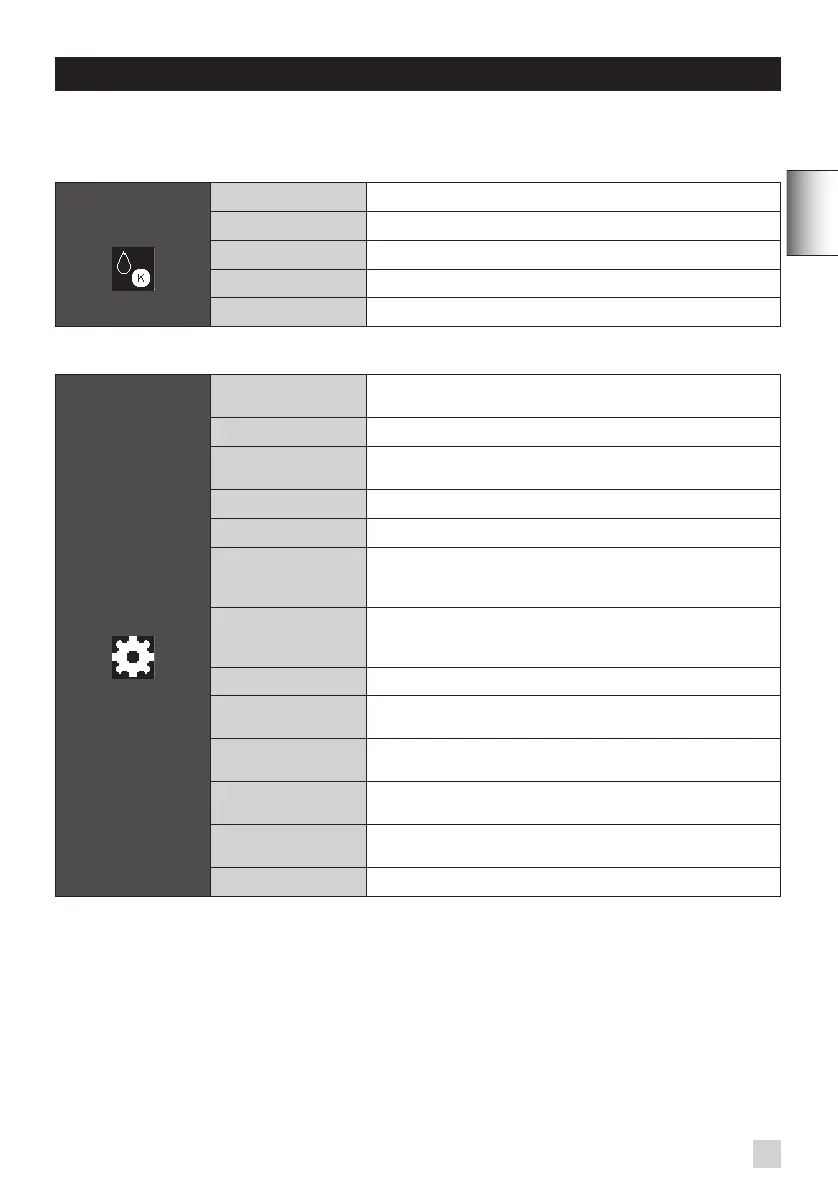
To access the menu of the appliance's other functions, use the settings function from the home menu screen.
MAINTENANCE
All of these options will enable you to start the programs selected. Next, you must follow the instructions on the screen.
MAINTENANCE OTC Rinse
Enables you to access the rinse of the OTC system.
Coffee Cleaning
Enables you to access cleaning.
Filter
Enables you to access the lter mode.
OTC Cleaning
Enables you to access the cleaning of the OTC system.
OTC Descaling
Enables you to access the descaling of the OTC system.
SETTINGS Languages
You may select the language of your choice from among those
listed.
Favourites
You may create, modify or delete your favourites.
Auto Rinse
You may automatically start the rinse of the appliance each time
it is switched on.
Contrast
You may adjust the screen contrast to suit your preference.
Clock
You may select either 12- or 24-hour time display.
Auto-Off
You may choose the length of the period of inactivity after which
your appliance will automatically switch off. From 30 min to 4 hr,
divided in 30 min blocks.
Auto-On
You may automatically start the appliance's pre-heating at
a determined time and on a determined day. (ability to set a
different time for each day of the week).
Unit of Measurement
You may select the unit of measurement (either ml or oz).
Water Hardness
You must set your water hardness between 0 and 4.
"Water Hardness Measurement".
Coffee Temperature
You may adjust the temperature of your espresso or coffee
according to three levels.
Date
It is necessary to set the date, particularly when using an anti-
scale cartridge.
Reset
Enables you to reset some of the machine's default settings
(favourites and organisation of the menu screens).
Bluetooth®
You may activate and deactivate the Bluetooth® BLE module.
SETTINGS
35


 To Next Page