2.3 Pairing iOS / Android devices
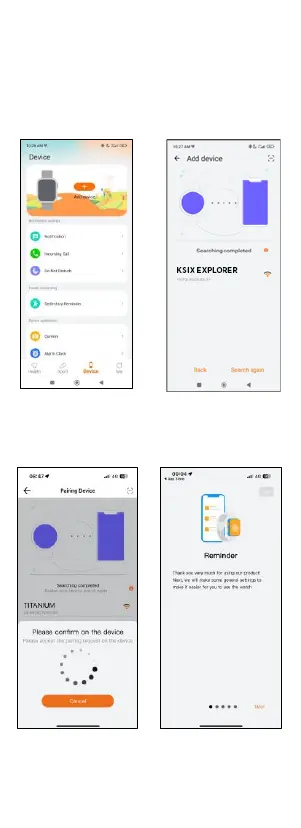
1. Enable your
smartphone’s BT.
2. Log in to the Smart-
Time Pro app and access
the device section (third
icon on the bottom of
the screen). You will see
this:
4. Make sure to accept all
the permissions. Then,
tap on KSIX EXPLORER.
5. Once you have done so,
a pairing message will
appear on the smartwatch.
Accept it.
6. Once paired, the “Initial
setup” screen will appear.
Make sure to accept all the
permissions.
2.4 Troubleshooting
- If the app cannot find the device power off the smartwatch
and then on again.
- If the device connects and disconnects quickly there may
be an obstruction between the device and the phone.


 To Next Page