17OPERATING THE TRACTOR
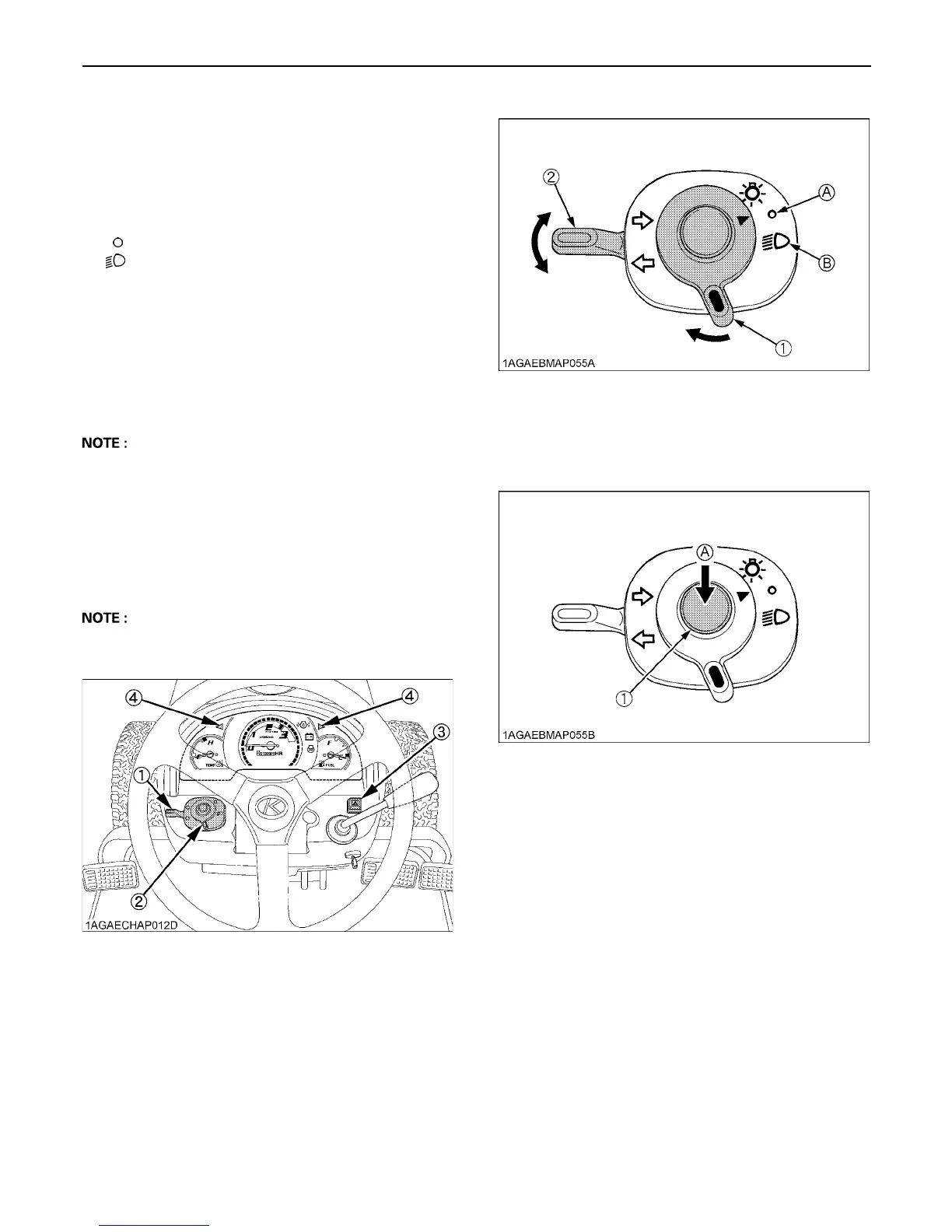
BHead Light / Turn Signal / Hazard Light
Switch
C Head Light Switch
(A) .....Head light OFF.
(B) .....Head light ON.
C Turn Signal Light Switch
To indicate a right turn, turn the turn signal light switch
clockwise. To indicate a left turn, turn the turn signal light
switch counter-clockwise. The corresponding right and
left turn signal lights and indicator on the instrument panel
will flash. Turn signal is active when key switch is in the
"ON" position.
A Be sure to return switch to center position after turning.
C Hazard Light Switch
When hazard light switch is pushed, the hazard lights
flash along with the indicator on the instrument panel.
Press the hazard light switch again to turn off the light.
The hazard light switch is operative, even when the key
switch is at "OFF" position.
A The indicator in the hazard light switch will light up
when the head light switch is turned on.
BHorn Button
The horn will sound when the key switch is in the "ON"
position and the horn button pressed.
2. Selecting light switch positions.
(1) Turn signal light switch
(2) Head light switch
(3) Hazard light switch
(4) Hazard / Turn signal indicator
(1) Head light switch
(2) Turn signal light switch
(A) "OFF"
(B) "ON"
(1) Horn button (A) "PUSH"


 To Next Page