Getting Started (Cont.)
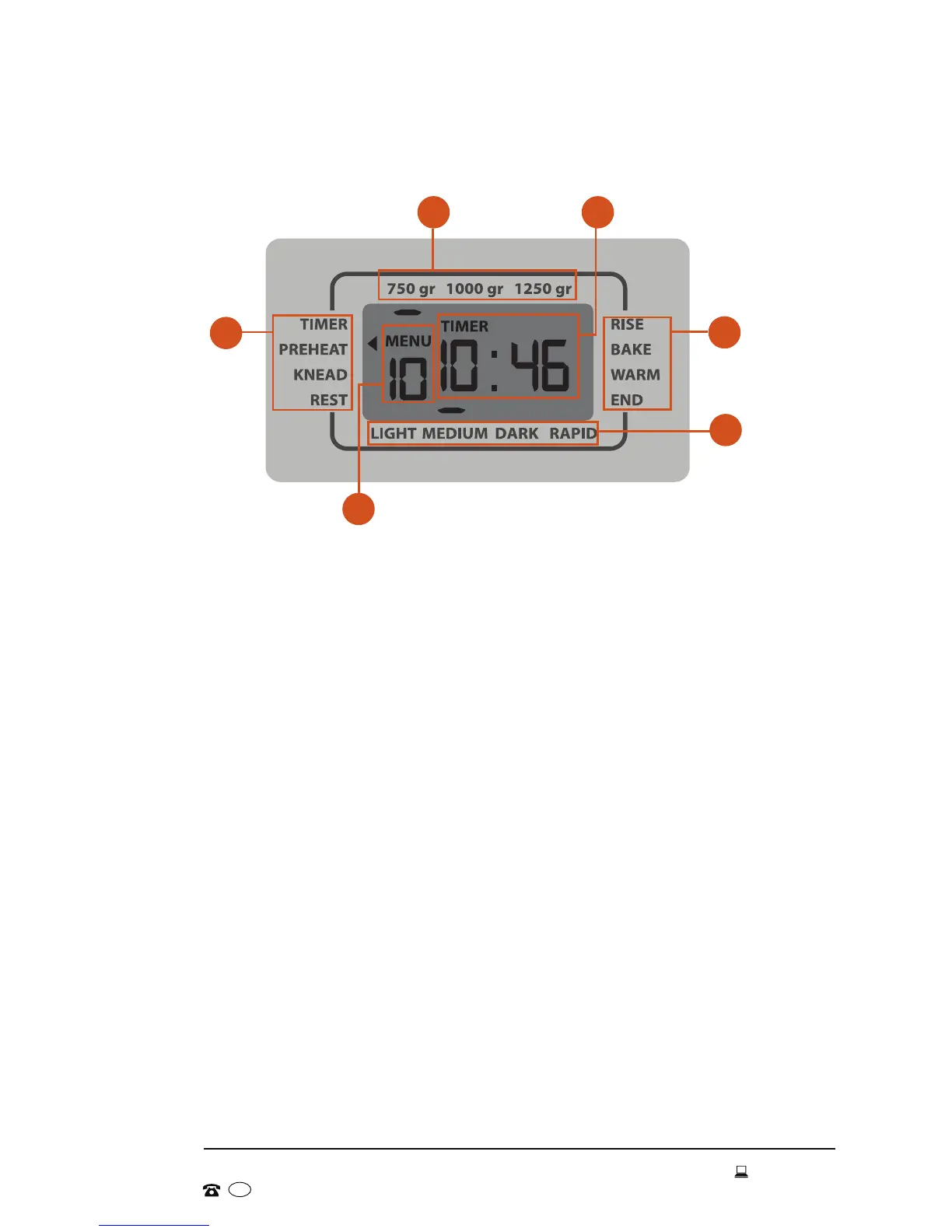
The LCD screen displays the selections you have made for the bread-making
process, including the size of your loaf, the chosen crust colour and the
stage of the bread-making process. When plugged into a power point, the
appliance will sound a signal and the LCD screen will light up.
1 Current program stage: During the different stages of the baking
process, the arrow on the display shows the current stage: Timer,
Preheat, Knead, Rest, Rise, Bake, Warm (1hr) and End.
2 Loaf size: The small bar in the top row of the display shows the selected
loaf size: 750g, 1000g, 1250g.
3 Timer: Depending on the stage of the bread-making process, the
display will show the total program time of the selected program, or the
countdown timer if you have set a delayed start, or the time remaining
once the program has started. The maximum delay time is 15 hours.
4 Crust colour: The small bar in the bottom row of the display shows the
selected crust colour: Light, Medium, Dark. The Rapid option is available
for programs 1, 2 and 3.
5 Menu: This is the selected program (see page 18 for details of all
available programs).
LCD screen
2
1
5
1
3
4


 To Next Page