NOTE: Both the slicing and grating discs are double sided, make sure you check which
side you need to use before mounting.
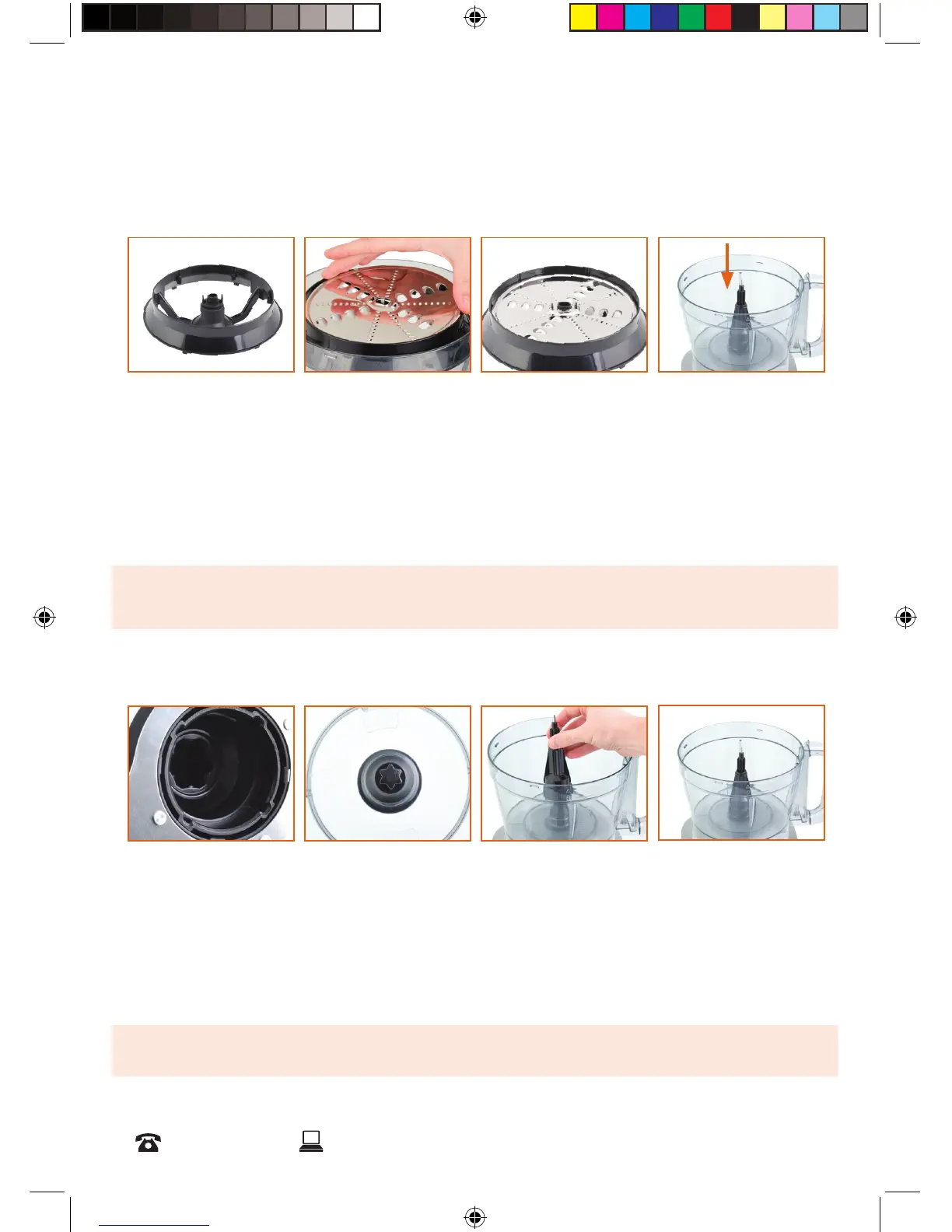
NOTE: Mount the spindle without the blade attached when using the processing discs.
Mount the processing discs in the disc adaptor before assembling in the Food Processor.
Do not mount the discs with the chopping or dough blade attached.
All functions of the Food Processor require the spindle to be mounted correctly.
Mounting Discs on Disc Adaptor
Mounting the Spindle in the Bowl
1. Place the disc adaptor on a flat surface. (fig 5)
2. Carefully place the chosen processing disc into the adaptor, aligning the tabs. (fig 6)
3. The processing disc should sit flat in the adapter. (fig 7)
4. The assembled processing disc can then be mounted to the spindle in the bowl. (fig
8). See instructions below on how to mount the spindle.
1. The underside of the spindle (fig 9) has a gear mould that corresponds with the centre
post in the bowl. (fig 10)
2. To mount the spindle, place it on top of the securing post. (fig 11)
3. The spindle should sit firmly on the securing post. (fig 12)
g 5
g 9
g 6
g 10
g 7
g 11
g 8
g 12


 To Next Page