13
After Sales Support
Telephone: 1300 663 907
Email: customercare
@
winplus.com.au
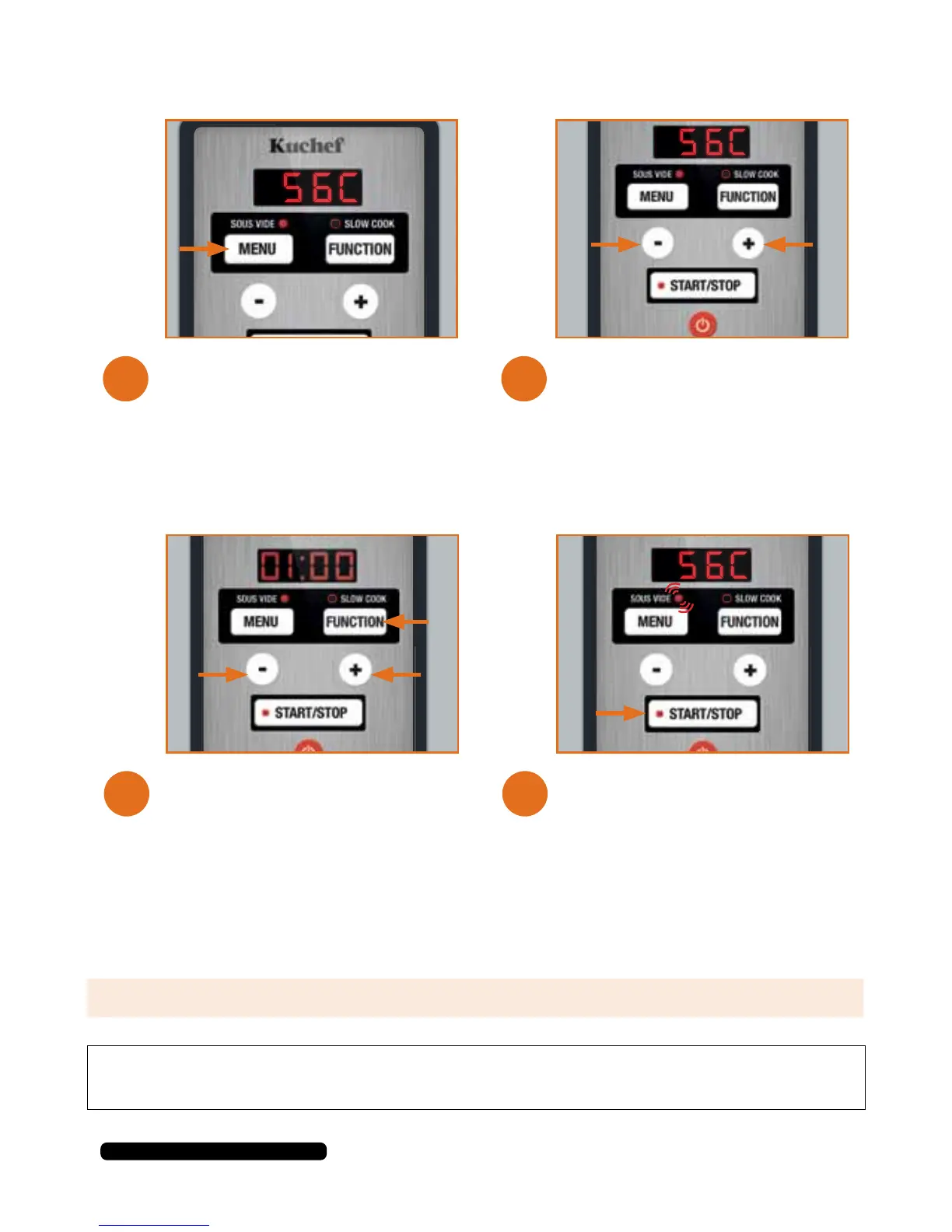
Set the temperature by
pressing the + or – buttons. The
temperature will change in 1°C
increments.
To start the preheating process
press the START/STOP button.
The SOUS VIDE light will begin
to flash to indicate that the unit
is heating the water to the set
temperature.
The unit will begin on SOUS VIDE
mode. The MENU button will
change the selected mode, ensure
the SOUS VIDE indicator light is
red.
Press the FUNCTION button to
begin setting timer. Select the time
by pressing the + or – buttons.
NOTE: The default temperature is
50°C.
6.
8.
5.
7.
NOTE: Default time starts at 1 hour. The timer changes in 10 minute increments.
TIP: When in pre-heating mode, the (:) symbol will NOT be flashing indicating that the
timer has NOT begun counting down.


 To Next Page