EasyManua.ls Logo

Kukirin G3 Pro - Charging; Button Function

Kukirin G3 Pro
16 pages
Print Icon
To Next Page IconTo Next Page
To Previous Page IconTo Previous Page
Loading...
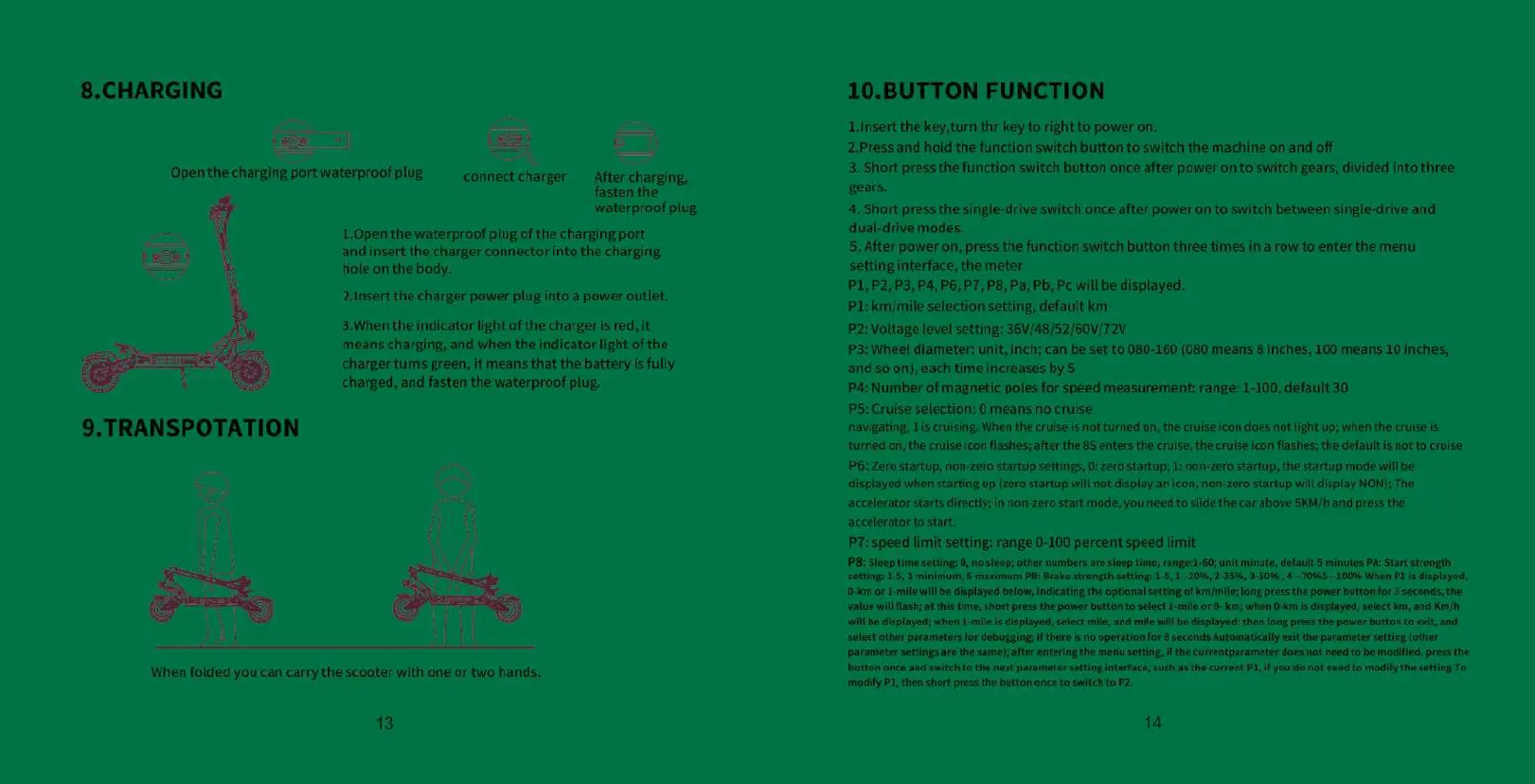
8.CHARGING
=
Open
the
charging
port
waterproof
plug
connect
charger
After
charging,
fasten
the
waterproof
plug
1.0pen
the
waterproof
plug
of
the
charging
port
and
insert
the
charger
connector
into
the
charging
hole
on
the
body.
2.Insert
the
charger
power
plug
into
a
power
outlet.
3.When
the
indicator
light
of
the
charger
is
red,
it
means
charging,
and
when
the
indicator
light
of
the
charger
tums
green,
it
means
that
the
battery
is
fully
charged,
and fasten
the
waterproof
plug.
9.TRANSPOTATION
nt
When
folded
you
can
carry
the
scooter
with
one
or
two
hands.
13
10.BUTTON
FUNCTION
Linsert
the
key,turn
thr
key
to
right
to
power
on.
2.Press and
hold
the
function
switch
button
to
switch
the
machine
on
and
off
3.
Short
press
the
function
switch
button
once
after
power
on
to
switch
gears,
divided
into
three
gears.
4.
Short
press
the
single-drive
switch
once
after
power
on to
switch
between
single-drive
and
dual-drive
modes.
5.
After
power
on,
press
the
function
switch
button
three
times
in
a
row
to
enter
the
menu
setting
interface,
the
meter
P1,P2,
P3,
P4,
P6, P7,
P8, Pa,
Pb,
Pc
will
be
displayed.
PL:
km/mile
selection
setting,
default
km
P2:
Voltage
level
setting:
36V/48/52/60V/72V
P3:
Wheel
diameter:
unit,
inch;
can
be set
to
080-160
(080
means
8
inches,
100
means
10
inches,
and
so
on),
each time
increases
by
5
Pa:
Number
of
magnetic
poles
for
speed
measurement:
range:
1-100,
default
30
P5:
Cruise selection:
0
means
no
cruise
navigating,
1is
cruising.
When
the
cruise
is
not
turned
on, the
cruise
icon
does
not
light
up;
when
the
cruise
is
turned
on,
the cruise
icon
flashes;
after
the
8S
enters
the
cruise,
the
cruise
icon
flashes;
the
default
is
not
to
cruise
P6:
Zero
startup,
non-zero
startup
settings,
0:
zero
startup;
1:
non-zero
startup,
the
startup
mode
will
be
displayed
when
starting
up
(zero
startup
will
not
display
an
icon,
non-zero
startup
will
display
NON);
The
accelerator
starts
directly;
in
non-zero
start
mode,
you
need
to
slide
the
car
above
SKM/h
and
press
the
accelerator
to
start.
PT:
speed
limit
setting:
range
0-100
percent
speed
limit
PB:
Sleep
time
setting:
0,
no
sleep;
other
numbers
are
sleep time,
range:1-60;
unit
minute,
default
5
minutes
PA:
Start
strength
Setting:
1-5,
1
minimum,
5
maximum
PB:
Brake
strength
setting:
1-5,
1--20%,
2-35%,
3-50%
470351005
When
PL
is
displayed,
0-km
or
1-mile
will
be
displayed
below,
indicating
the
optional
setting
of
km/mile;
long
press
the
power
button
for
3
seconds,
the
Value
wil
lash;
at
this
time,
shor
press
the
power
button
to
select
1-mill
or
O-
km;
when
0-km
i
displayed,
select
km,
and
Km/h
‘will
be
displayed;
when
1-mile
is
displayed,
select
mile,
and
mile
will
be
displayed;
then
long
press
the
power
button
to
exit,
and
‘select
other
parameters
for
debugging;
if
there
is
no
operation
for
8
seconds
Automatically
exit
the
parameter
setting
(other
parameter
settings
are
the
samel; afte
entering
the
menu
seting
f
the
currentparameter
does
not
need
to
be
modified,
ress
the
button
once
and
switch
tothe
next
parameter
setting
interface,
sich
a
the
current
PL,
if
you
do
not
need
to
modify
the
setting
To
maify
P1,
then
short
press
the
button once
to
switch
to
P2.
14

Related product manuals