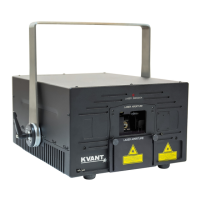
The KVANT Laser System is a Class IV laser product designed for entertainment purposes, providing powerful laser light for various applications. It is manufactured in accordance with EN 60825-1:2007, emphasizing safety and proper operation. The core function of the system is to project laser beams to create visual effects, ranging from simple shapes to complex graphics, for indoor and outdoor shows.
Function Description:
The KVANT Laser System utilizes coherent energy waves (photons) to produce a laser beam. The color and visibility of the laser beam are determined by the wavelength, measured in nanometers. The human eye is most sensitive to green light around 555nm, making green lasers appear more visible than other colors at the same power output. The system's visibility is primarily enhanced by dust or mist particles in the air, which scatter the laser light, making haze or smoke machines beneficial for indoor shows. For outdoor events, higher power lasers are often used to compensate for unpredictable wind conditions that might disperse haze or smoke.
The system is capable of producing a wide range of colors by mixing three primary colors: Red, Green, and Blue. This allows for the creation of secondary colors such as Magenta (Red + Blue), Yellow (Red + Green), Cyan (Green + Blue), and White (Red + Green + Blue). The precision and stability of the modulation, along with the linearity of the system, determine the accuracy and consistency of the colors produced.
At the heart of the KVANT Laser System's projection capability is its scanning system. This system consists of two tiny mirrors, each moving along an X or Y axis. These mirrors work in conjunction to "scan" the laser beam in all directions. When a shape is scanned more than 20 times per second, it appears static to the human eye. Thus, any laser-drawn shape is generated by a single laser beam rapidly moving. Each scanning system has a mechanical limit to how fast its mirrors can move, typically represented in Points Per Second (pps) at a specific scanning angle (e.g., 8 degrees). Understanding these limits is crucial to prevent damage to the scanning system.
The system incorporates several safety features to ensure safe operation. It includes a Safety Key, an E-STOP Remote with a second safety key, and interlocks that terminate laser output under specific conditions, such as power loss, emergency switch activation, or key removal. An Emission Delay period of 60 seconds after startup ensures that the system performs a self-check and allows the operator to be ready before laser emission begins.
Usage Features:
Operating the KVANT Laser System requires careful adherence to safety regulations and proper setup procedures. The installation process mandates mounting the system to a strong, secure point, away from unauthorized access, and ensuring it is properly tightened to prevent movement from vibrations or cable pull. A safety rope must always be used. Adequate cable leverage is necessary to prevent accidental disconnections. The system requires at least 20cm of clearance from walls or other objects to ensure sufficient airflow and prevent overheating. It must also be kept away from heat sources like spotlights or radiators. Crucially, the fan openings must never be covered during operation. All installations must comply with the Laser Safety Regulations of the country where the laser is being used.
The control of the KVANT Laser System is dependent on external control software and hardware. The manual recommends control systems from Pangolin Laser Systems and Showtacle, highlighting the importance of correct device configuration within the laser control software for optimal performance. Connection diagrams illustrate how to link the laser system to power, control interfaces (USB or CAT5 for Moncha.NET or Pangolin FB4), and E-STOP Remote. The CAT5 connection is only available if the system has an inbuilt Moncha.NET or Pangolin FB4 control interface.
For multiple laser projectors, a daisy-chain interlock system can be implemented, allowing a single E-STOP Remote to control the safety interlocks of all connected projectors. If an interlock event occurs, the START button on the E-STOP Remote must be pressed after the issue is resolved to disable the interlock and allow the laser projectors to resume operation after the Emission Delay period. A user Remote Interlock Connection (RIC) can also be inserted into the system, consisting of a passive mechanical contact in series with line 1 of the cable connection, with lines 2 and 3 passing straight through.
Understanding and managing the scanning system's limits is critical for preventing damage. Each effect or picture comprises a different number of graphical points, influencing the maximum scan rate. The more points an effect contains, the lower the maximum scan rate will be relative to the scanning angle. Exceeding the maximal scan-rate can lead to distorted effects, rounded corners, noisy scanners, and irreversible damage to the scanner's coils and rotor magnets due to overheating. Operators must adjust the number of points within an effect or the frame rate (FPS) in the control software to maintain safe scan rates, especially when increasing the projection size (scanning angle).
The switching ON sequence involves connecting all signal and power leads, turning the Safety Key to ON (and the 2nd Safety Key on the E-STOP Remote if used), ensuring the E-STOP button is released, choosing the ScanFail Safety mode, opening the aperture window, pressing the Main Power switch, and finally pressing the RESTART button on the E-STOP Remote. The system then performs a self-check, and the ScanFail safety indicator flashes for 60 seconds (Emission Delay period) before laser emission is possible.
Maintenance Features:
Regular maintenance is essential for the longevity and optimal performance of the KVANT Laser System. The manual outlines three key cleaning procedures:
-
Aperture window cleaning: The aperture window should be cleaned using a soft cloth and medical-grade isopropyl alcohol. If necessary, the window can be detached by unscrewing four socket bolts to clean its backside. This is particularly important if humidity causes condensation inside the laser.
-
Cooling fans cleaning: The cooling fans, located at the bottom of the heat sink, are vital for the system's correct operation. They should be cleaned every two months using compressed air, or more frequently if the laser is used in dusty environments, to ensure they spin freely.
-
Internal optics cleaning: Cleaning the internal optical components should only be performed by an authorized technician. Incorrect techniques or chemicals can cause serious damage to the laser system. Since the optical compartment is split and sealed from the rest of the system, this procedure should not be necessary more often than once a year.
Troubleshooting guidance is provided for common issues, such as the main power switch light not being on, the device status indicator not being on, or problems with the safety interlock. It directs users to check power connections, safety keys, aperture masking plate, color adjustment pots, system temperature, and control system setup. If the ScanFail indicator flashes randomly, it suggests checking if the current effect is compatible with the ScanFail safety mode. If the device status indicator flashes periodically, it indicates the initial 60-second Emission Delay period, and the user should simply wait. For any issues not resolved by the troubleshooting steps, users are advised to contact their local KVANT supplier or technical support team.


 To Next Page
 General