Rev: 08.04.2017
Page 14
Kwikee® 888 Electric Step Owner's Manual
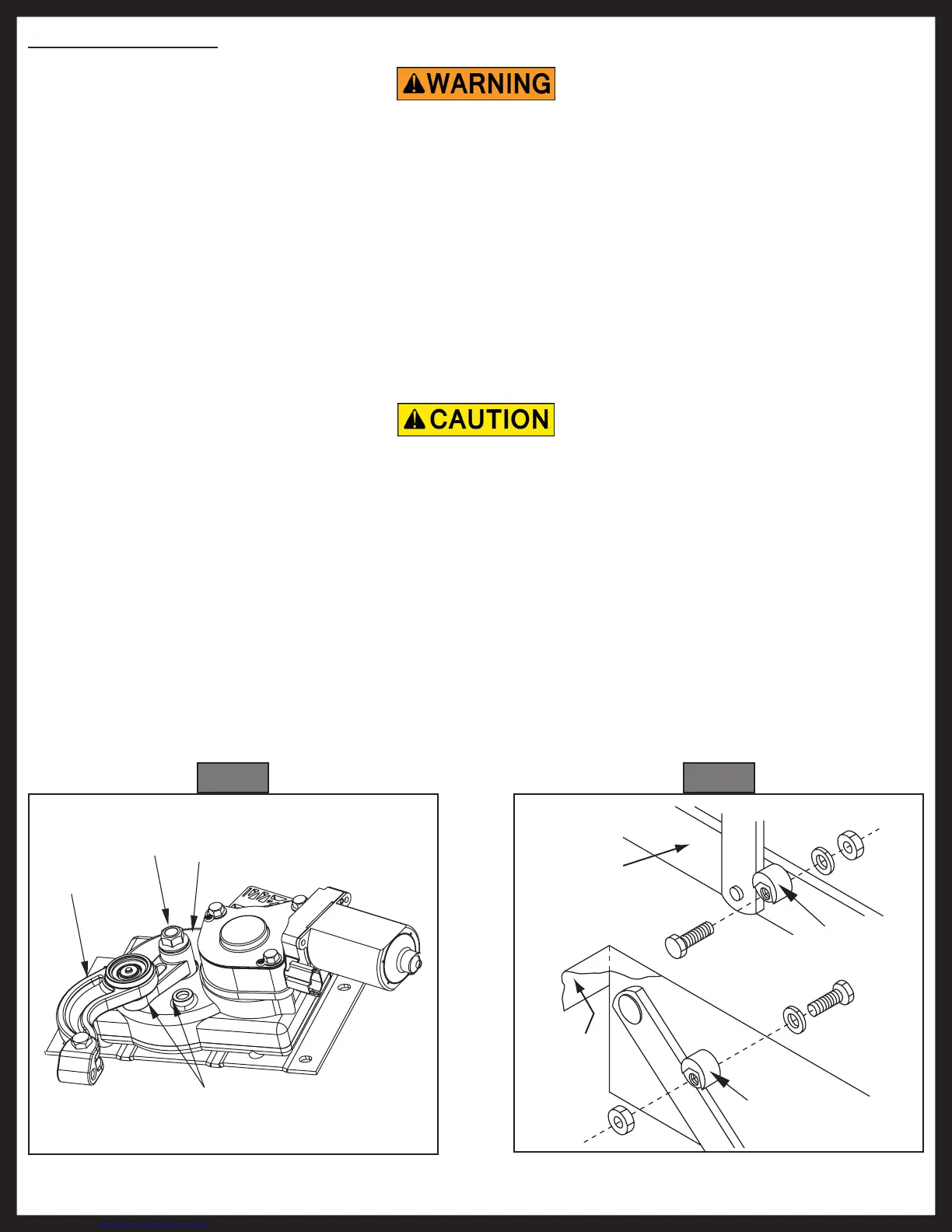
Fig. 18
Linkage
Gear
Case
These surfaces
must be in contact
for the step to be
fully extended.
Nylock
Nut
Fig. 19
Push securely
against leg
Push securely
against leg
Tread side rail
Step top
NOTE: The adjustment of cam stops applies to 24, 25, 27, 32, 34, 35, 36, 38, and 40 Series Steps.
Kwikee Steps are fitted with adjustable cam stops on the step frame that help lock the step in the "out"
position, creating a firm stepping platform and relieving load-bearing stress on the motor and drive linkage.
The cam is adjusted at the factory, but due to the rigors of shipping, installation, and normal use the cam
may fall out of adjustment and need to be tightened. When the cam stops are out of adjustment, the
step may feel loose or "mushy" when stepped on. The cam stops are located under the step top on the
32, 36, and 38 Series Steps, and on the bottom tread side rail on the 24, 25, 27 and 40 Series Steps. There is
one stop on each side of the step.
Adjusting Cam Stops
If the cam stops are not properly adjusted the step may not extend fully to the locked-out position. Using a
step with loose or out-of-adjustment cam stops may cause damage to the motor assembly and/or the drive
linkage.
1. Loosen the stops so they move freely and retract the step.
2. Extend the step fully to its locked extended position (Fig. 18). Make sure that the motor assembly
linkage rests against the gear case (Fig. 18). Repeat if needed until the motor assembly locks in the
extended position.
3. Push the stops against the leg and tighten securely (Fig. 19). Make sure that both stops are tightened
and that they rest securely against the leg.
4. Retract and fully extend the step. Check the motor assembly to make sure that it is locked all the way
out, and that both stops are secure against the legs. Repeat steps 3 and 4 if needed to properly adjust
the stops.
5. Push on the front edge of the step tread. If the step seems loose, repeat steps 2-4. The stops may not
be properly adjusted so that they rest tightly against the leg.
When working under the step, be sure that the step cannot be activated and that nothing can get caught in
the step mechanism.



 To Next Page