x
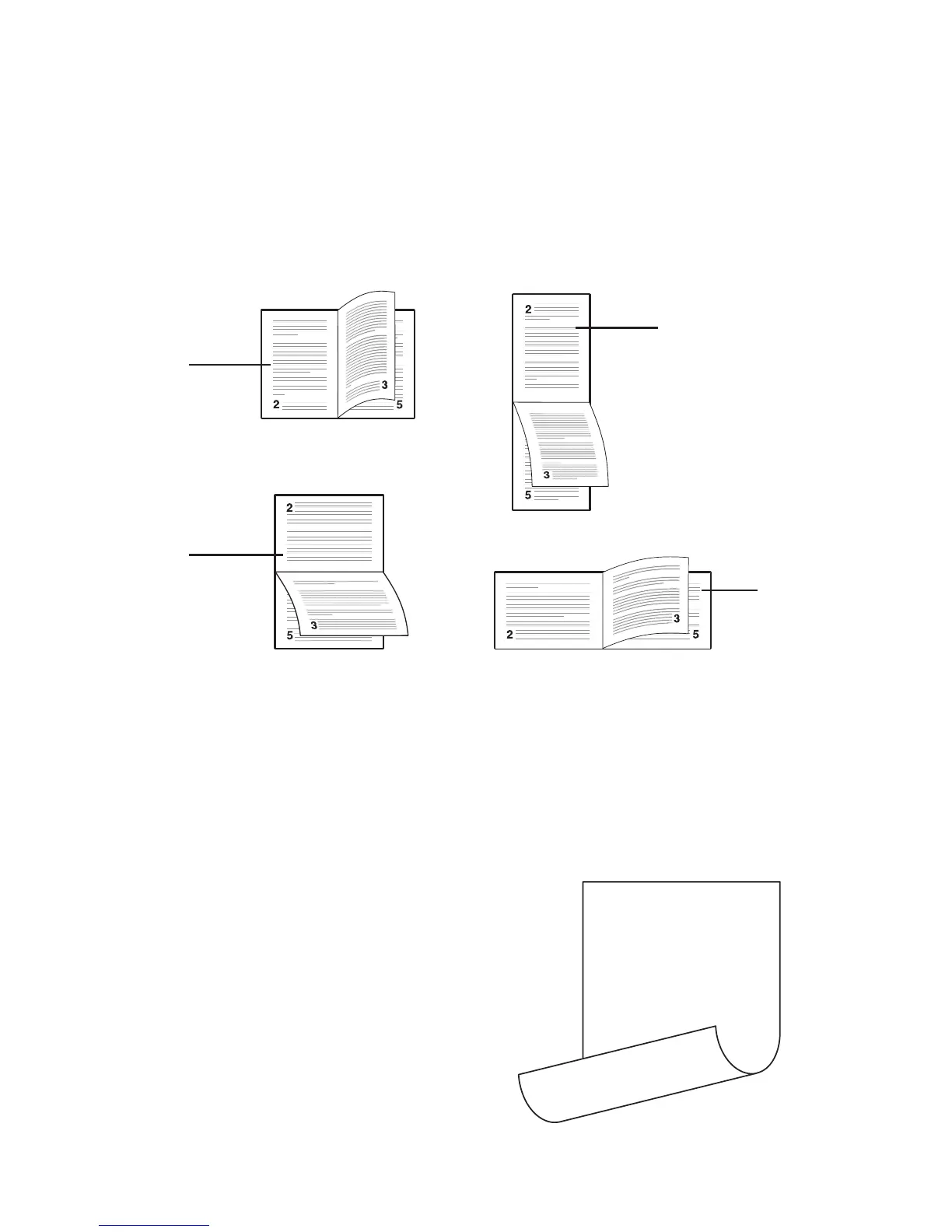
Fig. 9 Types of binding setups
Abb. 9 Mögliche Einstellungen zum Binden
Fig. 9 Types de réglages de liaison
Fig. 9 Tipi di impostazione raccolta
Figura 9 Tipos de encuadernación
(1)
(3)
(2)
(4)
P - Portrait, long-edg P - Hochformat, längsseitig P - Portrait, bord long P - Ritratto, bordo lungo
P - Retrato, borde largo
Q - Portrait, short-edge Q - Hochformat, kurzseitig Q - Portrait, bord court Q - Ritratto, bordo corto
Q - Retrato, borde corto
R - Landscape, long-edge R - Querformat, längsseitig R - Paysage, bord long
R - Paesaggio, bordo lungo R - Paisaje, borde largo
S - Landscape, short-edge S - Querformat, kurzseitig S - Paysage, bord court
S - Paesaggio, bordo corto S - Paisaje, borde corto
Fig. 10 Sample of output with the
duplexer
Abb. 10 Druckbeispiel bei Verwendung
der Duplexeinheit
Fig. 10 Exemple de sortie par une unité
de duplexage
Fig. 10 Esempio di uscita con l’unità
duplex
Figura 10 Muestra de salida con
duplexor
This text prints right side-up on the front side of the page
This text prints upside-down on the reverse side of the page
P
Q
R
S



 To Next Page