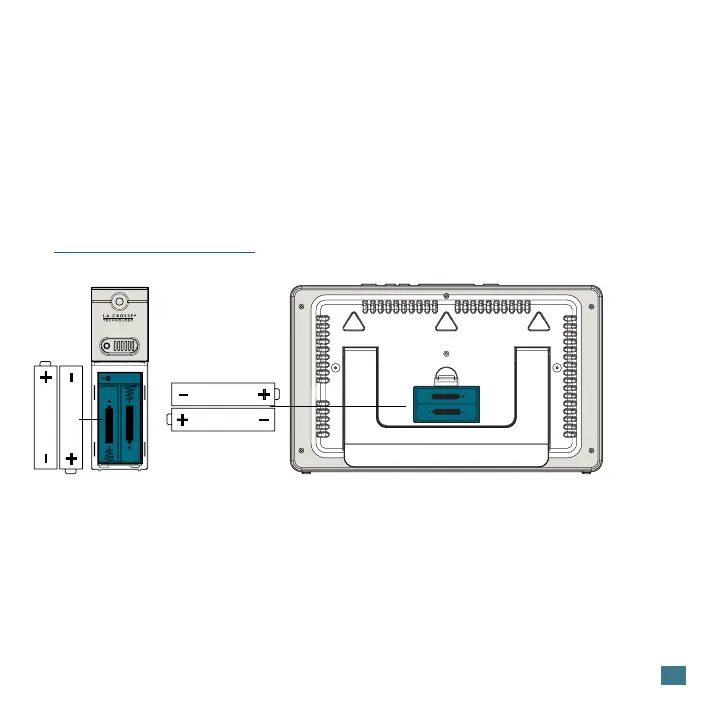
1. Insert 2-AA batteries into your Outdoor Sensor.
2. Insert 2-AA batteries Into your Station.
3. Use the instructions below to enter the Settings Menu to adjust your time, date,
and time zone. This will ensure your station searches for the Atomic Time Signal at
optimal times.
4. Once the sensor is reading to your station, place the sensor outside in a
shaded location. View our sensor mounting video here:
bit.ly/th_sensor_mounting
2
POWER UP
Outdoor Sensor
TX141-Bv4
Station
CA73453B
AA
AA
AA
AA
SETTINGS MENU
To Set the Time Manually:
1. Hold the SET button until the display changes to enter the Settings Menu. Press
and release the + or - buttons to adjust values by one. Hold to adjust quickly.
2. Press and release the SET button to confirm values and move to the next setting
or exit the menu.
3. Press and release the SNOOZE button at any time to exit.





 To Next Page