Need help?
Do you have a question about the La Crosse Technology C85845v4 and is the answer not in the manual?
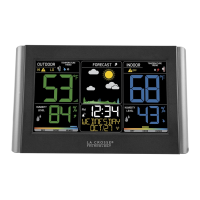
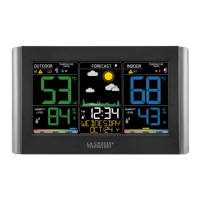
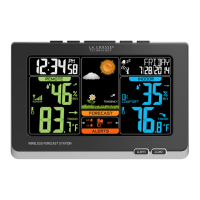
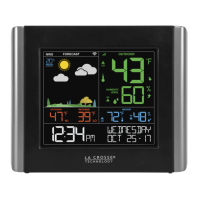
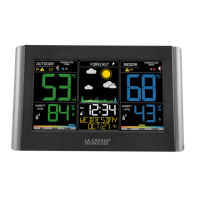
This document describes the Wireless Color Weather Station, a device designed to provide comprehensive weather information for both indoor and outdoor environments. Its primary function is to display temperature, humidity, and weather forecasts, along with various related data points, to help users stay informed about changing conditions.
The Wireless Color Weather Station serves as a central hub for monitoring environmental conditions. It receives data wirelessly from an outdoor sensor, allowing it to display outdoor temperature and humidity alongside indoor readings. A key feature is its weather forecast capability, which uses atmospheric pressure changes to predict future weather conditions with a reported accuracy of 70-75%. This intelligent forecast system learns over time, requiring 7-10 days for barometric calibration to provide a personalized and accurate forecast for the user's specific location. The station presents this forecast using a set of six distinct icons, covering conditions such as Sunny, Partly Sunny, Cloudy, Rain, T-Storm, and Snow (for temperatures below 32°F/0°C).
Beyond basic temperature and humidity, the station also calculates and displays the Heat Index and Dew Point for outdoor conditions. The Heat Index helps users understand how hot it "feels" when humidity is factored in, while the Dew Point indicates the temperature at which condensation will form, providing insight into the air's moisture content.
The device also incorporates a robust alert system for both temperature and humidity. Users can set custom high and low alerts for indoor and outdoor temperature and humidity. When an armed alert value is reached, the station will beep and a flashing alert icon will appear, indicating the type of alert (HI or LO). This feature is crucial for monitoring critical environmental changes, such as preventing pipes from freezing or ensuring optimal comfort levels.
For historical data, the station automatically records and displays HI/LO temperature and humidity records, which reset daily at midnight. It also tracks temperature and humidity trends, using arrows to indicate whether these values have risen, fallen, or remained stable over the past hour, with updates every 15 minutes.
Timekeeping is another important function, with the station capable of receiving the WWVB Atomic Time Signal. This ensures highly accurate time and date display, automatically adjusting for time zones and Daylight Saving Time (DST). If the atomic signal is not received, the station will search for it every two hours until a connection is established.
The Wireless Color Weather Station is designed for user-friendly operation with a clear LCD display and intuitive button controls.
To begin, users insert two AA batteries into the outdoor sensor. The main station is powered by a 5-volt power cord, with an option for two AA backup batteries. Once powered, the station automatically searches for the outdoor sensor. Initial setup involves adjusting time and date settings, including language, beep ON/OFF, atomic time ON/OFF, time zone, DST ON/OFF, 12H/24H format, hour, minutes, year, month, date, and Fahrenheit/Celsius display. The settings menu is accessed by holding the SET button, and values are adjusted using the + or - buttons.
When operating on AC power, the backlight offers three settings: HI, LOW, and OFF, adjustable by pressing the BACKLIGHT button. If running on batteries alone, the backlight will briefly illuminate when the BACKLIGHT button is pressed.
Setting alerts is straightforward. Users hold the ALERTS button to enter alert set mode. They can then arm or disarm specific alerts (Outdoor HI/LO Temperature, Outdoor HI/LO Humidity, Indoor HI/LO Temperature, Indoor HI/LO Humidity) and adjust the alert values using the + or - buttons. Once an alert is triggered, pressing any button will silence the beep, though the alert icon will continue to flash until the conditions are out of the alert range or the alert is disarmed.
The TEMP button allows users to cycle through HI/LO indoor and outdoor temperature/humidity records, as well as outdoor Heat Index and Dew Point readings. Temperature and humidity trend arrows are continuously displayed, providing at-a-glance information about recent changes.
If outdoor temperature readings show dashes, indicating a lost sensor connection, users can hold the TEMP button for 3 seconds to initiate a sensor search. The sensor reception icon will flash during the search and become solid upon successful reconnection.
Maintaining the Wireless Color Weather Station involves simple steps to ensure its longevity and accurate operation.
The station features low battery indicators for both the outdoor sensor and the main station. When these indicators appear, it's time to replace the batteries. Users are advised to use fresh batteries of the correct size and grade, avoid mixing old and new batteries, and refrain from mixing different battery types (Alkaline, Standard, Lithium, Rechargeable). All batteries in a set should be replaced at the same time. Battery contacts should be cleaned prior to installation, and batteries should be removed from the device if it will not be used for an extended period. Expired batteries should be promptly removed.
In case of persistent issues or to return the station to its original "out of the box" condition, a factory restart can be performed. This involves removing all power (batteries and AC) from both the outdoor sensor and the weather station, then pressing any button on the weather station at least 20 times to clear all memory. After ensuring the screen is blank, both units should remain without power for 15 minutes. Subsequently, the AC power cord is reinserted into the station, fresh batteries are put into the outdoor sensor, and the TX button on the sensor is pressed to transmit the RF signal. The sensor and station should be kept 5-10 feet apart for 15 minutes to establish a strong connection, and no buttons should be pressed during this period.
The manual emphasizes general care practices such as ensuring batteries are installed with correct polarity. While not included with the device, a Sensor Weather Shield is recommended for protecting the outdoor sensor from rain, snow, and limited sun exposure, which can be purchased separately.
The Wireless Color Weather Station is designed to be a reliable and informative tool for monitoring local weather and environmental conditions, with features that cater to both immediate data needs and long-term trend observation.
 General
| Display Type | LCD |
|---|---|
| Temperature Range (Outdoor) | -40°F to 140°F (-40°C to 60°C) |
| Temperature Range (Indoor) | 32°F to 122°F (0°C to 50°C) |
| Humidity Range | 1% to 99% |
| Time Display | Yes |
| Date Display | Yes |
| Weather Forecast | Yes |
| Wireless Transmission | 433 MHz |
| Power Source (Outdoor Sensor) | 2 x AA batteries (not included) |
| Wireless Range | 300 ft (91 m) in open air |




 To Next Page