03
04
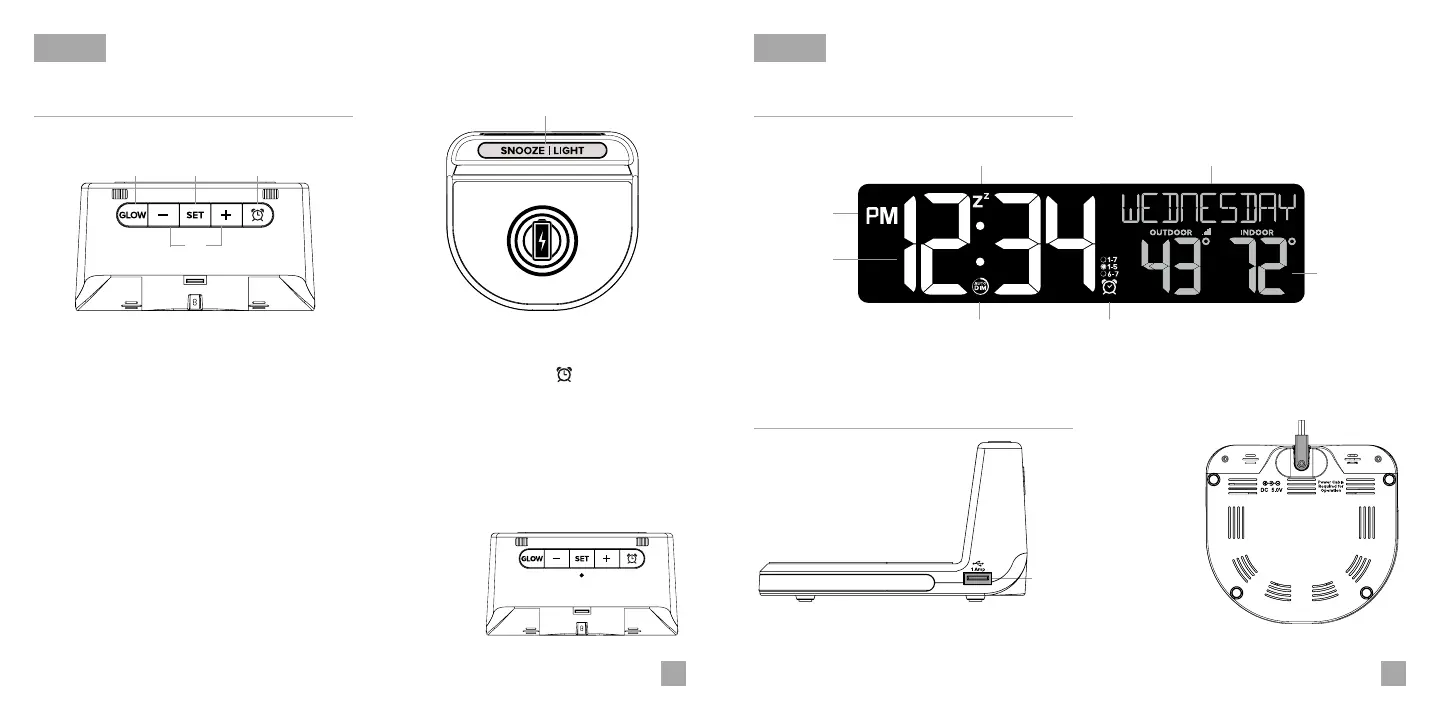
Buttons LCD Display
Ports
BASICS BASICS
1. GLOW
4. PLUS/MINUS (+/-)
2. SET
3. ALARM
6. RESET
Press to change the Glow
Light color. Hold to turn Glow
Light o.
Press to activate/deactivate or
hold to enter alarm settings.
Press to increase/decrease
Glow Light Brightness. Press
to increase/decrease values in
Settings Menu, hold to change
values quickly. + button: Hold
to search for Outdoor Sensor.
Tap to snooze sounding alarm,
adjust backlight, or hold for
Auto-Dim Settings.
Press to change Display
Modes. Hold to enter
Settings Menu.
Top View
5
1
4
32
Back View
Press to factory reset
your station.
6
RESET
5. SNOOZE/LIGHT
Right View
1 Amp USB
Charging Port
Bottom View
Power Jack
Snooze
Indicator
AM/PM
Indicator
Auto Dim
Indicator
Time
Alarm
Indicator
Weekday
Outdoor/Indoor
Temperature


 To Next Page