13
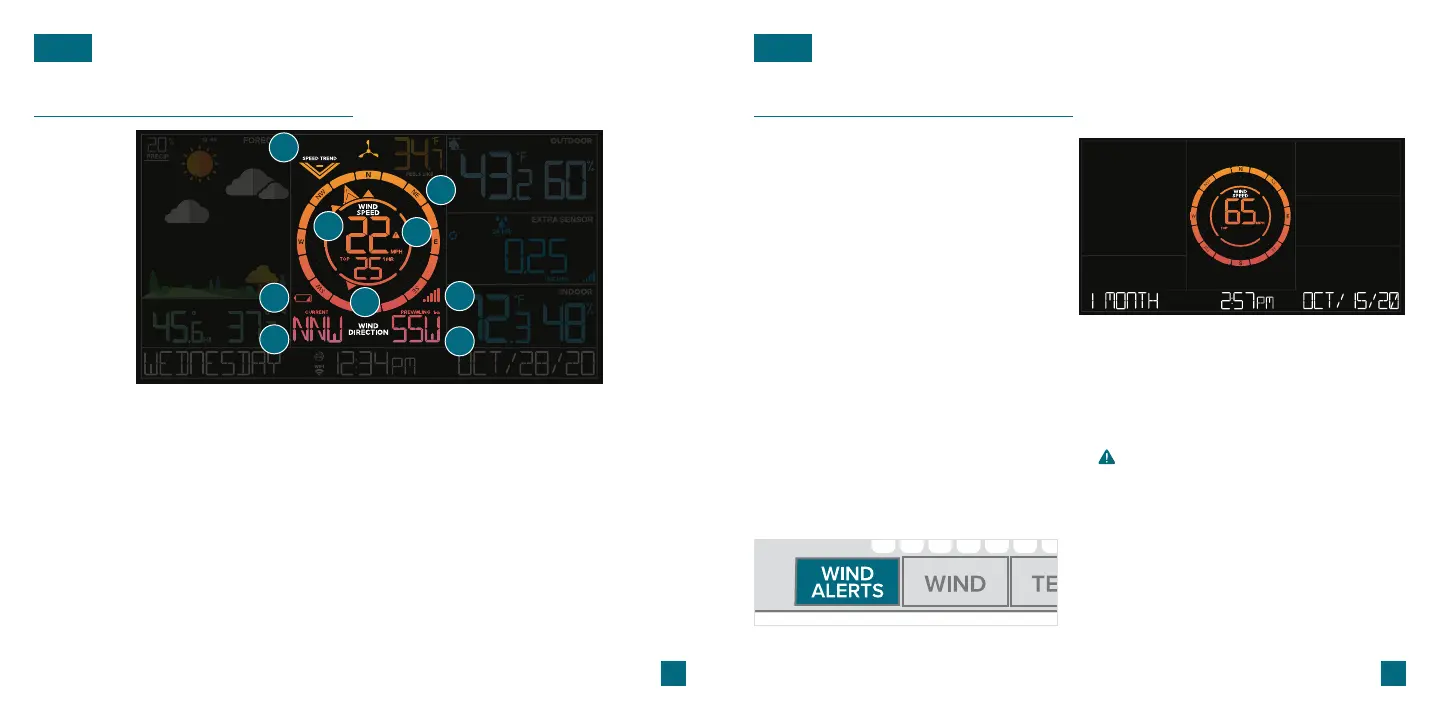
Viewing Your Wind Data
WIND
1. WIND SPEED TREND
INDICATOR
Shows wind speed trends
over the past 60 minutes
2. COMPASS ROSE
Displays cardinal direction
with animated arrows
(16 directions total)
Indicates if the station is
receiving data from the
sensor
8. WIND DIRECTION
3. CURRENT WIND SPEED
Appears when the sensor’s
batteries needs to be
replaced
6. BREEZE PRO SENSOR
LOW BATTERY ICON
The top wind speed in the
past 31 seconds
Choose between cardinal
points (letters) or degrees
in the Settings Menu for
Current Wind Direction
7. RECEPTION ICON
5. TOP WIND SPEED
The top wind speed in
the past 60 minutes
4. WIND SPEED ALERT
Appears if a wind speed
alert is set & active
9
1
2
3
4
5
6
7
8
Prevailing Wind Direction
over the past hour
9. PREVAILING DIRECTION
14
Wind Speed History and Alerts
WIND
Viewing Wind Speed History Records
Activate/Deactivate Wind Speed Alert Important Notes:
Press the WIND button to toggle
through wind speed history records
with time and date stamps.
The wind speed records include:
past 24 hours, 7 days, 1 month, & 1 year.
Press the WIND ALERTS button to activate/
deactivate the alert. WIND SPEED ALERT ON or
OFF will appear on the bottom of the LCD.
• The alert is defaulted to be o.
• When the armed alert value is reached, the station
will beep and the icon will flash. Press any button
to stop the alert sound.
• The Alert Icon will remain flashing until out of the
alert range.
• This Wind Speed Alert is for the station only
and will not aect the app.
1. Hold the WIND ALERTS button to enter the Alert Settings Menu.
2. Use the +/- buttons adjust wind speed alert settings. Press the WIND ALERTS
button to confirm your selection.
3. Your wind speed alert is active when the icon on.
Setting the Wind Speed Alert
Monthly Wind Speed Record Example















 To Next Page