1
The Wireless Weather Station features manual set time, date, time
alarm, weather forecast, indoor and outdoor temperature/humidity, with
temperature alerts, heat index and dew point. Wireless transmission
range of over 90 meters (300 feet) in open air, from transmitter to
forecast station.
SETUP INSTRUCTIONS STEP BY STEP
STEP 1:
Remove battery cover from the forecast
station
Insert 2 NEW AA batteries (not included) into
the back of the forecast station. Observe the
correct polarity (see marking inside the
battery compartment).
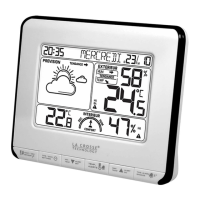
The forecast station will light up and show, indoor temperature,
humidity and time.
STEP 2:
Ensure that the transmitter is within 3 meters (10 feet) of the forecast
station.
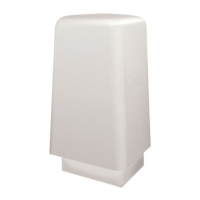
Remove battery cover from transmitter: Slide the battery cover down
and lift off the front of the transmitter.
Insert 2 NEW AA batteries (not included) into the
transmitter.
Observe the correct polarity.
Within 3 minutes, the forecast station will show
readings in the Outdoor temperature area on the LCD.
Note:
Use Alkaline batteries (or Lithium for temperatures
below -28.8°C/- 20°F ).
Allow the weather station and the transmitter to stay within 10 feet of
each other for the first 15 minutes of set up.
TRANSMITTER SIGNAL STRENGTH
After the batteries are inserted, the forecast station will search for the
outdoor temperature/humidity transmitter for 3 minutes.
The antenna symbol will flash during reception, and temperature
display will be dashes “---“.
The antenna symbol will scroll during transmitter synchronization.
If synchronization fails once, the antenna will lose one bar.
If synchronization fails twice, the antenna will lose two bars.
If reception continuously fails to receive 5 times, the antenna symbol
will be shown as .
The antenna will show full display with successful RF
(radio frequency) reception.
TROUBLESHOOTING
If the outdoor temperature is not displayed after three
minutes, hold the HEAT/DEW/SENSOR button on the
forecast station for three seconds to search for outdoor
transmitter.
Next, remove the battery cover from the transmitter then press the TX
button to send a signal.
If it still does not receive the outdoor data, remove the batteries from
both the forecast station and the transmitter for 15 minutes repeat
setup instructions from step 1.
The maximum transmitting range in open air is over 90 meters(300-
feet).Obstacles such as wall, windows, stucco, concrete, and the
large metal objects can reduce the range.
TIME/DATE
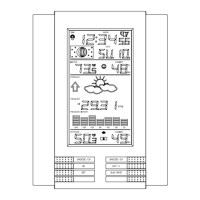
The SETTINGS button moves through the program menu
and confirm settings.
Use the UP ARROW button to increase a value.
Use the DOWN ARROW button to decrease a value.
SET TIME/DATE
Hold the SETTINGS button for three seconds to enter time set mode.
BEEP ON/OFF: BP ON(BEEP) will flash .The default is ON. Press
and release the UP or DOWN button to ON or OFF the BEEP button
sound.
12/24-HOUR: The time format will flash. Use the ARROW buttons to
choose 12-hour or 24-hour time format and press the SETTINGS
button to confirm and move to hour.
HOUR: The Hour will flash. Use the ARROW buttons to choose the
hour, and press the SETTINGS button to confirm and move to
minutes.
MINUTES: The Minutes will flash. Use the ARROW buttons to
choose the minutes, and press the SETTINGS button to confirm and
move to the year.
YEAR: The Year will flash. Use the ARROW buttons to choose the
year, and press the SETTINGS button to confirm and move to the D-
M.
D-M: The D-M will flash. Use the ARROW buttons to choose
DATE/MONTH or MONTH/DATE format, and press the SETTINGS
button to confirm and move to the Month.
MONTH: The Month will flash. Use the ARROW buttons to choose
the month, and press the SETTINGS button to confirm and move to
the date.
DATE: The Date will flash. Use the ARROW buttons to choose the
date, and press the SETTINGS button to confirm and move to
Celsius/ Fahrenheit.
CELSIUS /FAHRENHEIT: °C or °F will flash. Use the ARROW
buttons to select Celsius or Fahrenheit. Press and release the
SETTINGS button to confirm and Move to the language.
LANGUAGE: The language will flash. The default is FRENCH. Use
the ARROW buttons to select the language for weekday display
(French or English) and press the SETTINGS button to confirm and
exit setting.
Note:
Up/Down arrows: Press once to adjust by 1 unit, hold for fast scroll
adjustment.
When in setting mode of any feature, all the rest of the information of
the LCD should disappear, only concentrate in the setting of the
feature
Press the TIME ALARM/SNOOZE button at any time to exit or wait 20
seconds without pressing buttons to return to the normal time display.
Wireless Weather Station
WS6818 | Quick Setup Guide

 Need help?
 General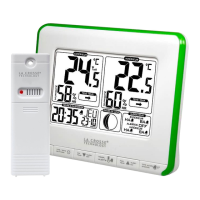



 To Next Page