EasyManua.ls Logo

La Crosse 513-1417CH - User Manual

La Crosse 513-1417CH
11 pages
Print Icon
To Next Page IconTo Next Page
Loading...
La Crosse Technology, Ltd. www.lacrossetechnology.com/support Page 1
513- 1417CH FAQS
The links below will work in most PDF viewers and link to the topic area by clicking the link. We recommend
Adobe Reader version 10 or greater available at: http://get.adobe.com/reader
CONTENTS
513-1417CH FAQS
................................................................................................................................................. 1
Batteries
............................................................................................................................................................... 2
Atomic Clock Factory Restart
............................................................................................................................ 2
Remote Temperature Sensor
............................................................................................................................ 2
Compatible Remote sensors ............................................................................................................................ 2
Quick Connect .................................................................................................................................................. 3
Remote Temperature Signal Strength ............................................................................................................. 3
Dashes show for Remote Temperature ........................................................................................................... 3
Power Requirements ........................................................................................................................................ 3
Inaccurate Remote Temperature Reading ....................................................................................................... 3
Intermittent Remote Temperature ................................................................................................................... 4
Remote Temperature is stuck or HH.H, LL.L ................................................................................................... 4
Remote sensor drains batteries quickly........................................................................................................... 4
Remote sensor fell. The sensor no longer works ............................................................................................ 5
Temperature Trend Arrows .............................................................................................................................. 5
HI | LO Temperature readings .......................................................................................................................... 5
Mounting/Positioning Remote sensor .............................................................................................................. 5
Position Atomic clock ....................................................................................................................................... 6
Distance/Resistance/Interference .................................................................................................................... 6
Atomic clock
........................................................................................................................................................ 7
Power Requirements ........................................................................................................................................ 7
12-Hour time format .......................................................................................................................................... 7
Fahrenheit/Celsius ............................................................................................................................................ 7
Moon Phase ...................................................................................................................................................... 7
Dashes, HH.H, LL.L or stuck Indoor Temperature ........................................................................................... 8
Inaccurate Indoor Temperature Reading ......................................................................................................... 8
Set Time Alarm ................................................................................................................................................. 8
Activate/Deactivate time alarm ........................................................................................................................ 8
Snooze Alarm.................................................................................................................................................... 8
Manually Set Time/Date: Program Menu ........................................................................................................ 9
Does the clock have a backlight? .................................................................................................................. 10

Time is off by hours ........................................................................................................................................ 10

Daylight Saving Time ...................................................................................................................................... 10
Atomic clock is dim ......................................................................................................................................... 10
Atomic clock has distorted or frozen display ................................................................................................. 10
Question and Answer IconNeed help?

Do you have a question about the La Crosse 513-1417CH and is the answer not in the manual?

Summary

Batteries

Atomic Clock Factory Restart

Remote Temperature Sensor

Quick Connect

Remote Temperature Signal Strength

Power Requirements

Inaccurate Remote Temperature Reading

Intermittent Remote Temperature

Remote Temperature is stuck or HH,H, L,L

Remote sensor drains batteries quickly

Remote sensor fell. The sensor no longer works.

Mounting;Positioning Remote sensor

Position Atomic Clock

Distance;Resistance;Interference

Atomic clock

Power Requirements

Specifies the power requirements for the atomic clock.

Dashes, HH,H, L,L or stuck Indoor Temperature

Troubleshoots error messages like dashes or stuck temperature readings.

Inaccurate Indoor Temperature Reading

Addresses issues with inaccurate indoor temperature readings.

Set Time Alarm

Provides instructions on how to set the time alarm.

Manually Set Time;Date: Program Menu

Guides through manually setting time and date using the program menu.

Time is off by hours

Troubleshoots the atomic clock displaying incorrect time.

Overview

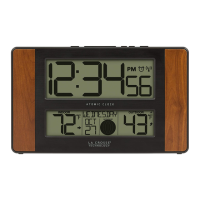
This document describes the features, troubleshooting, and maintenance of the La Crosse Technology 513-1417CH Atomic Clock with Remote Temperature Sensor.

Function Description:

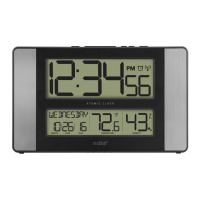
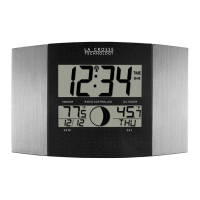
The device is an atomic clock that displays time, date, and indoor temperature, and also receives and displays outdoor temperature from a remote sensor. It includes features such as moon phase display, time alarm with snooze, and temperature trend indicators. The atomic clock synchronizes with the WWVB signal for accurate timekeeping, and the remote sensor transmits temperature data wirelessly.

Important Technical Specifications:

  • Power Requirements:
    • Remote Sensor: 2-AA Alkaline or Lithium batteries. Lithium batteries are recommended for temperatures below -20°F/-28.8°C.
    • Atomic Clock: 2-AA Alkaline batteries.
    • Battery life is over 24 months for both units when using reputable battery brands.
  • Remote Sensor Transmission:
    • Frequency: 433MHz.
    • Maximum Open Air Range: Over 330 feet (100 meters). This range is reduced by obstacles like walls, windows, stucco, concrete, large metal objects, electrical wires, transmitting antennas, and vegetation.
  • Temperature Display:
    • Indoor and Remote Temperature Trend Indicators: Update every 30 minutes or less, representing temperature changes over the past three hours (2°F / 1°C).
    • Daily HI | LO Temperatures: Reset automatically at midnight (12:00 AM).
    • Temperature Units: Fahrenheit or Celsius (selectable via program menu).
  • Time Display:
    • Format: 12-hour only.
    • Atomic Synchronization: Receives WWVB signal.
    • Time Zones: Selectable.
    • Daylight Saving Time (DST): ON/OFF selectable.
  • Alarm: Time alarm with a 10-minute snooze feature.
  • Moon Phase: Based on lunar calendar, year, month, and date settings. Displays waxing, waning, crescent, gibbous, new moon, full moon, first quarter, and last quarter.
  • Display: No backlight.

Usage Features:

  • Quick Connect: For re-establishing connection between the atomic clock and remote sensor after minor disruptions. Involves placing units 5-10 feet apart, holding the MINUS button for 5 seconds on the clock, and pressing the TX button on the sensor.
  • Factory Restart: A comprehensive reset procedure for both units to resolve persistent issues. Requires removing batteries, clearing memory by pressing a clock button 20 times, leaving units unpowered for 15 minutes, inserting fresh batteries into the sensor, pressing TX, and allowing units to sit together for 15 minutes.
  • Manual Time/Date Setting: Accessible via the SETTINGS button, allowing adjustment of language, beep ON/OFF, atomic ON/OFF, DST ON/OFF, time zone, hour, minutes, year, month, date, and Fahrenheit/Celsius units.
  • Time Alarm Setting: Hold the ALARM button for 5 seconds to set the hour and minutes.
  • Time Alarm Activation/Deactivation: Press and release the ALARM button once to show alarm time, then again to toggle activation (bell icon appears/disappears).
  • Snooze Function: Press the LIGHT button when the alarm sounds for a 10-minute snooze. The snooze icon flashes. To stop the alarm for one day, press the ALARM button during snooze mode.
  • HI | LO Temperature View: Press the PLUS button to view minimum then maximum temperatures.
  • Remote Sensor Mounting: Recommended to place the sensor in a shaded outdoor location, protected from direct sun, rain, or snow. Mount vertically at least 6 feet high on the North side for best results. Avoid metal fences. For indoor use, it can monitor areas like crawl spaces.
  • Atomic Clock Positioning: Can be desk-mounted or wall-mounted. Place within range of the remote sensor, at least 6 feet away from electronics that can cause interference.

Maintenance Features:

  • Battery Replacement: Use fresh, reputable brand batteries. Check expiration dates (at least six years in advance of the current year for stability). Replace batteries when remote sensor drains quickly or when the atomic clock display is dim, distorted, or has missing segments.
  • Troubleshooting Connection Issues:
    • Dashes for Remote Temperature: Indicates lost connection. Try fresh batteries, repositioning the atomic clock (turn 90 degrees), or performing a quick connect or factory restart.
    • Intermittent Remote Temperature: Move sensor closer to the clock, check batteries, or try a freezer test to confirm the correct sensor is being read.
    • Remote Temperature Stuck/HH.H/LL.L: Indicates sensor is outside readable range. Check batteries (overpowered/underpowered can cause this), or replace the sensor.
  • Troubleshooting Inaccurate Temperature Readings:
    • Remote Temperature: High readings often indicate a location issue (e.g., direct sunlight, heat sources). Perform a side-by-side test with the atomic clock to verify accuracy. If accurate side-by-side, try a different outdoor location.
    • Indoor Temperature: Often power-related or location issue. Perform a side-by-side test with the remote sensor. Check for heat/cold sources near the clock.
  • Troubleshooting Time Issues:
    • Time Off by Hours: Check for the WWVB Tower icon (indicates signal reception). Reposition the clock (front/back facing Colorado). Verify correct time zone and DST settings in the Program Menu. Large buildings or electrical equipment can interfere with the WWVB signal.
    • Daylight Saving Time Change Issues: May take up to 5 nights for the change to occur. Ensure WWVB signal reception, correct time zone, and DST setting. Fresh batteries improve signal reception. Position the clock near a window facing Ft. Collins, Colorado.
  • Troubleshooting Display Issues:
    • Atomic Clock Dim: Often power-related. Remove batteries, press a button 20 times, leave unpowered for 1-2 hours, then install fresh alkaline batteries.
    • Atomic Clock Distorted/Frozen Display: Check for a thin plastic scratch guard film on the screen. If parts of numbers/letters are missing, it's often power-related; try the battery removal/reset procedure.

La Crosse 513-1417CH Specifications

General IconGeneral
BrandLa Crosse
Model513-1417CH
CategoryClock
LanguageEnglish

Related product manuals