EasyManua.ls Logo

La Crosse WS-8117 - User Manual

La Crosse WS-8117
10 pages
Print Icon
To Next Page IconTo Next Page
Loading...
WS-8117
OUTDOOR TEMPERATURE TRANSMITTER:
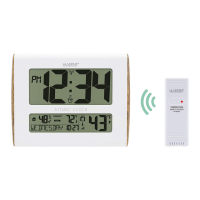
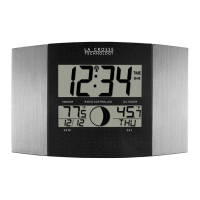
ATOMIC CLOCK WITH OUTDOOR WIRELESS TEMPERATURE AND
MOON PHASE
Instruction Manual
FEATURES:
ATOMIC CLOCK:
WWVB Radio controlled time with manual time setting
12/24 hour time display
Time display: hour, minute, second
Alarm setting with snooze function
Calendar display
Weekday display (3 languages to choose from: English, French and Spanish)
Time zone setting
Daylight savings time ON/OFF option (DST)
ºC or ºF temperature display selectable
Indoor temperature display
Outdoor temperature display via 433MHz transmission
Wall mount or freestanding
Current moon phase display
Remote transmission of outdoor temperature to the atomic clock by 433 MHz signals
Wall mounting case
Holder
TO INSTALL AND REPLACE BATTERIES IN THE ATOMIC CLOCK
The atomic clock uses 2 x AA, 1.5V batteries. To install and replace the batteries, please follow the
steps below:
1. Insert finger or other solid object in the space at the bottom center of the battery compartment
and lift up to remove the cover.
2. Insert batteries observing the correct polarity (see marking inside battery compartment).
3. Replace compartment cover.
DO NOT SET THE CLOCK.
TO INSTALL AND REPLACE BATTERIES IN THE TEMPERATURE TRANSMITTER
The transmitter uses 2 x AA,1.5V batteries. To install and replace the batteries, please follow the
steps below:
1. Remove the cover.
2. Insert the batteries, observing the correct polarity (see marking inside battery compartment).
3. Replace the battery cover on the unit.
Alkaline batteries are recommended for use in both units. Avoid using rechargable batteries.
LCD1
display
LCD2
display
Battery cover
Function keys
Hanging holes
Foldable stand

Questions and Answers

  • D
    Daniel NguyenJul 27, 2025
    Why is my La Crosse Clock not receiving WWVB signal?
    • D
      dgonzalezJul 27, 2025
      If your La Crosse Clock isn't receiving the WWVB signal, here are a few things to try: 1. Point the front of the clock towards Ft. Collins, Colorado. 2. Allow the clock to search for the signal overnight. 3. Keep the clock at least 6 feet away from electronic devices like TVs, computers, and other radio-controlled clocks. 4. Remove the batteries for 5 minutes, reinsert them, and let the unit sit overnight without pressing any buttons.
  • A
    Amy CohenAug 2, 2025
    How to fix a faint LCD on my La Crosse WS-8117 Clock?
    • J
      Jessica ElliottAug 2, 2025
      If the LCD on your La Crosse Clock is faint, the first thing you should do is replace the batteries.
  • R
    Robert WatsonAug 7, 2025
    What to do if "--.-" appears on La Crosse WS-8117 outdoor temperature display?
    • D
      David HammondAug 7, 2025
      If "--.-" appears in the outdoor temperature section of your La Crosse Clock's LCD, try the following: 1. Remove the batteries from both the clock and the transmitter for one minute, then reinsert them. Ensure you're using fresh batteries. 2. Reduce the distance between the clock and the transmitter, ensuring they are within receivable range. 3. Interference from devices operating on the same frequency (433MHz) can disrupt signal transmission. Try relocating the units.
  • A
    Ashley TerrellAug 14, 2025
    Why does my La Crosse WS-8117 Clock display "OFL“ in the indoor temperature section?
    • D
      Daniel AguilarAug 14, 2025
      If "OFL“ appears in the indoor temperature section of the LCD of your La Crosse Clock, it means the current surrounding temperature is outside the measuring range. Move the clock to an area with a more moderate temperature, either warmer or cooler, to resolve this.
  • L
    Linda YatesAug 19, 2025
    What does "OFL“ mean on the outdoor temperature display of my La Crosse WS-8117 Clock?
    • K
      Kenneth HoffmanAug 19, 2025
      If "OFL“ appears in the outdoor temperature section of the LCD on your La Crosse Clock, it indicates that the current outdoor temperature is outside the transmitter's measuring range. You should wait until the temperature returns to within the acceptable range.

Summary

Atomic Clock Battery Installation

Temperature Transmitter Battery Installation

Initial Setup and Battery Insertion

Atomic Clock LCD Screen Overview

Manual Settings Overview

Setting the Time Zone

Daylight Saving Time (DST) Setting

Weekday Language Setting

Manual Time and Date Configuration

Year, Month, Date, and Weekday Configuration

Time Display and Temperature Unit Selection

Alarm and Snooze Functionality

Exiting Manual Setting Modes

Outdoor Temperature Transmitter Reception Check

Changing Display Mode (Day, Seconds, Temp)

WWVB Radio Controlled Time Reception

Moon Phase Display Information

Atomic Clock Positioning Guidelines

Foldout Table Stand Mounting

Wall Mounting the Atomic Clock

Positioning the Outdoor Temperature Transmitter

Mounting with Screws

Instructions for mounting the transmitter bracket using screws.

Mounting with Adhesive Tape

Instructions for mounting the transmitter bracket using adhesive tape.

Care and Maintenance Instructions

Product Specifications Summary

Liability Disclaimer and Usage Restrictions

Battery Replacement Recommendations

Warranty Information and Support

FCC Compliance Statement

La Crosse WS-8117 Specifications

General IconGeneral
BrandLa Crosse
ModelWS-8117
CategoryClock
LanguageEnglish

Related product manuals