10 – LABNET BIOPETTE PLUS PIPETTORS
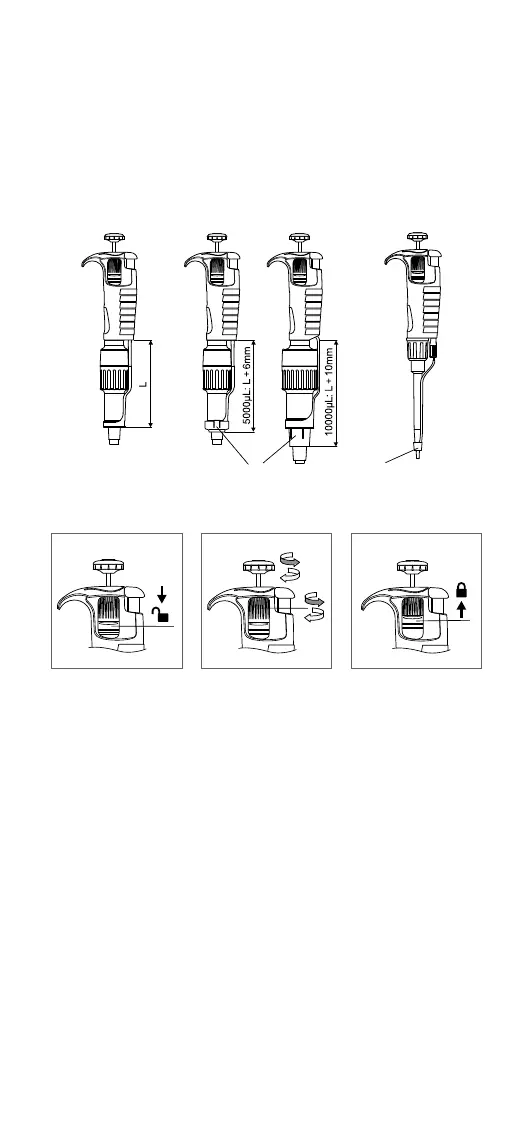
If the tip ejector cannot be adjusted suciently, or if the
diameter of the ejector is insucient to eject the tip, it
may be necessary to attach the ejector cap “M” to the
ejector.
In 2 and 10 μL pipettors place the cap, supplied with the
pipettor, on the bottom of the pipettor shaft and slide
thecap upwards to the bottom of the tip ejector.
M
M
Volume Setting
1. 2. 3.
1. To enable volume selection, set the locking ring to the
lower position.
2. Aspiration volume can be set by either turning the
pipetting pushbutton knob, or the adjustment knob.
The volume setting is displayed as a three digit counter,
which should be read from top to bottom. The smallest
volume increment is printed on the bottom counter drum.
3. After the volume has been set, set the locking ring to the
upper position to avoid inadvertent changing of volume.



 To Next Page