VERY IMPORTANT:
• Your network must have access to the Internet to complete the CloudBox Setup Wizard.
• The CloudBox Setup Wizard will guide you through the installation in a few easy steps.
• The CloudBox will be available for use once the Setup Wizard is complete and your
online account has been verifi ed.
a. LaCie Network Assistant (preferred)
Windows
®
:
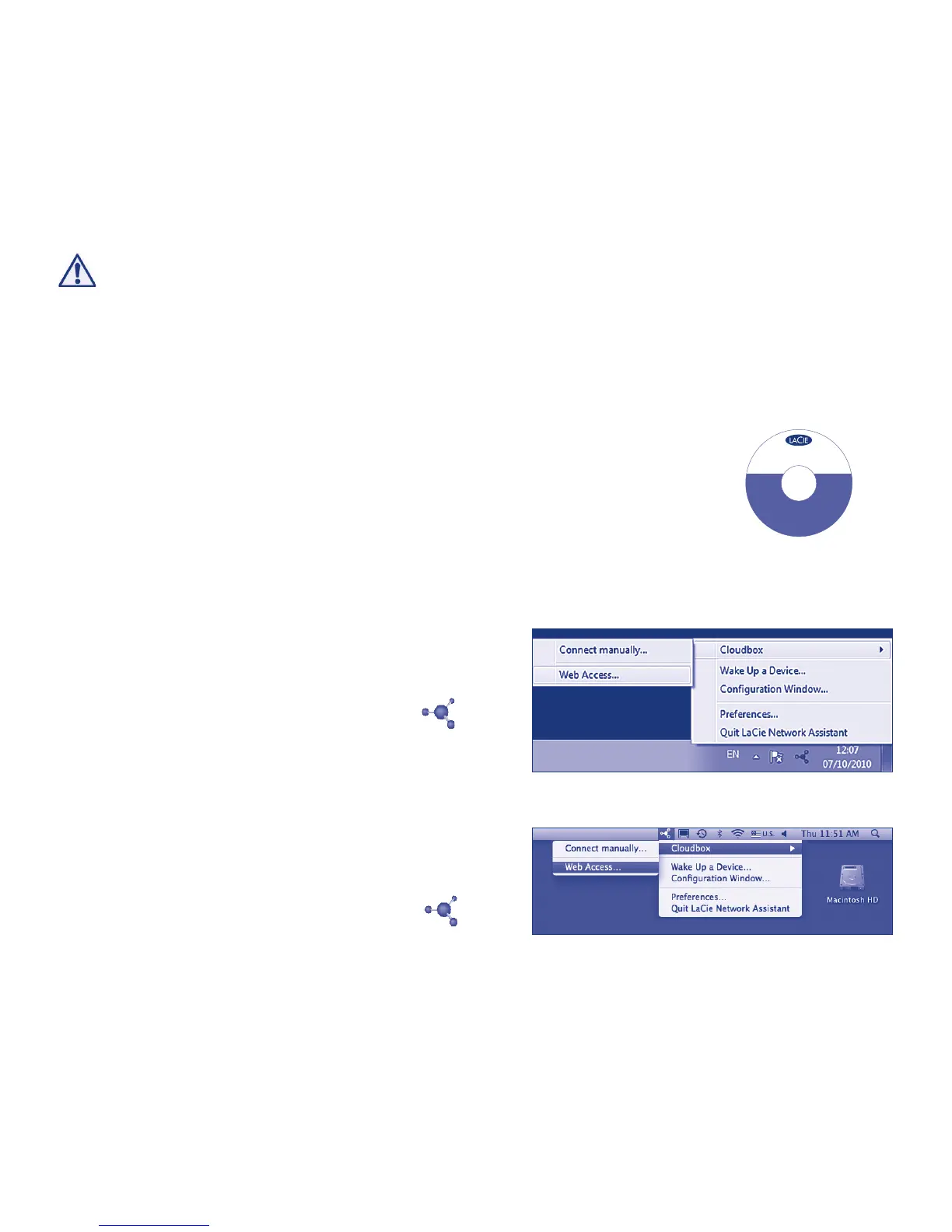
Click the LaCie Network Assistant icon
located in the system tray (bottom right of
the screen) and select CloudBox > Web
Access...
Mac
®
:
Click the LaCie Network Assistant icon
located in the menu bar (top right of the
screen) and select CloudBox > Web
Access...
Fig. 6 - LaCie Network Assistant (Windows)
Fig. 7 - LaCie Network Assistant (Mac)
1. Install and run LaCie Network Assistant, located on the LaCie
Utilities CD-ROM. LaCie Network Assistant can help you
launch the CloudBox Setup Wizard.
2. There are two options for launching the CloudBox Setup
Wizard: a. LaCie Network Assistant; and b. From your
Internet browser.
Setup
V
e
r
s
i
o
n
1
.
0
©
2
0
1
0
L
a
C
i
e
,
a
l
l
r
i
g
h
t
s
r
e
s
e
r
v
e
d
.
7
1
5
0
9
4
1
0
0
9
2
3
cloudbox
DESIGN BY NEIL POULTON
Windows
®
LaCie Network Assistant
Genie Timeline Backup
Mac
®
LaCie Network Assistant
User Manual
Manuel d’utilisation
Guida per l'utente
Benutzerhandbuch
Manual de Usuario
Fig. 5















 To Next Page