20-18071 Rev A
Prepare Fluid System
Blood and Fluid Systems
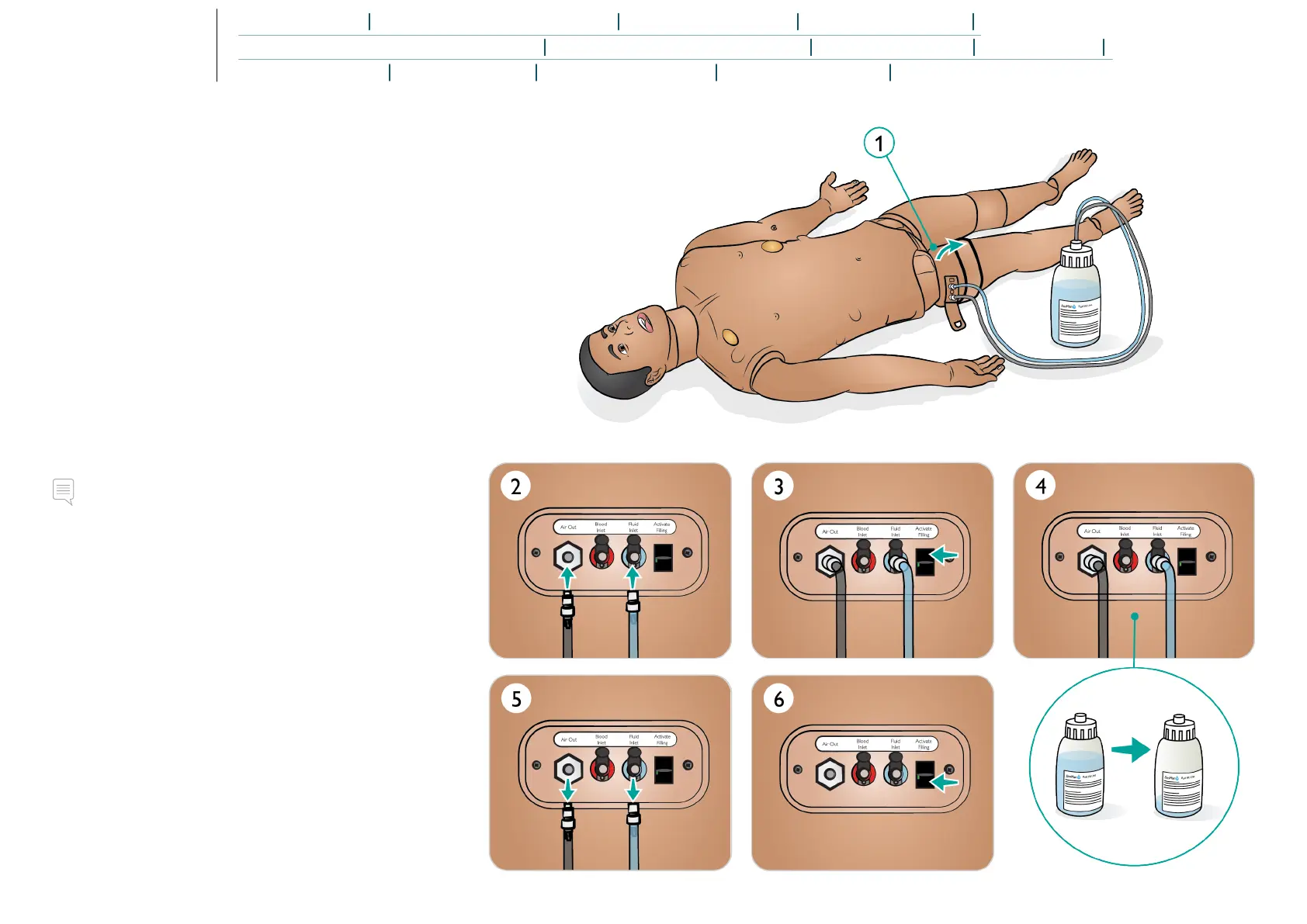
The Patient Simulator has two internal tanks, one for simulated
blood and one for fluids. The fluid fill panel is located at the top
of the right leg.
Filling the Internal Tanks
Ensure the Patient Simulator power is on.
1. Roll the right leg skin down to expose the fill panel. Lift the
panel cover.
2. Connect the fluid fill bottle tubes to the relevant inlet and
the air outlet in the right leg panel.
3. Turn on the Activate Filling. The button will light up and
fluid will flow into the Patient Simulator.
4. When the flow stops, disconnect fill bottle.
5. Turn off the Activate fill button.
Notes
• Disconnect tubes from the Patient Simulator before turning
off the Activate Fill button. Turning the fill button off before
disconnecting the tubes will initiate draining of the tank.
• Only one tank can be filled at a time.















 To Next Page