20-18071 Rev A
Replacing Batteries 2/2
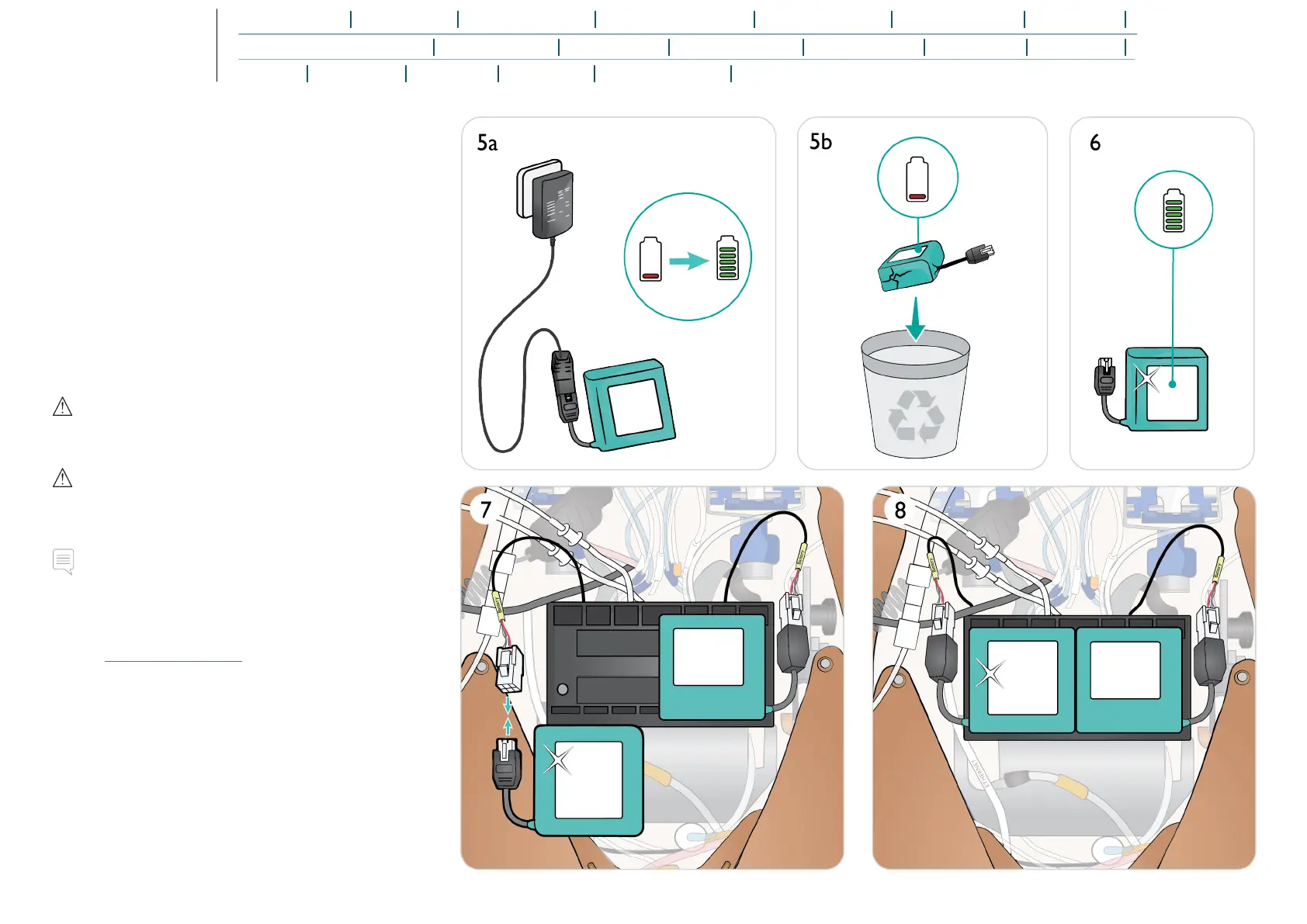
5. a. Charge battery
b. If battery(ies) are damaged, dispose or recycle in
accordance with local regulations, and replace with a new
battery.
6. Fully charged battery / new battery
7. Insert battery and connect battery to the torso cable as
shown.
8. Replace cover once battery/batteries are connected and
in place.
Warning
Inserting and connecting batteries incorrectly, short circuiting or
exposure to fluids pose an explosion hazard.
Caution
Do not use the batteries if they are visibly damaged,
malfunctioning or appear to leak electrolyte.
Note
If both batteries are removed while the simulation is paused,
the Patient Simulator will shut down and simulation data will be
lost.
Refer to Transport and Storage for more infomation relating
storing and transporting batteries.















 To Next Page