1 2 3
4
5
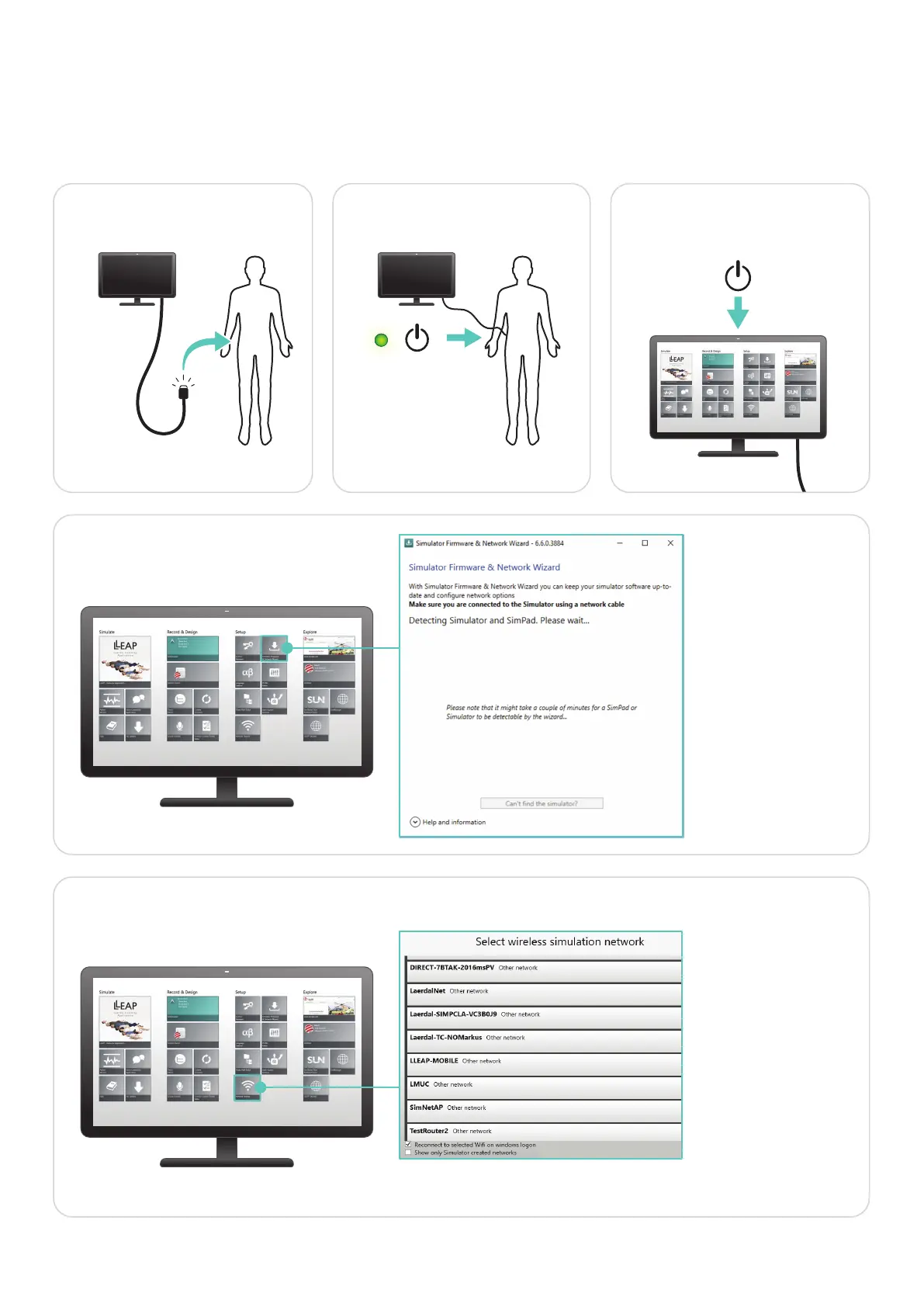
First Time WiFi Setup for PC
For an optimal network solution, we recommend connecting your simulator and other devices to a dedicated WiFi network.
Before you connect to a new WiFi network, connect Simulator and PC with a network cable and follow this process.
Connect PC and
Simulator with cable
Turn on Simulator Turn on PC and open
Laerdal Simulation Home
Steady green light
= Ready
Select Simulator
Select WiFi network
Open “Network Selector“
Select same WiFi network
as Simulator, and follow
on-screen instructions
Repeat this step on a
second PC to set up
Patient Monitor
(Optional)
Open “Simulator &
Network Wizard”
and follow on-screen
instructions
When network is established, you can disconnect the network cable. If you experience connection problems in future simulation
sessions, or if you want to connect to a new WiFi network, repeat this process.
20-15964 Rev B















 To Previous Page