Operator's Manual – Stacker Wall Street
©
LAI GAMES
The pattern of LEDs for each
game will be shown on the
LED Playfield Display
GAME HISTORY MODE
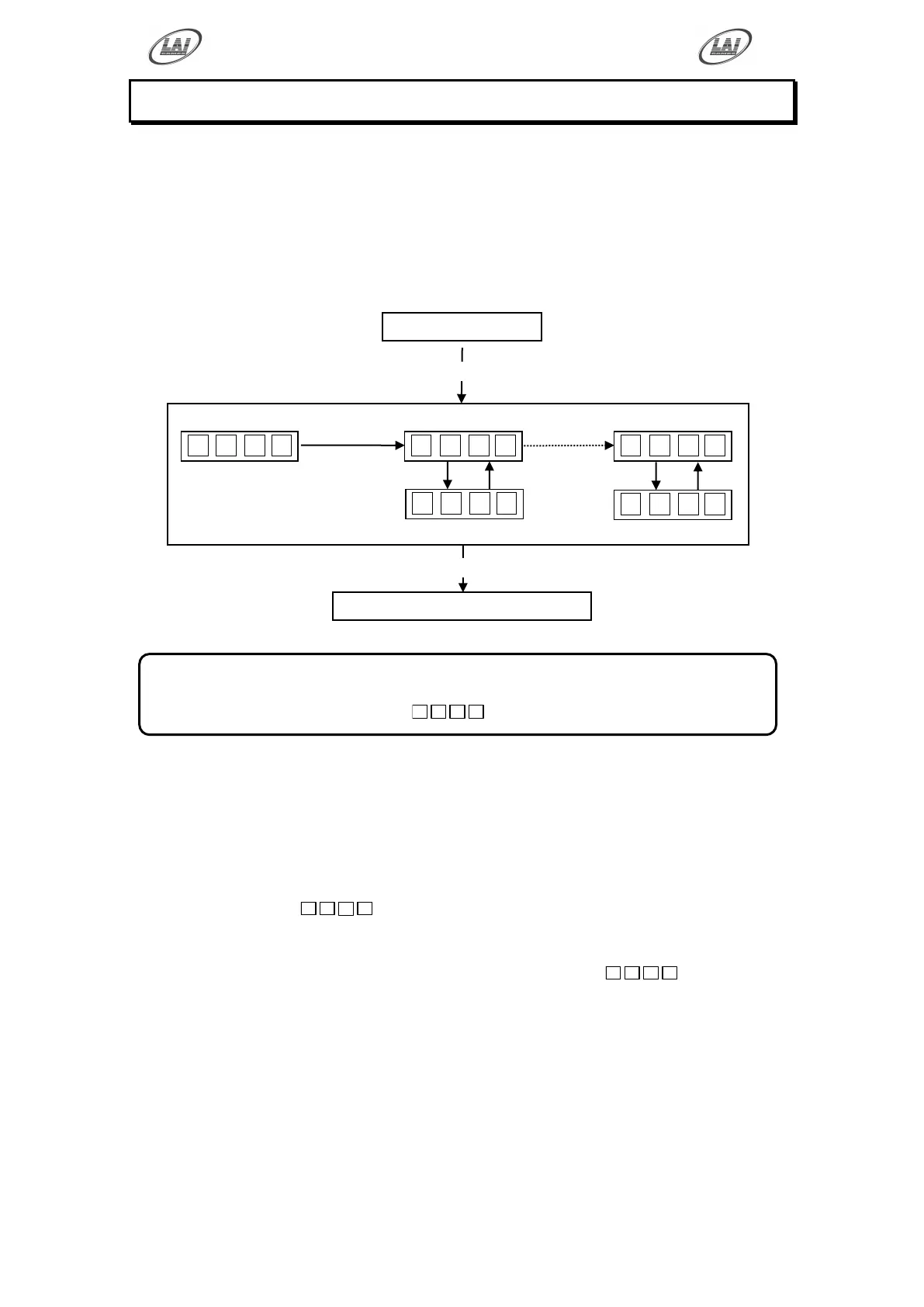
By using the Game History Mode the operator can view the results of the last 10
games played. This enables the operator to verify player‟s game results and verify the
win / lose pattern on the LED Playfield Display. The display shows the level reached
in each of the last 10 games.
GAME HISTORY MODE DIAGRAM
GAME HISTORY PROCEDURE
ENTER The Game History mode is entered from Audits mode by pressing the
Test button once or from Attract mode by pressing the Test button six
times.
Will be displayed on the 4-digit display.
SELECT The green Service button is pressed for advancing each step through
the set of Game Histories, starting from the
display, H01
being the first step, continuing through to H10, and then looping again
from H01 to H10 until the mode is exited.
EXIT The Game History mode is exited into Game Attract mode, by pressing
the Test button once.
PRESS
SERVICE
step from
H01 to H10
* NOTE! *
Score Histories will be erased if the game is switched off then on.
Empty score histories show as









 To Next Page