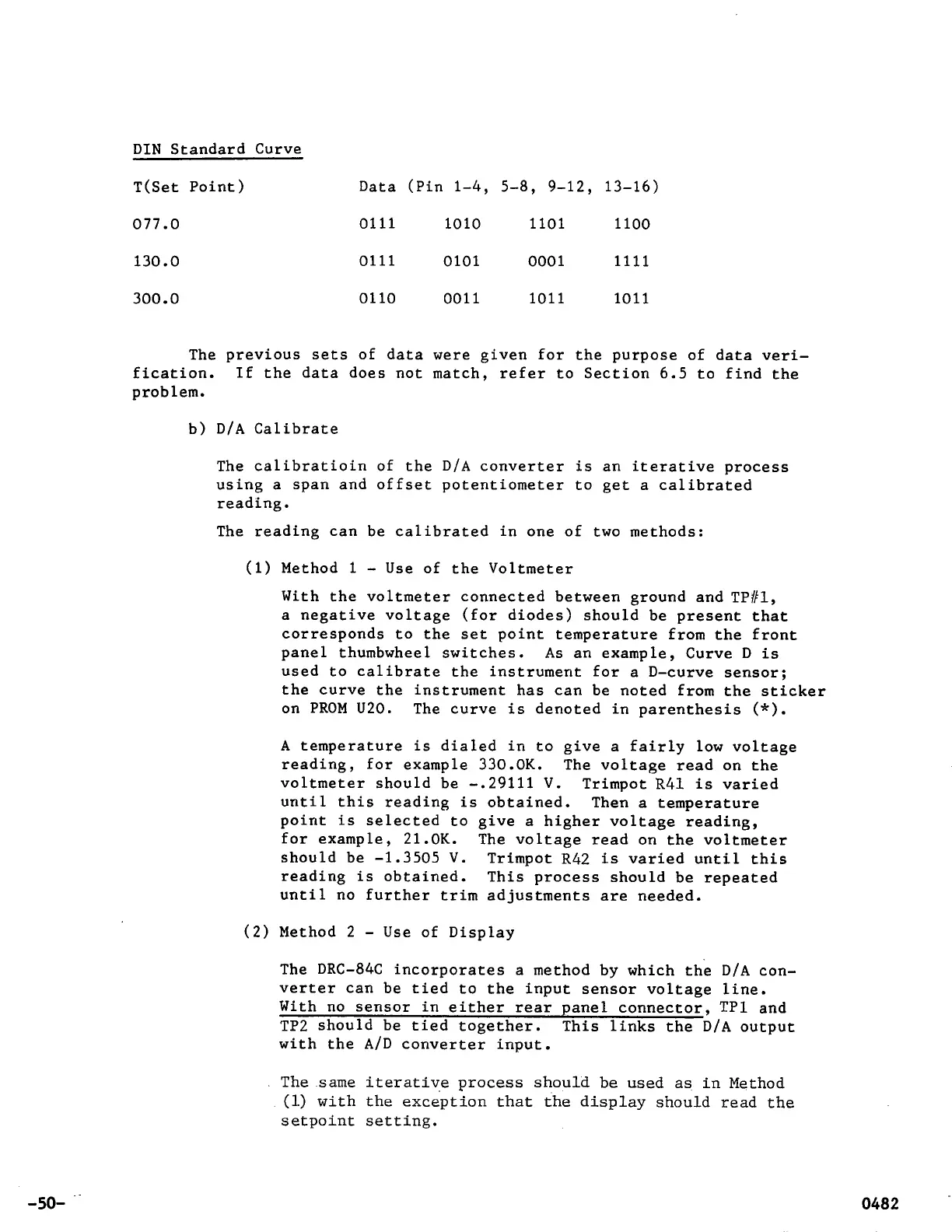
DIN Standard Curve
T(Set Point) Data (Pin 1-4, 5-8, 9-12, 13-16)
077.0
0111
1010
1101
1100
130.0
0111
0101
0001
1111
300.0
0110
0011 1011 1011
The previous sets of data were given for the purpose of data veri-
fication.
If
the data does not match, refer to Section
6.5
to find the
problem.
b) D/A Calibrate
The calibration of
the D/A converter is an iterative process
using a span and offset potentiometer to get a calibrated
reading.
The reading can be calibrated in one of two methods:
(1) Method
1
-
Use of the Voltmeter
With the voltmeter connected between ground and TP#1,
a negative voltage (for diodes) should be present that
corresponds to the set point temperature from the front
panel thumbwheel switches.
As
an example, Curve D is
used to calibrate the instrument for a D-curve sensor;
the curve the instrument has can be noted from the sticker
on PROM U20. The curve is denoted in parenthesis
(*).
A temperature is dialed in to give a fairly low voltage
reading, for example 330.0K. The voltage read on the
voltmeter should be -.29111 V. Trimpot
R41
is varied
until this reading is obtained. Then a temperature
point is selected to give a higher voltage reading,
for example, 21.0K. The voltage read on the voltmeter
should be
-1.3505
V. Trimpot
R42
is varied until this
reading is obtained. This process should be repeated
until no further trim adjustments are needed.
(2) Method 2
-
Use of Display
The DRC-84C incorporates a method by which the D/A con-
verter can be tied to the input sensor voltage line.
With no sensor in either rear panel connector, TP1 and
TP2 should be tied together. This links the D/A output
with the A/D converter input.
The same iterative process should be used
as
in Method
(1)
with the exception that the display should read the
setpoint
setting
.
-50-



 To Next Page