- 1 - - 2 -
2. GETTING TO KNOW THE CAMERA / CONTROLS
B
D
H
MJ K LI
E F G
C
A
A
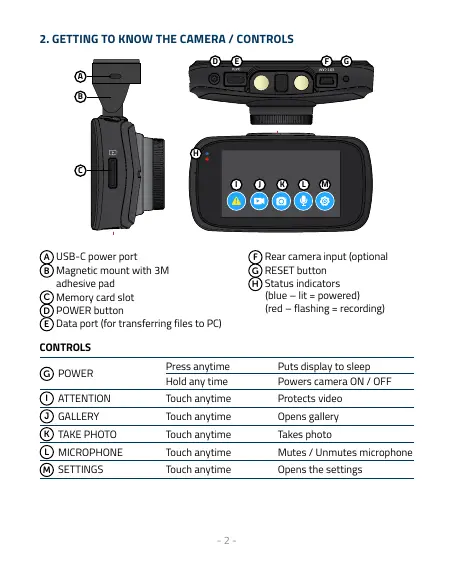
USB-C power port
B
Magnetic mount with 3M
adhesive pad
C
Memory card slot
D
POWER button
E
Data port (for transferring files to PC)
F
Rear camera input (optional
G
RESET button
H
Status indicators
(blue – lit = powered)
(red – flashing = recording)
CONTROLS
G
POWER
Press anytime Puts display to sleep
Hold any time Powers camera ON / OFF
I
ATTENTION Touch anytime Protects video
J
GALLERY Touch anytime Opens gallery
K
TAKE PHOTO Touch anytime Takes photo
L
MICROPHONE Touch anytime Mutes / Unmutes microphone
M
SETTINGS Touch anytime Opens the settings



 To Next Page