- 3 - - 4 -
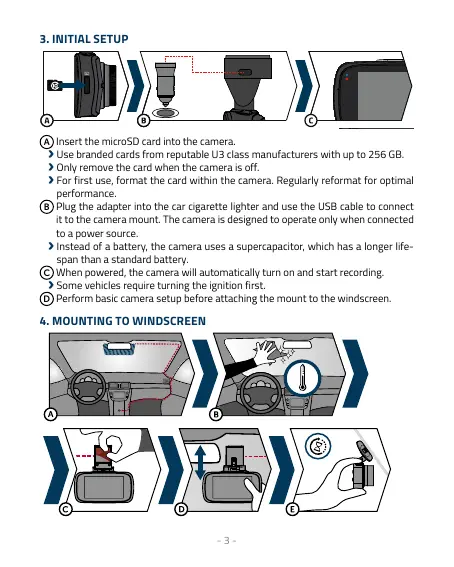
3. INITIAL SETUP
A
Insert the microSD card into the camera.
›
Use branded cards from reputable U3 class manufacturers with up to 256 GB.
›
Only remove the card when the camera is off.
›
For first use, format the card within the camera. Regularly reformat for optimal
performance.
B
Plug the adapter into the car cigarette lighter and use the USB cable to connect
it to the camera mount. The camera is designed to operate only when connected
to a power source.
›
Instead of a battery, the camera uses a supercapacitor, which has a longer life-
span than a standard battery.
C
When powered, the camera will automatically turn on and start recording.
›
Some vehicles require turning the ignition first.
D
Perform basic camera setup before attaching the mount to the windscreen.
4. MOUNTING TO WINDSCREEN



 To Next Page