4
B
Make sure the glass is clean and dry at the attachment point.
›
The ideal temperature for bonding is 20 °C – 40 °C.
C
Peel off the film from the 3M adhesive pad on the camera mount.
D
Before attaching it to the glass, turn on the camera and point it so that it has a good view.
E
Attach the camera with the 3M pad to the glass and hold for a while.
›
For easier removal of the mount, you can apply an electrostatic sticker between the 3M pad and the
windscreen.
›
Finally, adjust the direction of the lens so that part of the bonnet is visible in the frame.
5. BASIC FUNCTIONS
Loop recording
›
The camera automatically splits the recording into shorter video files and starts overwriting the oldest
unprotected files with new ones when the SD card is full. This way you don‘t have to worry about running
out of space on the card.
File protection
›
You can protect the currently recorded video manually by pressing the multifunction button or through
the app. When the recording is protected, a tone will sound and the LED indicator will turn red.
G-sensor
›
Thanks to the G-sensor, the camera can identify an impact, such as in a traffic accident. Once an impact
is detected, the camera immediately protects the current recording from being overwritten. (CAUTION,
formatting the card will also delete the protected files).
›
Caution, high sensitivity settings and driving on uneven surfaces may cause the files to lock themselves,
completely filling up the MicroSD card.
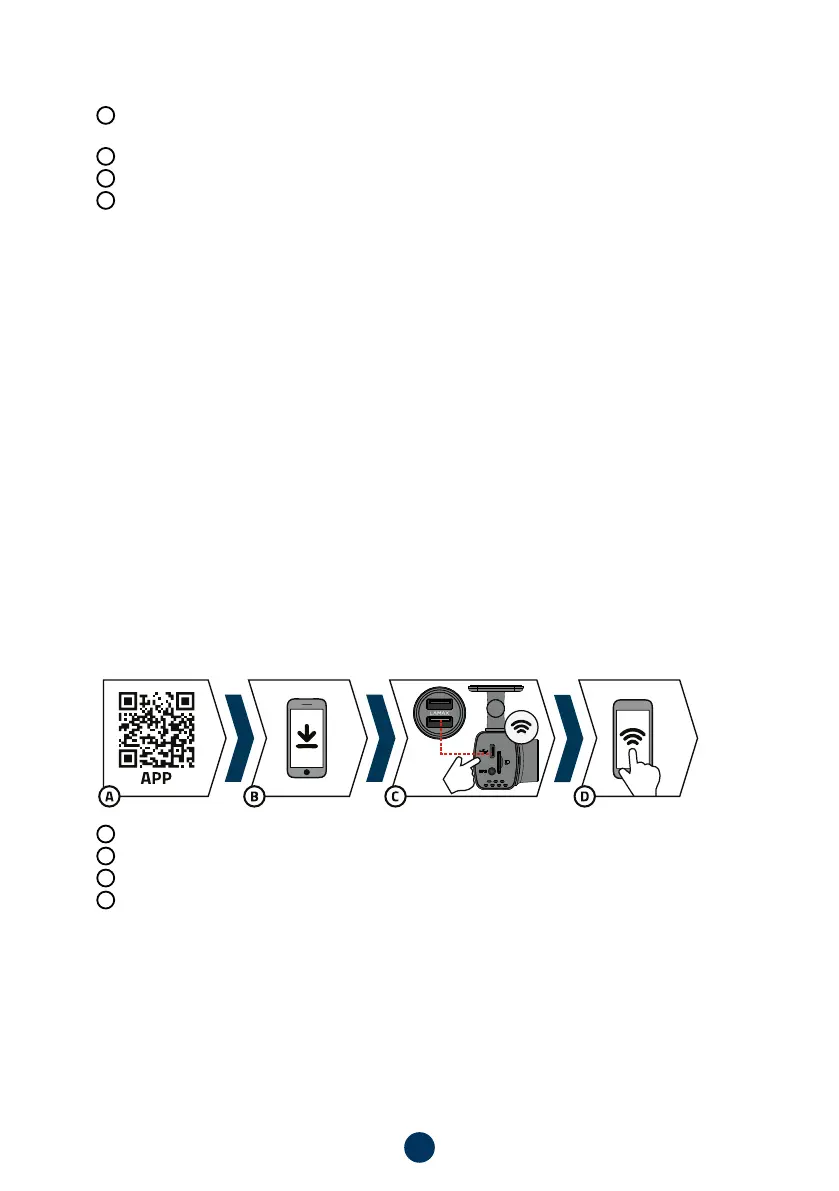
6. WIFI APPLICATION
To use the full range of features of this camera, download the app to your smartphone. This app is used for
precise camera setup and to save videos and photos to your phone. Scan the QR code below to install the app.
A
Scan the QR code or enter the URL – lamax-electronics.com/n4/app
B
Install the app on your smartphone or tablet.
C
Plug the power into the camera. When the camera turns on, the Wifi will automatically turn on.
D
On your smart device, connect to the WiFi network that has the name of the camera, enter the password
(default 12345678), run the app, and click the „Add Camera“ button to connect the camera.



 To Next Page