5
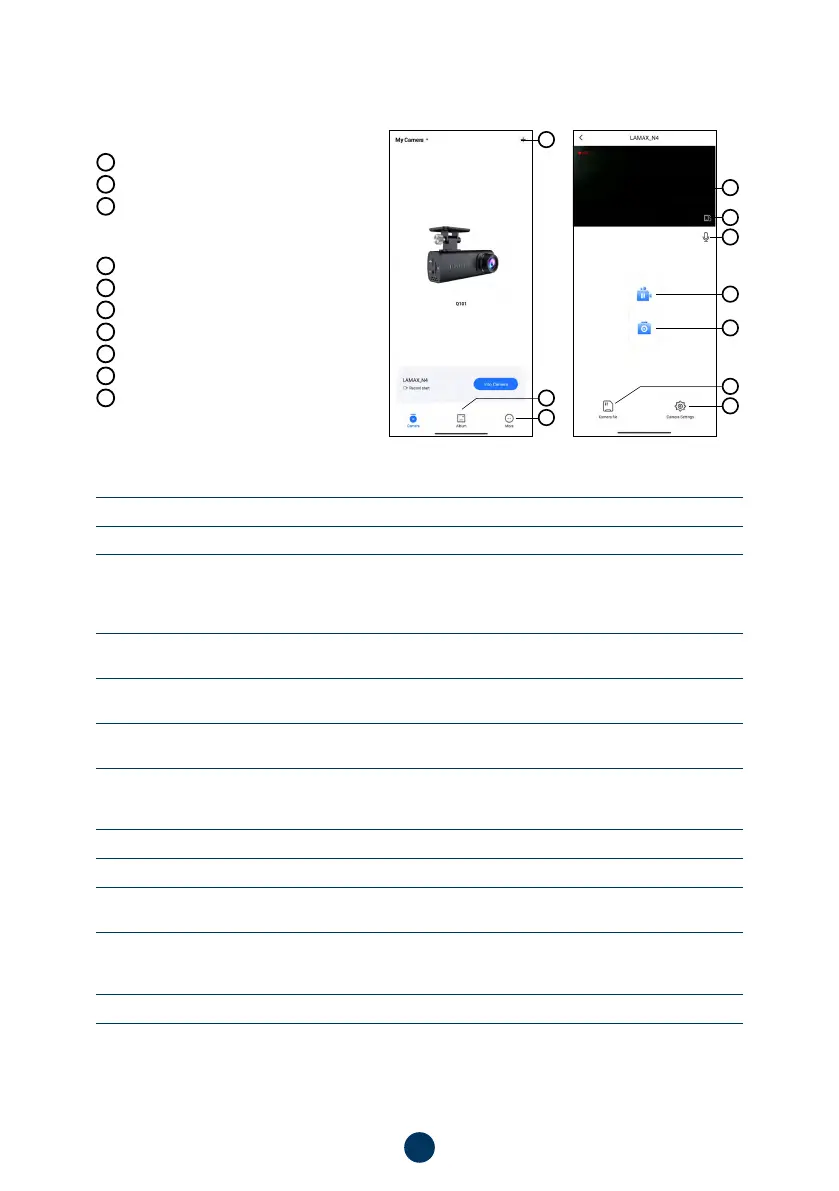
APP CONTROLS:
WITHOUT CONNECTION
E
Connect the dashcam
F
Download files to smart device
G
App information
AFTER CONNECTION
H
Camera settings (see chapter 7)
I
Camera preview
J
Take a photo
K
Switch to full screen mode
L
Camera files
M
Start/stop recording
N
Turn audio recording on/off
L
H
E
G
F
I
K
N
M
J
7. FULL SETTINGS
Sound recording
Microphone on/off
Speaker Volume
Volume of sound from the speaker
Loop Record Options
This is where you set the length of each recording. The camera will loop
video of 1–5 minutes in length. If the memory card fills up, the camera
will start overwriting the oldest recordings. The individual videos follow
each other seamlessly.
Exposure compensation
Allows you to adjust the camera exposure to optimize the brightness of
the video.
Speed watermark
With the optional GPS module, you can also add speed and location data
to your video.
GPS Coordinate
Allows you to adjust the display of the GPS coordinate watermark in the
video (only works with the GPS module).
Collision Sensing
Thanks to the G-sensor, the camera can detect a collision, for example
in a traffic accident. Once the camera detects a collision, it immediately
protects the currently recorded footage against being overwritten.
Wi-Fi Name
Set the WiFi name of the device.
Wi-Fi Password
Set the WiFi password.
Firmware Version
Here you can get information about the currently installed Firmware
version.
Format SD Card
This function deletes all photos and videos on the camera. Caution, this
even includes the protected ones! We recommend formatting at least
once a month.
Default Settings
Allows you to restore the camera settings to factory defaults.



 To Next Page