8
you can choose whether or not to display the coordinates on screen. You can also see all
the current data of the connected satellites (position, signal strength, etc.).
l) Time Zone Select – under this setting you can change the time zone to match your cur
-
rent location.
m) Daylight Saving Time – when this function is turned on, the time automatically adjusts
when daylight savings time begins or ends.
n) Factory Settings – allows you to restore the camera’s original factory settings. Press the
OK button to get to the settings, use the arrow keys to select yes or no and press OK
again to conrm.
o) Formatting the SD Card – we recommend formatting the card before using it for the
rst time, either in a PC or directly in the camera. Press the OK button to get to the
settings, use the arrows to select yes or no and press OK again to conrm. The card will
be formatted within a few seconds. Note that all data on the card is deleted when for
-
matting.
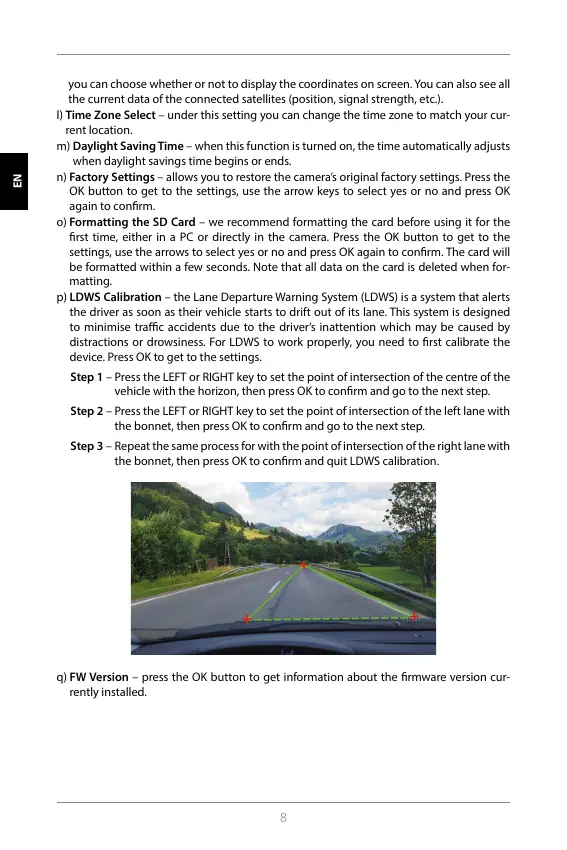
p) LDWS Calibration – the Lane Departure Warning System (LDWS) is a system that alerts
the driver as soon as their vehicle starts to drift out of its lane. This system is designed
to minimise trac accidents due to the driver’s inattention which may be caused by
distractions or drowsiness. For LDWS to work properly, you need to rst calibrate the
device. Press OK to get to the settings.
Step 1 – Press the LEFT or RIGHT key to set the point of intersection of the centre of the
vehicle with the horizon, then press OK to conrm and go to the next step.
Step 2 – Press the LEFT or RIGHT key to set the point of intersection of the left lane with
the bonnet, then press OK to conrm and go to the next step.
Step 3 – Repeat the same process for with the point of intersection of the right lane with
the bonnet, then press OK to conrm and quit LDWS calibration.
q) FW Version – press the OK button to get information about the rmware version cur-
rently installed.
HR SLO LT HU PL SK CZ DE EN
HR SLO LT HU PL SK CZ DE EN



 To Next Page