EasyManua.ls Logo

LAMAX T10 - WIFI APPLICATION AND CONNECTIVITY; Connecting to the WiFi App; App Controls and Interface

LAMAX T10
79 pages
Print Icon
To Next Page IconTo Next Page
To Previous Page IconTo Previous Page
Loading...
10
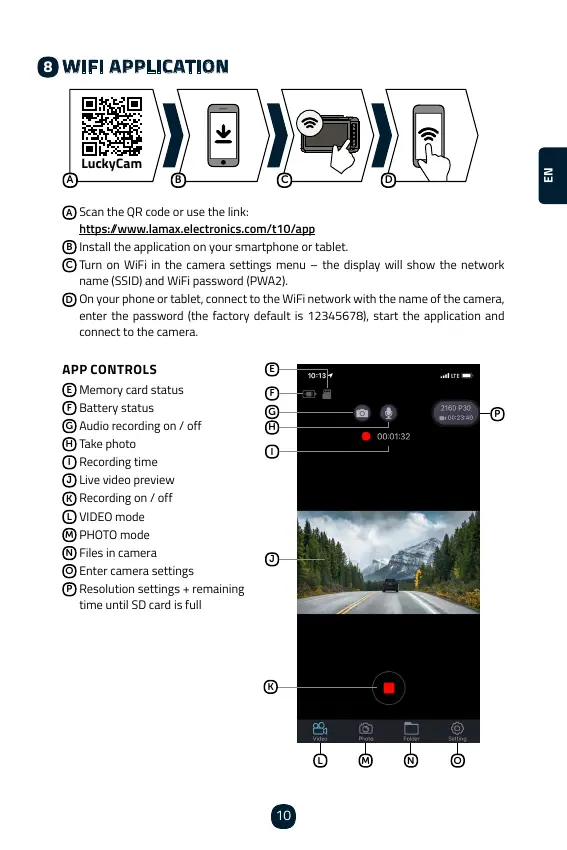
WIFI APPLICATION
LuckyCam
A
B
C
D
A
Scan the QR code or use the link:
https://www.lamax.electronics.com/t10/app
B

C
    

D

enter the password (the factory default is 12345678), start the application and
connect to the camera.
APP CONTROLS
E
Memory card status
F
Battery status
G

H
Take photo
I
Recording time
J
Live video preview
K

L

M

N
Files in camera
O
Enter camera settings
P
Resolution settings + remaining
time until SD card is full
E
F
G
J
H
I
K
L M N O
P
8
ENCSCSCSCSCSCSCSCSCS

Table of Contents

Other manuals for LAMAX T10

Related product manuals