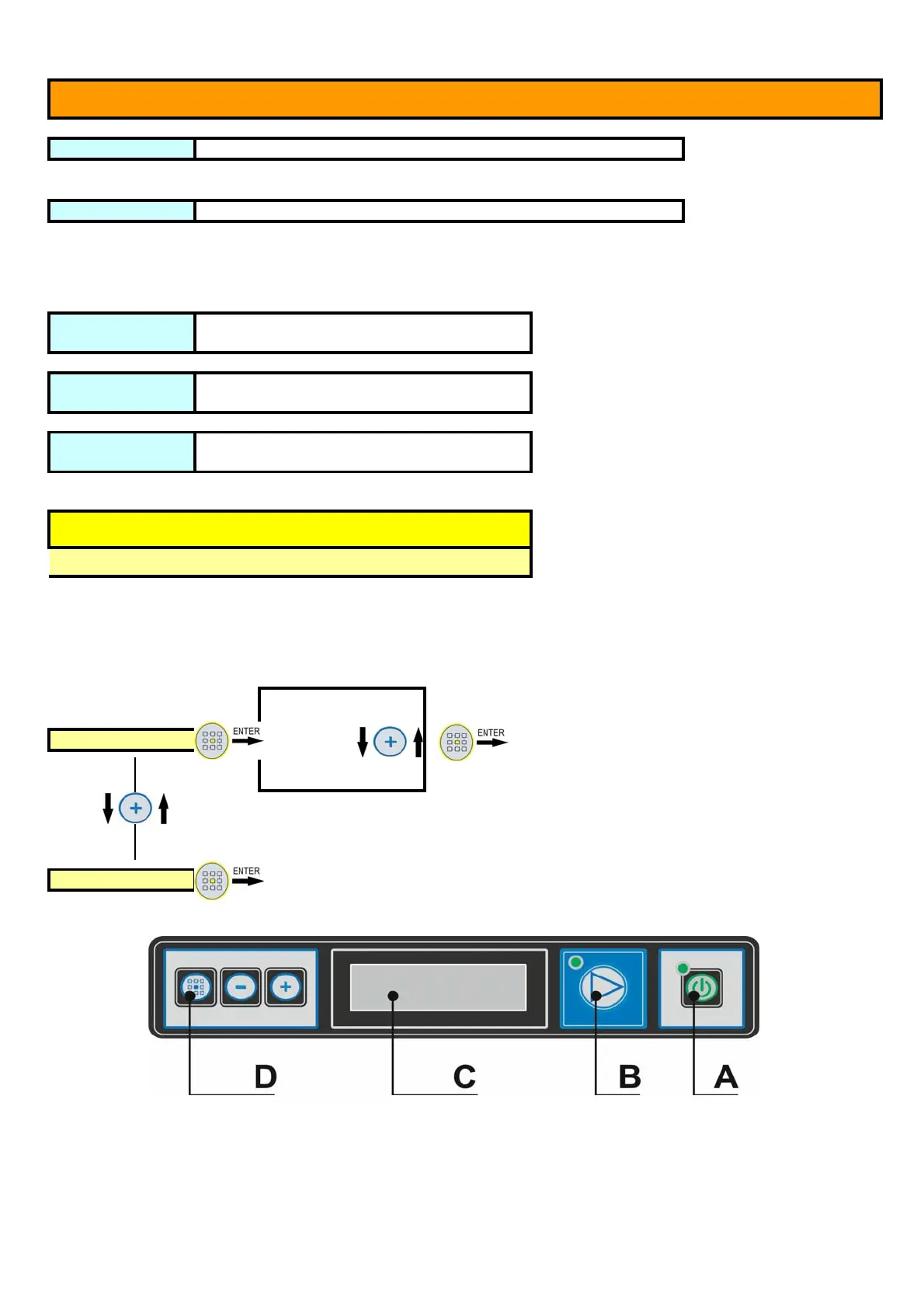
KEYBOARD INTERACTIVE MEMBRANE
REV16-2.47
Machine OFF ON/OFF push-button "A" for 1 second when the machine is ON (logo LAMBER appears)
(with the machine empty the display will show off after 10" seconds) (just with machine full)
Machine ON ON/OFF push-button "A" for 1 second when the machine is in OFF (Temperature displayed)
with the machine empty the display will indicate "door open" or "closed door" (just with machine full)
elect the washing
program
Key "+" while the machine is ON
elect the washing
program
Key "-" while the machine is ON
TART Washing
Program
Key "B" while the machine is ON
USER SET-UP
Button
+
for 5 seconds while the machine is in OFF
N.B. At the end of the programming operations
the machine turns off. Press push-button "A"
for 1 second to turn the machine on.
Italian
To confirm
Français
Language Englais
Allemand
Espagnol
exit


 To Next Page