14
www.howdens.com
Cancel
3 sec.
F1
F2
F3
F4
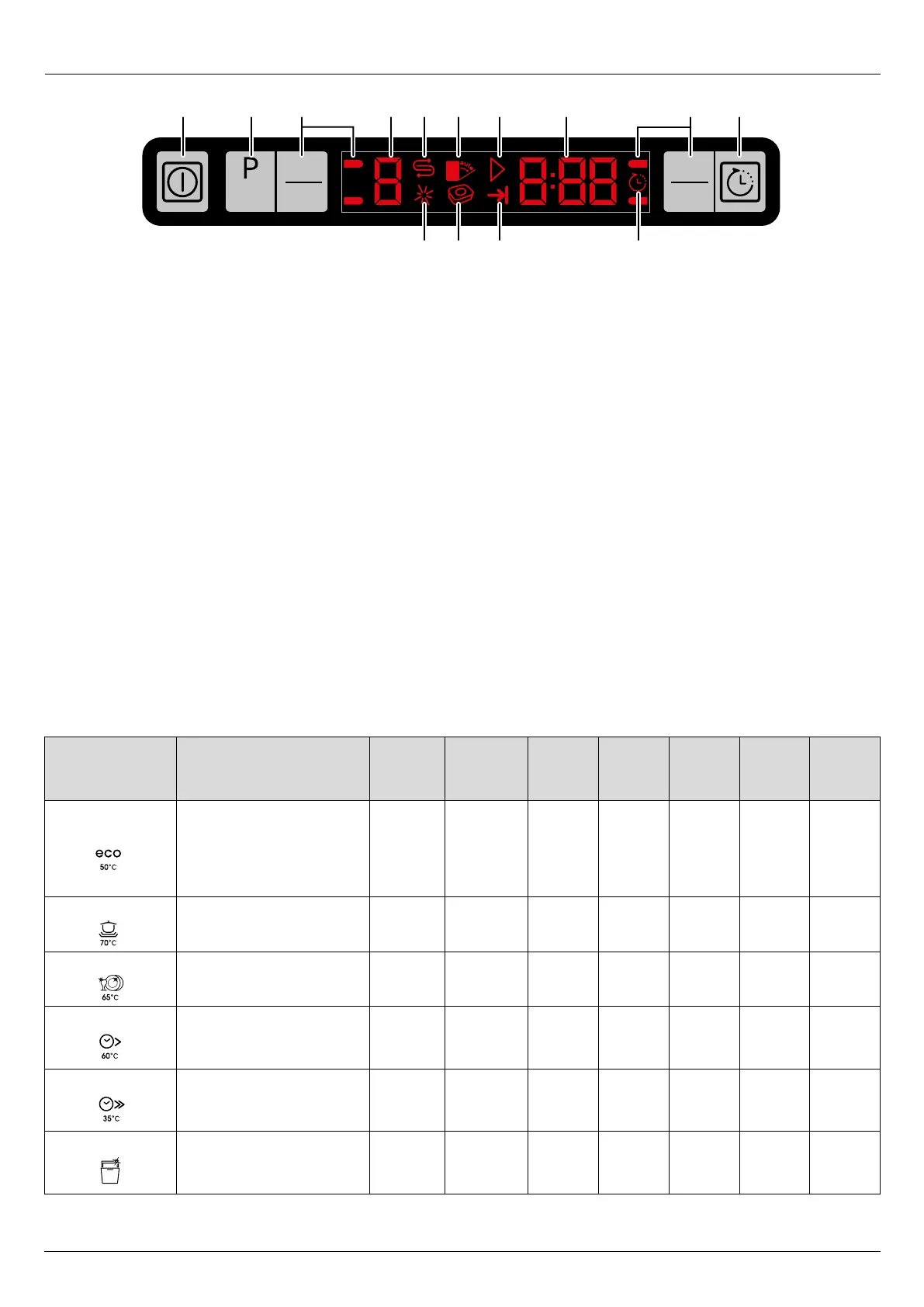
1 2 3 4 5 6 7
11 101213
8 3 9
1. Power On/Off
Display illuminates when the power is On.
For energy saving, the machine automatically turns
off following the completion of the programme or if the
programme is not started.
2. Programme Selection/Programme Cancel
Press until the desired programme appears.
The programme will start when the dishwasher
door is closed.
To cancel a running programme or
time delay function;
• Open the dishwasher door
• Hold for 3 seconds, (countdown 3-2-1),
until 0:01 is displayed.
• Close the dishwasher door.
• Wait for 2 minutes until the draining process is
completed and an audible warning is heard.
• Power Off/On and re-programme.
3. Function Keys
F1 - All in one tablet. F2 - Half load.
F3 - Fast + F4 - Extra Rinse
Use the function keys to select tablet or half load options
after selecting the desired programme.
4. Programme Indicator
The programme will start when the dishwasher door is
closed.
5. Salt Indicator
Refill salt reservoir when illuminated.
6. Not used
7. Start / Cancel Indicator
8. Programme Time Indicator / Time Delay
Indicator displays the duration of the programme or the
time delay before starting the selected programme.
9. Time Delay - 30 minutes to 24 hours.
Press and select the desired time delay before starting
the selected programme.
10. Time Delay Indicator
Illuminates and flashes when time delay is selected.
11. End of Programme Indicator
Illuminates when the selected programme finishes.
12. Ta bl et Det erg en t Fu nc ti on
Illuminates when the tablet function key has been
selected.
13. Rinse Aid Indicator
Refill rinse aid reservoir when illuminated.
Controls and programmes
Programmes
and
temperatures
Cycle selection
information
Degree
of
soiling
Prewash Wash Dry
Time
(mins)
Water
(l)
Energy
(kWh)


 To Next Page