16
www.howdens.com
Cancel
3 sec.
F1
F2
F3
F4
Cancel
3 sec.
F1
F2
F3
F4
Cancel
3 sec.
F1
F2
F3
F4
Cancel
3 sec.
F1
F2
F3
F4
Cancel
3 sec.
F1
F2
F3
F4
Cancel
3 sec.
F1
F2
F3
F4
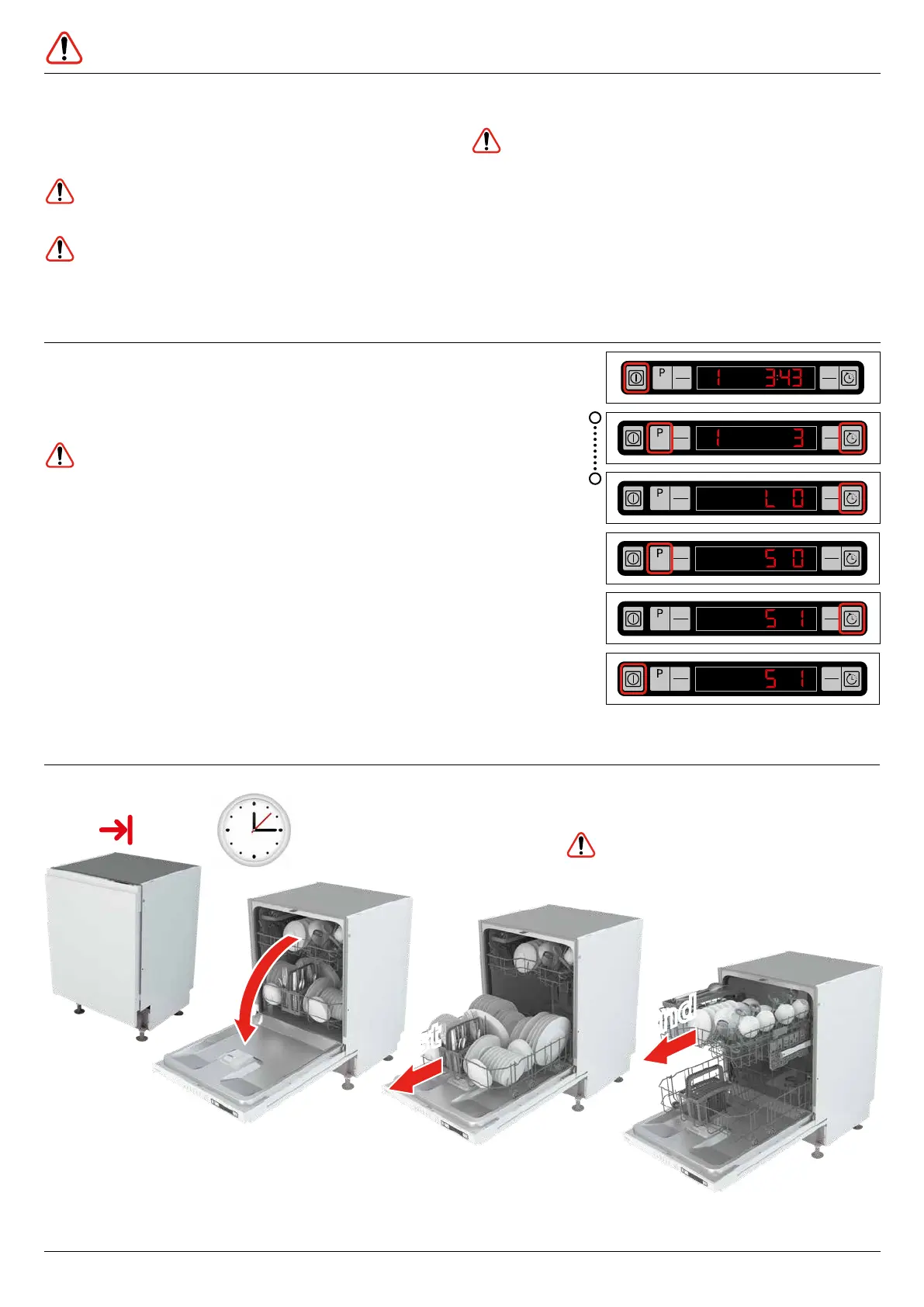
Press and hold
(display counts
down 3,2,1)
Switch Off
to save new audible
warning setting
Press to select new
audible warning setting
0,1,2 (off,low,high)
Press and
hold until
display shows
Switch On
Select audible
warning setting
(S...)
End
1st1st
2nd2nd
Wait to cool
15-20mins
Unload
Unload
An audio signal with an interval of 10 seconds warns
you to switch your machine off when the selected
washing programme ends. This audio signal warns
you for a duration of 5 minutes and then turns off.
Caution: Care must be taken when opening the
door, as hot steam may escape.
• Press the ‘On/Off button’ when the programme
has finished. The indicator lights will go off.
• The audio signal has 3 settings ‘off,low,high’ which
can be altered as shown opposite.
If you open the door while a programme is running,
the dishwasher stops immediately. When you close
the door, the dishwasher continues from the point of
interruption.
Caution: Care must be taken when opening the
door, as steam and water will escape.
Caution: Water may be very hot.
NOTE: At end of programme water may be present
on plastic items and on tops of cups, bowls etc.
This is normal. Use a clean tea towel to dry.
Caution: Items may be hot.
Unloading the dishwasher
Caution: Just after the dishwasher has started
the selected programme and you want to include
another item to be washed, open the door very slowly.
Care must be taken when opening the door, as steam
and water will escape. Load the item and close the
door. The dishwasher will resume operation.
Programme ends / setting audible warning
Opening the door whilst operating


 To Next Page