www.laney.co.uk
3
www.laney.co.uk
CUB-RANGE
USER MANUAL
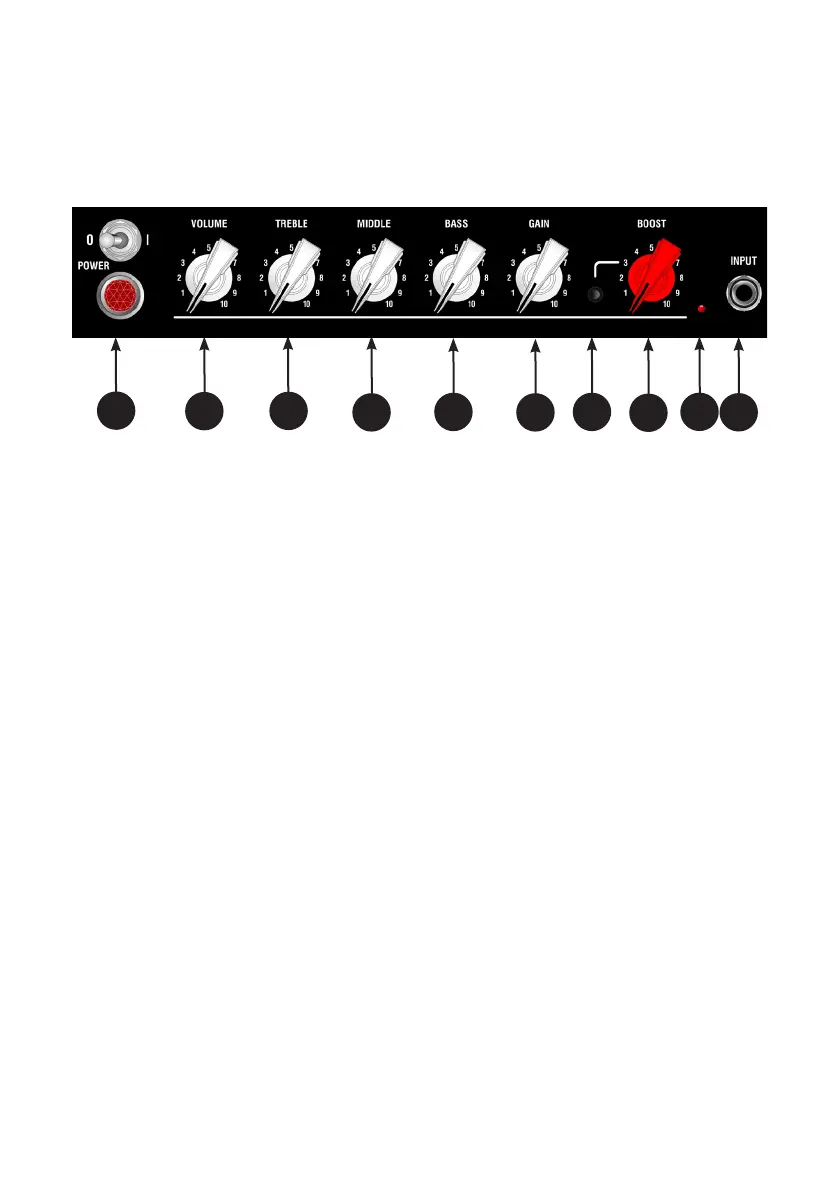
1 - POWER SWITCH & LAMP - Indicates that the amplier is powered up and ready to play.
2 - VOLUME - Controls the overall listening volume of the amplier and is used in conjunction with the
Gain control (6).
3 - TREBLE - Controls the amps high end response. Start at 4 or 5 and adjust depending on how dark or
bright you want the amplier to sound.
4 - MIDDLE - Controls the amps midrange response. Start at 4 or 5, lower settings will scoop the mids,
higher levels will allow you to actually hear the guitar in the mix.
5 - BASS - Controls the bass or bottom end of the amplier’s response. As the amp gets louder you may
want to back this o a bit. Start at 7-10 for bedroom volumes.
6 - GAIN - Controls the level of gain/distortion present in the guitar signal. Used in conjunction with the
volume control (2). For clean guitar sounds with plenty of headroom set the gain control low whilst
setting the volume control to the required level. As you dial more gain into the signal it might be
necessary to reduce the volume level accordingly.
7 - BOOST SWITCH - Engages the onboard pre-boost. This is just like kicking in your favourite boost pedal
in front of the amplier.
8 - BOOST KNOB - Dials in the amount of pre boost hitting the rst tube in the ampliers signal path.
Dialling in more BOOST will have the eect of pushing a clean amp into warm tube clipping or naturally
compressing an already clipping amplier.
1 2 3
4
5
6
7
8
10
CUB-SUPER10 FEATURES
9



 To Next Page