ImportantSafetyInstruction
OPERATEINSTRUCTIONS
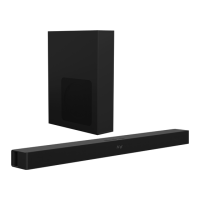
SettingtheSoundbar
1:Connectsubwoofertosoundbar;
2.Pluginthepowercordandthedisplaywilllightup.
3:SwitchonthesoundbarbyusingpowerbuttononsoundbarorbyusingSTANDBYbutton
onremote.Afterswitchingon,thedefaultinputmodewillappearondisplay.
4:lnputmodecanbechangedbypressingthepowerbuttonagainorbyusingtheINPUT
buttononremote.
LEDIndicators
Displayscreen:BT/OP/HD/US/AU/MV/MS/DL/3D/volumnvaluedisplay
BT :BlueTooth
mode
HD:HDMIARC
mode
OP:Opticalmode
US:USBmode
E0:MusicEQ
AU:AUXINmode
E1:MovieEQ
E3:NormalEQ
E2:VoiceEQ
3d:3DSoundeffect
PoweringOn/Off
1. Plugthesoundbarpowersupplyintoawalloutlet,andpresspowerbuttonto
turnondevice.
2. Toturnoff,pressthepowerbuttonthenunplugfromwalloutlet.
PlayingAudioviaBTConnection
1.Turnonsoundbarandthenshort‐presstheINPUTbuttontoswitchtoBTmode.
2.Activatethepairingfunctiononyourphoneorothercompatibledeviceandselect
“LarkL210K”.
3.Whensuccessfullypaired,theLEDdisplaywillstayon“BT”.
4.LongpressBluetoothbutton,orPlay/Pausebuttononremotecontroltodisconnect.
5.TheremotecontrolincludesBTmodeplaybackcontrols.
Notes:
• IfyourPairingdeviceswitchedofformanualdisconnected,thesoundbarwill
automaticallyenterpairingmode.
• Bluetoothwirelessrangeis10meters.
• Toconnecttootherdevices,repeattheabovepairingsteps.
• PressBTbuttonondevice3secondstoshutdowninpairingmode,and3secondsagainto
turnonparingmode.
Ot:Karaok e


 To Next Page