ImportantSafetyInstruction
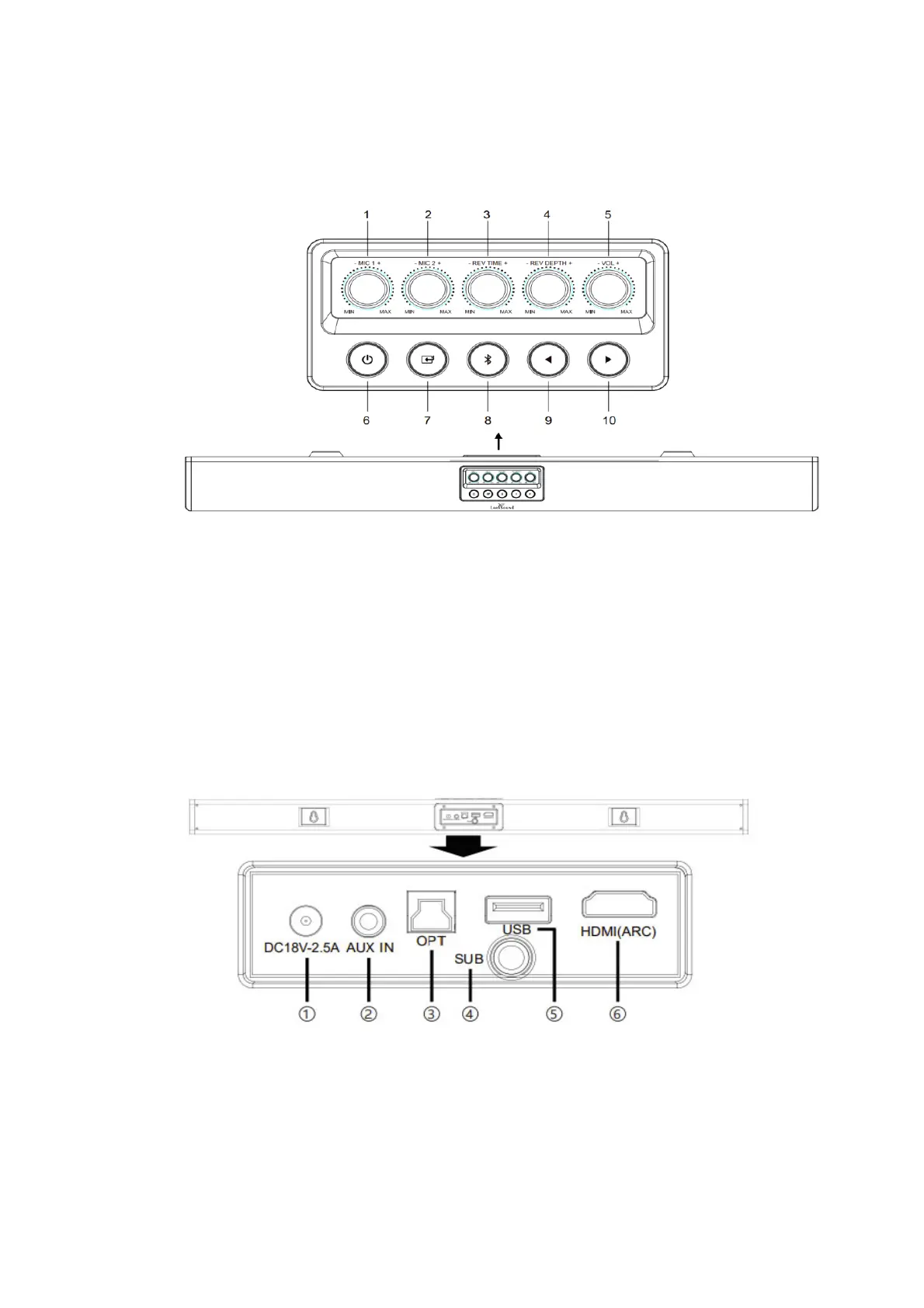
ProductDiagram
1. MIC1:Microphone1volume
2. MIC2:Microphone2volume
3. REVTIME:Reverberationtime
4. REVDEPTH:Reverberationdepth
5. VOL:Karaokesoundbarvolume.
6. Standby:standbymodeforpowerONorOFF;
7. Input:chooseinputmode(HDMIARC/OPT/AUX/USB/BT)
8. Bluetooth:shortpressforconnect/disconnectmicrophone;longpress
underBTmodefordisconnectdevice,longpressunderotherconnect
modeforenable/unenableBTconnection;
9. Prebutton:shortpressforlastprogra m;
10. Nextbutton:shortpressfornextprogram;
1. DCIN
2. AUXIN
3. Optical
4. Subwooferout:connectedwithsubwooferbyRCAcable
5. USB
6. HDMI(ARC)


 To Next Page