Need help?
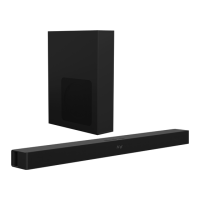
Do you have a question about the Larksound L210K and is the answer not in the manual?
Instructions to reduce the risk of electric shock, do not dismantle the product or expose to rain/moisture.
Appliance not for use by children; supervision required. General safety notices.
Steps for unpacking the soundbar, removing labels, and placing it on a surface.
Information on rubber feet and preventing furniture damage with felt pads.
Details on the required power source (SMPS 110V-240V) and voltage compatibility.
Identification and function of controls on the top panel (MIC, REVERB, VOLUME, etc.).
Identification and function of rear panel connections (DC IN, AUX IN, OPT, USB, HDMI).
Detailed explanation of buttons and functions on the remote control.
List of items included in the package with the soundbar.
Guidance on placing the soundbar horizontally on a flat surface for optimal airflow and sound.
Instructions and warnings for securely mounting the soundbar on a wall.
Covers setting up the soundbar, LED indicators, and powering on/off procedures.
Instructions for connecting to Bluetooth devices and playing audio wirelessly.
Steps to connect the soundbar to an external Bluetooth speaker for audio output.
Procedure for pairing and using a microphone with the soundbar for karaoke.
Connect to devices via 3.5mm cable; playback controlled by source device.
Connect USB drive with MP3/WMA files; auto-play and remote control support.
Connect digital audio output via optical cable; adjust volume and settings.
Connect via HDMI ARC for TV audio; requires HDMI ARC compliant TV.
Solutions for no sound from speakers or distorted/echoing audio.
Troubleshooting for device connection failures and unstable Bluetooth audio.
Compliance information regarding radio frequency energy and interference.
Information on safe installation and operation for FCC radiation exposure limits.
 General
| Brand | Larksound |
|---|---|
| Model | L210K |
| Category | Speaker System |
| Language | English |

 To Next Page