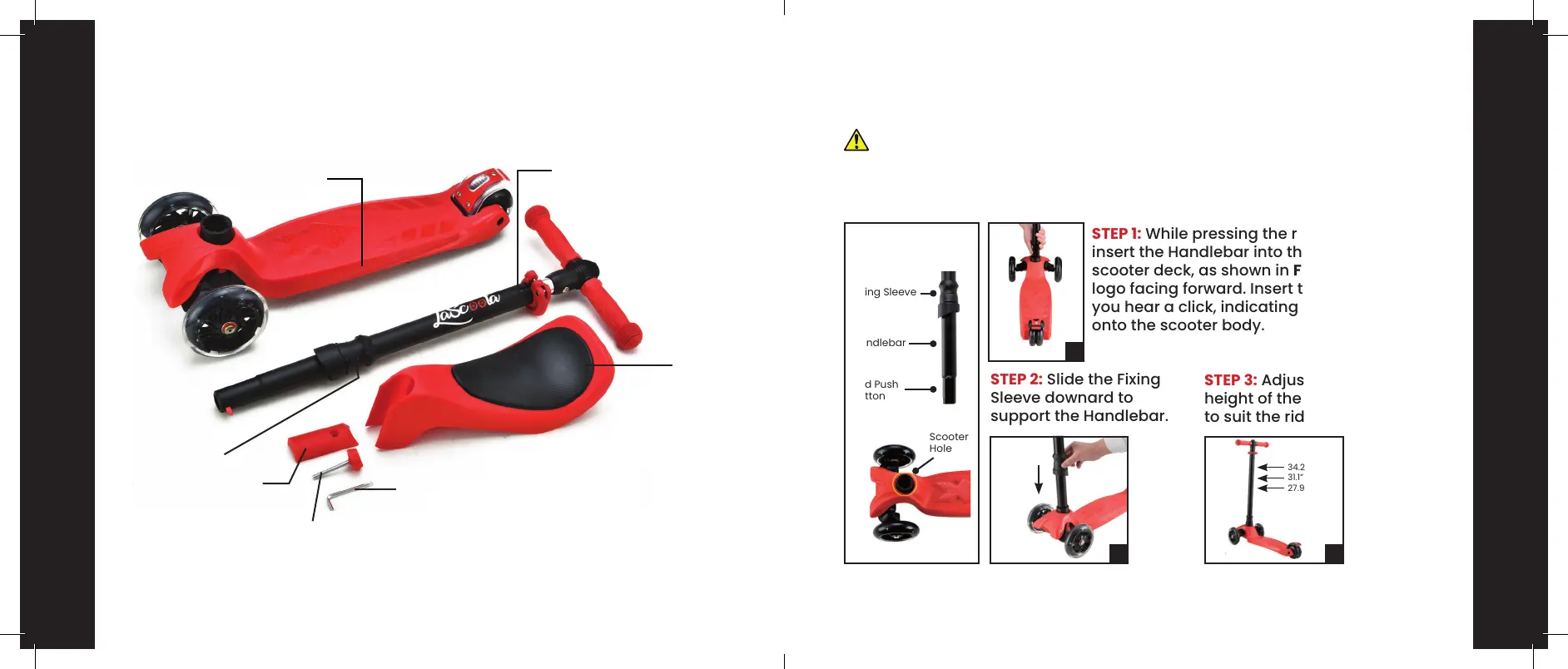
PACKAGE CONTENTS
8
SCOOTER ASSEMBLY
Warning! Keep kids at a safe distance to avoid accidental injury during
assembly.
STEP 1: While pressing the red push button,
insert the Handlebar into the hold on the
scooter deck, as shown in Figure A, with the
logo facing forward. Insert the Handlebar until
you hear a click, indicating that it has locked
onto the scooter body.
STEP 2: Slide the Fixing
Sleeve downard to
support the Handlebar.
STEP 3: Adjust the
height of the Handlebar
to suit the rider.
9
Scooter Body
Fixing Sleeve
Fixing Sleeve
Handlebar
Red Push
Button
34.2” (max)
31.1” (mid)
27.9” (min)
Scooter
Hole
Screw
Allen Key
Seat
Front Cover of Seat
Handlebar/Steering
Rod
PARTS LIST
A
B C


 To Next Page