EasyManua.ls Logo

Laser MID-787 - Navigating the User Interface; Lock and Unlock Screen; Home Screen Icons

Laser MID-787
13 pages
Print Icon
To Next Page IconTo Next Page
To Previous Page IconTo Previous Page
Loading...
QUICK OPERATION GUIDE MID-787 / MID-1087
7
LOCK / UNLOCK
When your tablet is in sleep mode, press the POWER button to show the unlock screen. TAP
and HOLD the LOCKED padlock icon, drag it to the UN-LOCKED padlock icon, then release.
Note: Some of the following images may be different from the actual product supplied.
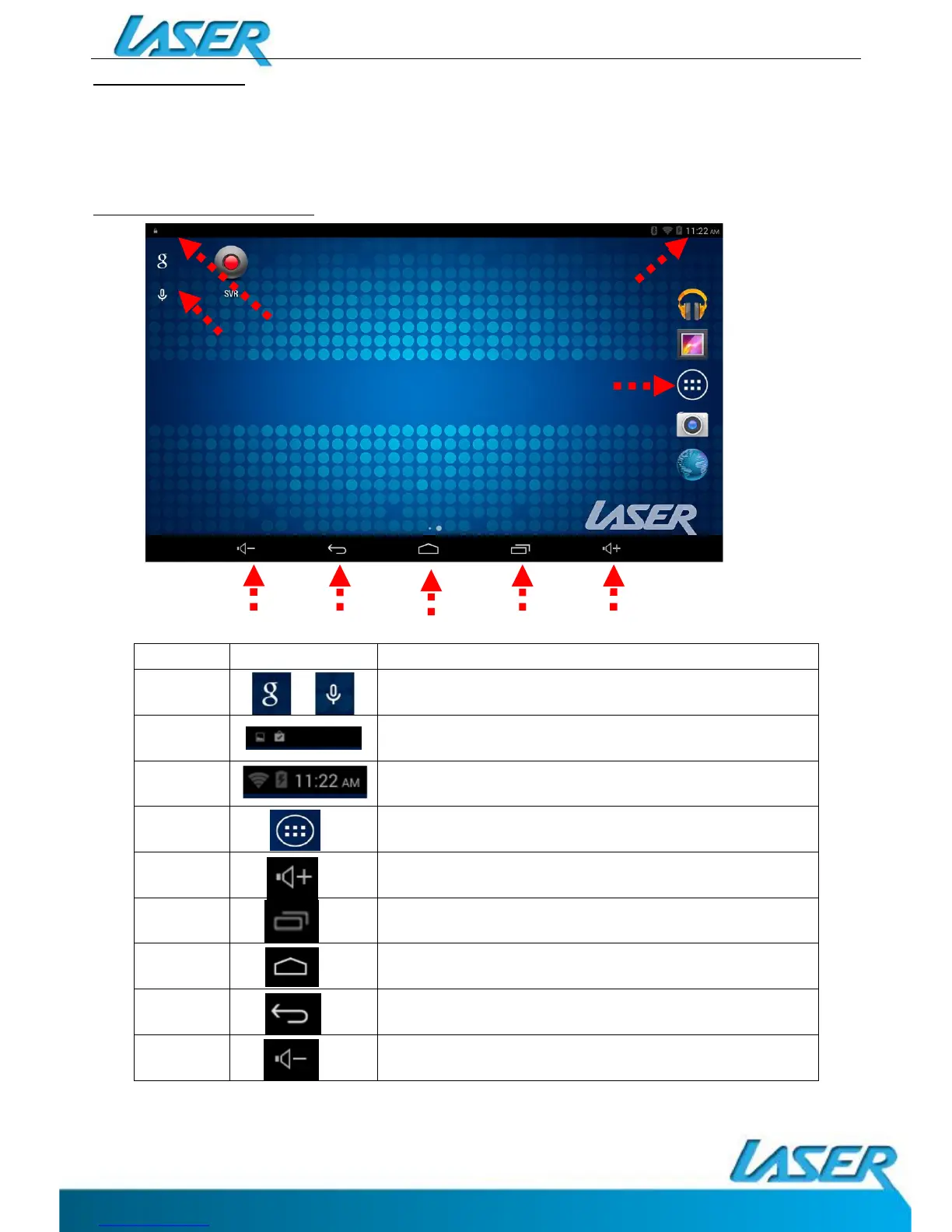
HOME SCREEN ICONS
Number
Icon Function
1
Open web browser / Voice command
2
“Swipe Down” Notification Menu Bar
3
“Swipe Down” Shortcut Menu Bar
4
View all apps
5
Increase Volume
6
Open a list of recently used applications
7
Home screen
8
Back button
9
Decrease Volume
1
3
4
5
6
7
8
9
2

Related product manuals