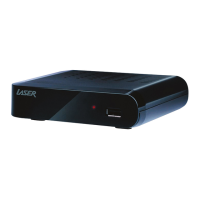
MMC-B19
8
Trouble shooting
1.No video on TV
- Check first if the product is powered on and in operational mode.
- Check if the video cable is properly connected between TV and the device.
- Check the correct SOURCE/INPUT has been selected on TV.
2.No Audio
- Check the volume level of your TV and the box.
- Check if the box or TV is on mute.
3.Poor audio and video quality
- If the antenna is covered or the signal is weakened by heavy rain, the quality of audio and video may
become temporarily poor.
4.Remote control problem
- Check if the battery is flat.
- Point the remote control directly toward the box.
- Make sure that nothing blocks the front panel display.
5.Channel search problem
- Make sure if tuner configurations are all correctly made.
- Check if the antenna cable(s) are properly connected.
NOTICE
- Specifications are subject to change without further notice.
- Please note that a new software may change the features of the receiver.
- The manufacturer holds the rights of changes without any further notice.
- For further information of MMC-B19, please visit our website: www.laserco.com.au


 To Next Page