3.2.1.
If „O.L.“ appears on the display instead of a measured value, the diode has either been tested in
the reverse direction or is faulty. If 0.0 V is measured, the diode is faulty or a short-circuit has occurred.
Forward direction
BlackBlackRed Red
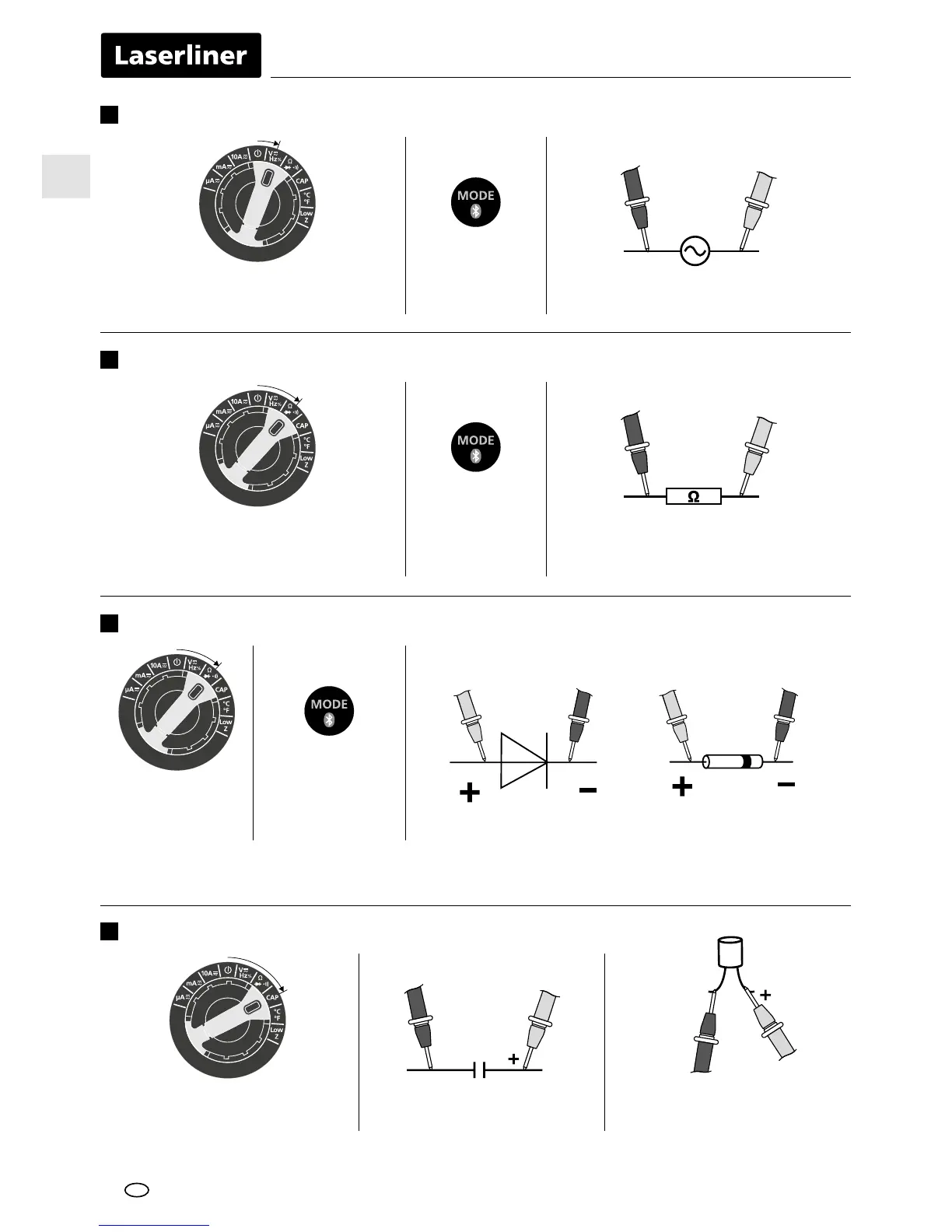
Frequency and duty factor measurements
6
Hz / % Connect the measuring contacts
to the object to be tested
RedBlack
AC, DC, Hz
and % selection
Resistance measurement
7
RedBlack
Connect the measuring contacts
to the object to be tested
Ω, continuity
check and diode
check selection
Diode test
8
Diode test
Ω, continuity
check and diode
check selection
Capacitance measurement
9
Capacitance measurement Connect the measuring contacts
to the object to be tested
In the case of poled capacitors,
connect the positive pole to
the red test prod.
RedBlack
EN




 To Next Page