MultiMeter
19
GB
BAT. Battery charge status measurement
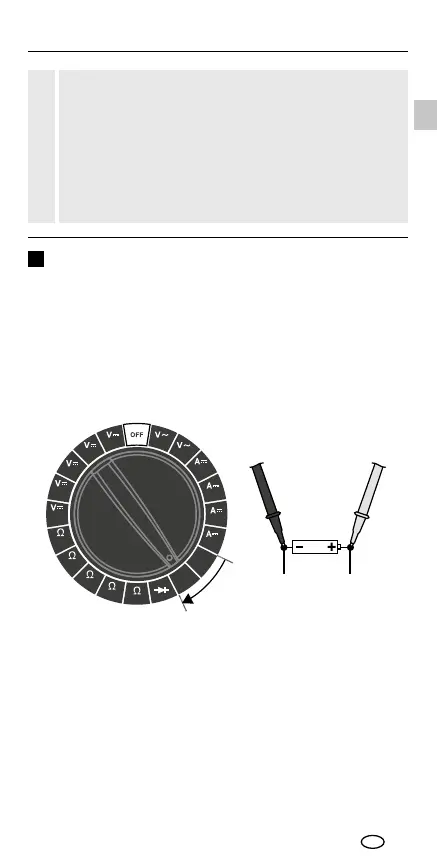
To measure the battery charge status, set the rotary switch to
the "BAT." position with the corresponding measuring range.
1.5 V = 1.5 V round cells / AA, AAA, C, D
1.2 V round cells (NiMH) / AA, AAA, C, D
9 V = 9.0 V flat cells / E-block
8.4 V flat cells (NiMH) / E-block
Then connect the measuring contacts to the battery.
20
300 300
10A
BAT.
9V
BAT.
1.5V
200200
2000
m
200
m
2000
k
200
k
20k
2000
200
200m
20m
2000
μ
7
The battery voltage is shown on the display. You can read off the
battery charge status from the following scale.
Good: battery fully charged
Weak: battery is weak and will soon need replacing
Replace: battery is at and should be replaced
Example
Battery: Alkaline 9 V
Measured voltage: 6.2 V
Battery charge status: weak
black red
Do not measure currents above 2 A for longer than
10 seconds within 15 minutes. This could damage the
device or the test prods.
Current above 200 mA must not be measured in the
μA / mA range and currents above 10 A must not be
measured in the A range. Otherwise the corresponding
built-in fuse will trip (F 250 mA / 300 V, F 10 A / 300 V,
Ø 5 mm x 20 mm).
!





 To Next Page