EasyManua.ls Logo

Lasonic i-931X - Quick Start; Powering On and Setting Clock

Lasonic i-931X
28 pages
Print Icon
To Next Page IconTo Next Page
To Previous Page IconTo Previous Page
Loading...
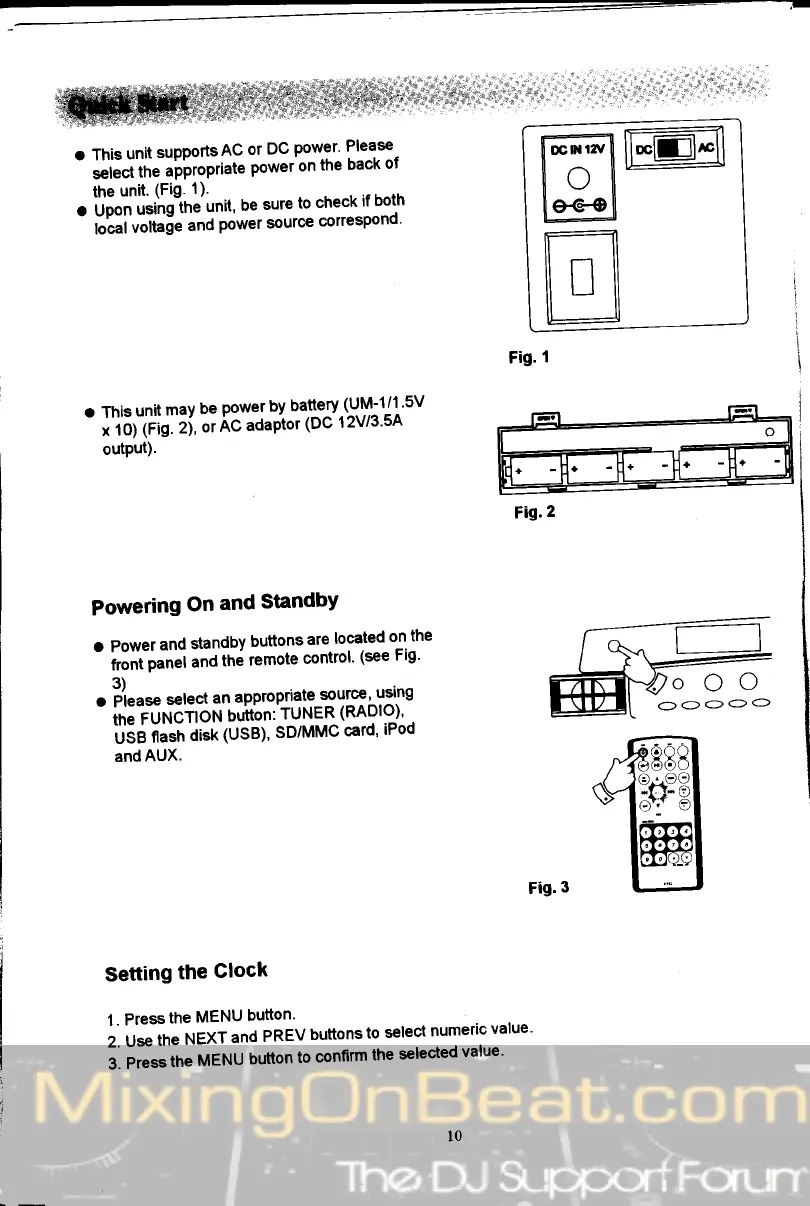
o This
unit
supports
AC
or
DC
power'
Please-
-
;|il
th"
.'PPropriate
Power
on
the
back
of
the
unit'
(Fig.
1)'
.
ilp""
',iiiiigihe'unit,
be
sure
to
check
if
both
folat
vottase
and
Power
sourc€
correspond'
rffilffil
I
o
[:
le€€[
ml
lL:l
Fig.
I
o
This
unit
may
be
power
by
battery
(-UM-1/1
'5V
-
;'ioiiii?:
ti,
or
Ac
adaptor
(Dc 12vl3'5A
output).
Powering
On
and
Standby
a
Power
and
standby
buttons
are
located
ol
the
-
it""l
p*"r and
the
remote
control'
(see
Fig'
3)
. ii".*
select
an
appropriate
source'
uslng
-
in"?urGiroN
buiibn:
TUNER
(RADlo-)'
.
Uie
n""h
di"l
(UsB)'
SD/MMC
card'
iPod
and
AUX.
Fig.3
Setting
the
Clock
1.
Press
the
MENU
button'
i.
U."
tn"
NEXT
and
PREV
buttons
to
select
numeric
value'
3.
Press
the
MENU
button
to
confirm
the
selected
value'
.'.;
,
:::,
Fig.2