EasyManua.ls Logo

Lasonic i-931X - Connections; Connecting Audio and Video Devices

Lasonic i-931X
28 pages
Print Icon
To Next Page IconTo Next Page
To Previous Page IconTo Previous Page
Loading...
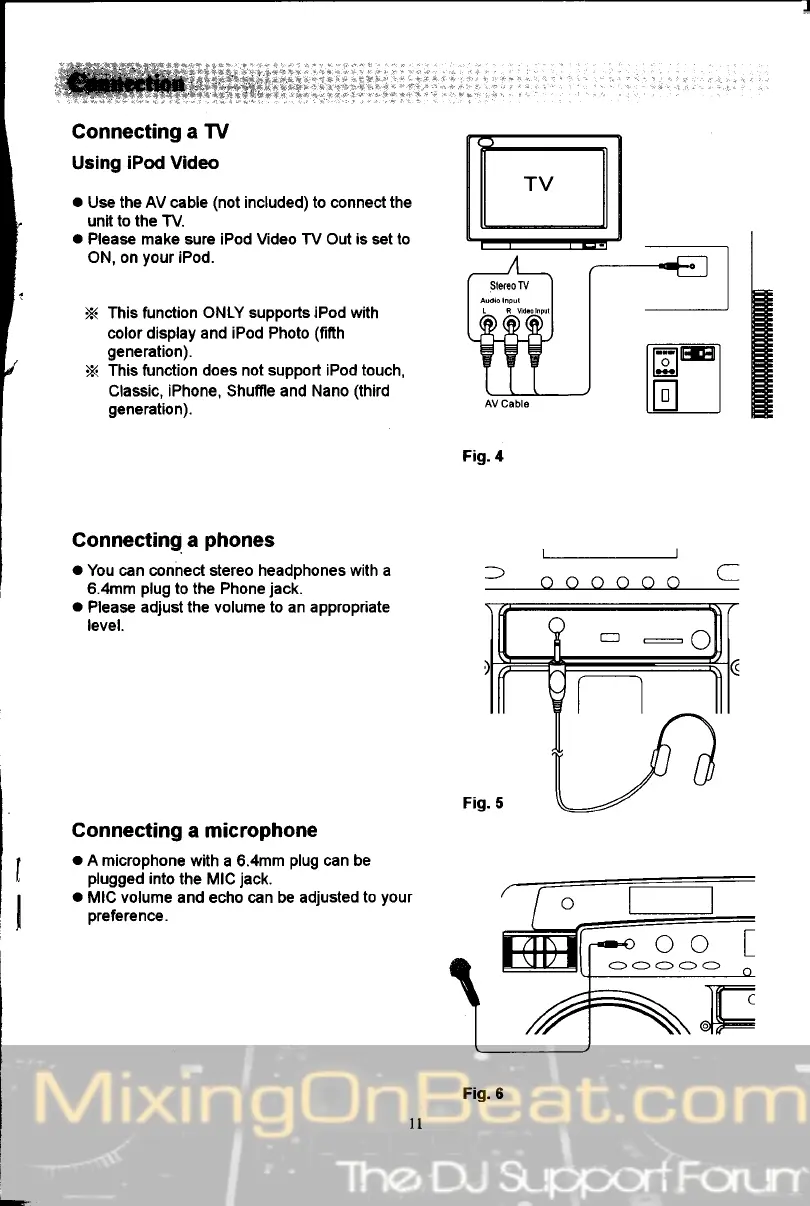
Connecting a TV
Using
iPod Video
.
Use the AV cable
(not
included) to connect the
unit to the
TV.
o
Please make sure iPod Video TV Out is set to
ON, on
your
iPod.
This function
ONLY supports iPod with
color display and iPod Photo
(fifth
generation).
This function does not
support iPod touch,
Classic, iPhone, Shufile and Nano
(third
generation).
Connecting. a
phones
o
You can conhect stereo headphones with a
6.4mm
plug
to the Phone
jack.
o
Please adjust
the
volume
to
an
appropriate
level.
Connecting
a microphone
o
A microphone
with a 6.4mm
plug
can be
plugged
into
the MIC
jack.
a
MIC volume and echo can be adjusted
to
your
preference.
f
a,ara,araro
C
TV
Fig.6
oo